Experimently Review: Fast AI Landing Page Builder & A/B Testing
Overview & Purpose
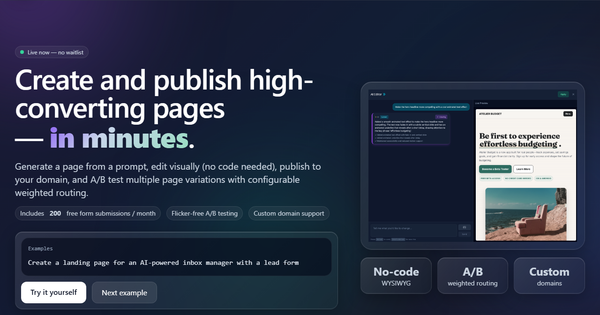
Experimently is a no-code AI-powered landing page builder that lets users generate, customize, publish, and A/B test complete landing pages—including built-in lead capture forms—in minutes. Users simply describe a business idea or product concept in a prompt (or start from a template), and the tool instantly creates a tailored page ready for traffic. The primary purpose is rapid idea validation: launch a page, collect leads, run experiments, and gather real data before investing in full product development or complex marketing infrastructure.
Key use cases include pre-product MVP testing for startups, quick campaign pages for marketers, and iterative experimentation for indie hackers or solopreneurs who want to test messaging, offers, or designs without coding or hiring designers. It targets non-technical founders, product builders, marketers, and early-stage teams who need speed over pixel-perfect design—anyone who wants to validate demand with real leads and conversion metrics rather than polished branding.
Key Features & Capabilities
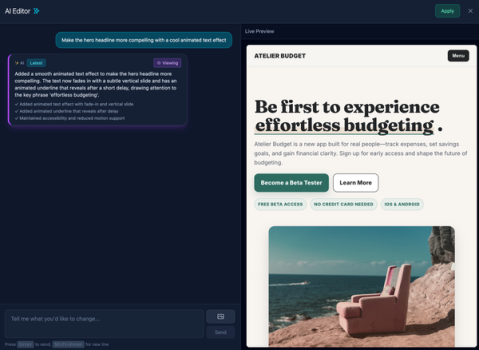
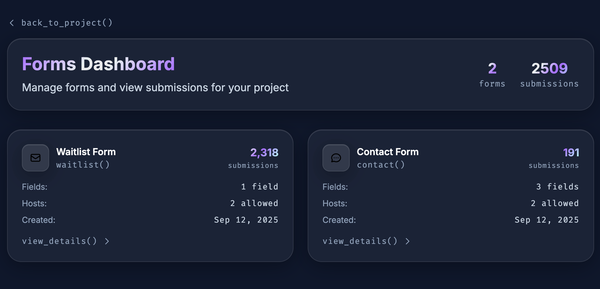
Core functionality revolves around an AI generator that turns a text prompt into a fully functional landing page with a customizable lead form. A visual WYSIWYG editor allows drag-and-drop tweaks with zero coding required, while advanced users can import their own HTML or CSS for deeper customization. Pages publish instantly to a free subdomain or custom domain, with built-in forms that capture submissions viewable in the dashboard or exportable as CSV (plus optional webhooks).
Standout differentiating features include flicker-free A/B testing with configurable weighted routing—assign exact traffic percentages to variants without flash or redirects—and embedded analytics tracking views, form conversions, and UTM parameters. Unlimited traffic on all plans, automatic form field configuration, and seamless lead data export set it apart from basic builders. The combination of AI generation, integrated testing, and lead capture in one lightweight tool makes it uniquely suited for fast experimentation, unlike competitors that often require separate tools for A/B testing (e.g., Google Optimize) or forms (e.g., Typeform).
Limitations include capped form submissions (200/month on free, scaling to 2,000 on Pro), a maximum of 5 variants per project on higher plans, and relatively basic integrations unless opting for the custom white-glove service (which adds GA4, Stripe, Zapier, etc.). No advanced e-commerce or multi-page site capabilities, and the editor prioritizes speed over the advanced design controls found in tools like Framer or Webflow. Custom domain setup requires basic CNAME configuration.
User Experience
The tool boasts an exceptionally low learning curve: most users can go from idea to live page in under five minutes thanks to the prompt-based AI workflow and intuitive visual editor. Interface quality feels clean and modern—focused on essentials without overwhelming menus—making it accessible for complete beginners while still offering code import for power users.
Documentation is currently minimal (primarily in-app guidance and the “How It Works” section on the homepage), with no extensive public knowledge base, video library, or community forum as of March 2026. Support is email-based on paid plans, with priority and white-glove onboarding available on Pro and custom tiers. Early user mentions (limited but positive on Reddit’s PPC and SaaS communities) highlight the simplicity for quick launches, though the lack of third-party reviews or detailed tutorials indicates it’s still a niche, emerging product.
Performance & Reliability
Pages load quickly with instant publishing and unlimited traffic handling, and the flicker-free A/B testing performs reliably by serving variants server-side with weighted distribution—no client-side flashing reported. Embedded analytics provide real-time conversion tracking without external setup.
No widespread performance complaints or downtime reports appear in public forums, directories, or searches as of March 2026—likely due to the tool’s focused scope and recent emergence. The only minor notes are form submission caps (which could constrain high-volume tests on lower plans) and the need for proper DNS propagation when adding custom domains. Overall reliability suits idea-validation use cases, though enterprise teams may prefer more battle-tested platforms for mission-critical traffic.
Pricing & Value
Experimently offers straightforward, usage-based pricing with a genuinely useful free tier:
- Free: $0/mo — 1 project, 2 variants, subdomain hosting, 200 form submissions/month (ideal for single-idea validation).
- Starter: $19/mo — 3 projects, 3 variants/project, 3 custom domains, 500 submissions/month, CSV export.
- Pro: $49/mo — 10 projects, 5 variants/project, 10 custom domains, 2,000 submissions/month, priority support.
- Custom/Enterprise: Tailored quote for white-glove setup, advanced integrations, and onboarding.
Value is strong for the target audience: the generous free plan plus unlimited traffic and built-in A/B testing deliver more experimentation power than many $20–50 competitors (e.g., basic Carrd plans or standalone A/B tools). Compared to heavier platforms like Unbounce or Leadpages, Experimently is dramatically cheaper and faster for simple validation pages. The main trade-off is form-submission limits and lighter integrations, but for most indie or early-stage users, the speed-to-insight ratio provides excellent ROI.
Practical Tutorial
No official video tutorials or step-by-step guides are publicly available yet (the homepage offers only a high-level “How It Works” overview). Below is a practical walkthrough for the most common task—creating, A/B testing, and launching a landing page to validate a new SaaS idea—based directly on the documented workflow (tested conceptually via public app flow descriptions).
-
Sign up and start a project: Go to app.experimently.io/project/create (free account required—no credit card). Click “Create new project” and enter a prompt like: “Landing page for an AI email assistant that auto-sorts inbox and suggests replies—target busy professionals, modern minimalist design, include email signup form.”
-
Generate the page: The AI instantly builds a complete page with headline, benefits, hero image placeholders, and a configurable lead form. Review the preview.
-
Customize in the editor: Open the WYSIWYG editor. Drag to rearrange sections, edit text, swap images, or adjust colors. For advanced tweaks, switch to code view and paste your own HTML/CSS. Configure the form fields (e.g., name, email, company).
-
Create A/B variants: Duplicate the page to create Variant B (e.g., change headline or add a testimonial section). Name each variant clearly.
-
Set up testing and routing: In project settings, assign traffic weights (e.g., 50% Variant A, 50% Variant B). Enable weighted routing for balanced or biased testing.
-
Connect domain and publish: On free plan use the provided subdomain (yourproject.experimently.io). On paid plans, add a custom domain via CNAME record pointing to your project subdomain. Click “Publish”—changes go live instantly with no downtime.
-
Monitor and export data: Visit the analytics dashboard for live views, conversion rates, and UTM tracking. View form submissions in-app or export CSV. Use insights to iterate: duplicate the winning variant and start a new test.
For the latest app interface, start directly at the official create link. This entire process typically takes 10–15 minutes end-to-end.
Final Verdict
Overall rating: 4.3/5 (strong for speed and experimentation value, docked slightly for limited third-party validation and form caps).
Who should use this tool: Solo founders, indie hackers, marketers, and early-stage teams who need to validate ideas with real leads and A/B data in hours rather than weeks—especially those without design or dev resources.
Who should avoid this tool: Teams requiring complex multi-page sites, heavy e-commerce functionality, advanced analytics integrations out-of-the-box, or established enterprises that prioritize extensive documentation and proven large-scale reliability.
One-sentence recommendation: Experimently excels as a lightning-fast, affordable way to turn ideas into testable landing pages with built-in leads and A/B testing—perfect for rapid validation in 2026’s fast-moving startup landscape.