Fathom Review: The Best AI Meeting Assistant for Automating Notes
Overview & Purpose

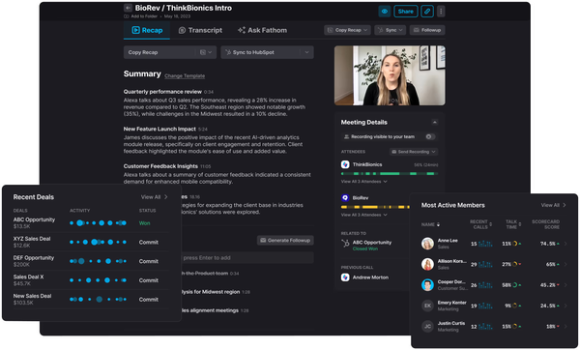
Fathom is an AI-powered meeting assistant designed to automatically record, transcribe, summarize, and extract actionable insights from video calls on platforms like Zoom, Google Meet, and Microsoft Teams. It joins meetings (via a desktop app), captures full video/audio, generates word-perfect transcripts, AI summaries, action items, key moments, and searchable highlights, allowing users to stay fully present without manual note-taking. Post-meeting, it delivers instant recaps, clips, playlists, and the ability to query past conversations via "Ask Fathom" for insights across your history.
Primary use cases include sales calls (CRM syncing and coaching), team syncs (shared understanding and follow-through), customer interviews (feedback harvesting), internal strategy sessions, HR interviews, and any remote/hybrid meeting where follow-up efficiency matters. It saves an average of 38 minutes per meeting by automating admin work.
Target audience spans individual professionals, freelancers, consultants, and teams in sales, marketing, operations, HR/talent, product/engineering—anyone who spends significant time in meetings and values productivity without sacrificing presence. It scales from solo users (free tier) to growing teams needing collaboration and enterprise features.
Key Features & Capabilities
Core functionality revolves around seamless integration with major video platforms: Fathom auto-joins scheduled meetings (via calendar sync), records video/audio, provides high-accuracy multi-speaker transcription, generates AI summaries and action items, creates timestamped highlights/clips, and stores everything in a searchable dashboard. Users can share specific clips or playlists without granting full note access.
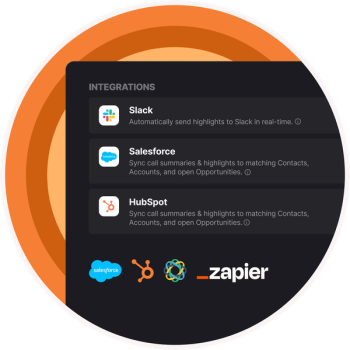
Standout features that differentiate it include its generous free tier with unlimited recordings, transcriptions, storage, and basic AI summaries; "Ask Fathom" conversational search across all past meetings; real-time in-meeting widget for tagging moments; customizable AI templates (paid); coaching metrics/scorecards for sales/leadership; and direct CRM field syncing (Salesforce, HubSpot) plus Slack/Asana/Zapier automations in higher plans. It supports 38 languages for transcription, far exceeding the initial 7 noted in early descriptions, and offers playlists for curating highlights.
Limitations include reliance on a Mac/Windows desktop app (no native mobile-only recording), visibility of the Fathom bot participant (which can feel intrusive in sensitive external meetings), restriction to scheduled online video calls with links (no easy in-person or phone upload), and gating of advanced AI features (unlimited action items, expert templates, global team search) behind paid plans. Some users note summaries can occasionally feel generic or miss nuanced context in complex discussions.

User Experience
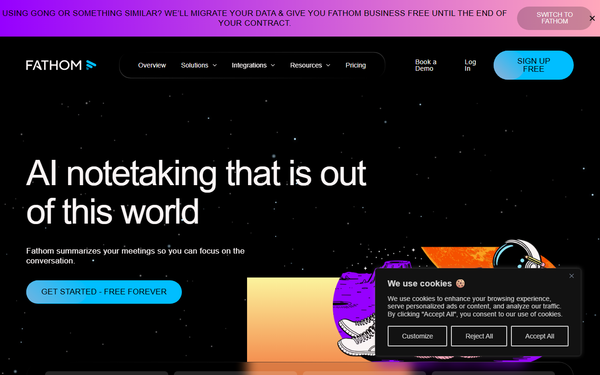
Fathom is widely praised for its ease of use and minimal learning curve—setup takes minutes: sign up, connect your calendar, download the desktop app, and it runs in the background. The interface is clean, intuitive, and modern, with a post-meeting dashboard that lets users quickly jump between transcripts, summaries, video timestamps, and clips. In-meeting controls are simple via a floating widget.
Documentation and support are strong, with a comprehensive help center, quick-start guides, webinars, and responsive resources. Users report seamless onboarding and high satisfaction with accuracy, enabling them to focus entirely on conversations.
Performance & Reliability
Processing is fast and efficient: full summaries, transcripts, and highlights are typically available within a minute after meetings end, with unlimited storage preventing bloat. Transcription accuracy is consistently high across accents and multiple speakers, and the tool reliably handles standard meeting lengths without dropouts.
Known issues from user reviews include occasional transcription glitches in very noisy environments or with heavy accents (though rare and improving), and the visible bot sometimes causing minor friction with clients who prefer invisible tools. A small number of complaints mention stiff AI phrasing in summaries or the need for minor manual edits. Overall reliability is excellent, with strong uptime and no major outages reported in recent reviews.
Pricing & Value
Fathom offers a robust free plan for individuals: $0 forever with unlimited recordings, transcriptions, storage, basic AI summaries, clips, playlists, and personal search—making it one of the most generous free tiers in the category.
Paid plans include:
- Premium (individuals): ~$19–20/month (or $16 annual) for unlimited advanced AI features like action items, follow-up emails, and custom summaries.
- Team: $19/user/month (monthly) or $15/user/month (annual, min. 2 users) — adds global search, collaboration (comments, folders, mentions), keyword alerts, advanced templates, SSO, and team views.
- Business (higher tier): ~$25–34/user/month (annual) for full CRM syncs (Salesforce/HubSpot field mapping), coaching metrics, deal/customer views, custom retention, and enterprise features.
Enterprise options include custom pricing, dedicated support, and advanced compliance.
Value is exceptional compared to alternatives like Fireflies or Otter.ai, which often require payment for core unlimited use. The free tier alone outperforms many paid competitors for solo users, while team plans deliver strong ROI through time savings and CRM automation.
Practical Tutorial
Fathom provides official resources like its Quick Start Guide. Here is a step-by-step walkthrough for the most common task: setting up automatic meeting capture and reviewing/sharing a post-meeting summary (based on official documentation and user tutorials as of April 2026).
-
Sign up and connect your calendar: Go to https://www.fathom.ai/, create a free account (Google or Microsoft login recommended). Connect your Google or Microsoft calendar so Fathom can detect and auto-join meetings with Zoom/Google Meet/Teams links.
-
Download and install the desktop app: Download the Mac or Windows app from the dashboard (essential for full functionality, even if using browser-based meetings). Open the app and log in.
-
Optimize settings: In the Fathom app settings, enable auto-record for all meetings, connect your preferred platforms (Zoom/Meet/Teams), and customize AI summary preferences. For teams, enable team visibility options.
-
Join or start a meeting: Schedule or attend a call as usual. Fathom will automatically join as a participant (you'll see the bot name, customizable in paid plans). A small widget appears in-meeting for real-time highlighting.
-
Review the summary after the meeting: Within ~1 minute of ending, open the Fathom app or web dashboard. You'll see the full video recording, searchable transcript, AI-generated summary, action items, and key clips. Use "Ask Fathom" to query specifics (e.g., "What were the next steps for the Q3 campaign?").
-
Share highlights without full notes: Select key moments or create a playlist of clips. Generate a shareable link that shows only the selected video segments and summary text—perfect for follow-ups. In paid plans, auto-push to Slack/CRM.
Example: In a sales discovery call, Fathom might flag "Budget confirmed at $50K" as a highlight, extract action items like "Send proposal by Friday," and let you share just that clip with your team or sync directly to Salesforce.
For video walkthroughs, check official YouTube tutorials or the help center at https://help.fathom.video/.
Final Verdict
Overall rating: 4.7/5 — A top-tier, highly practical AI meeting assistant that excels in core functionality and accessibility.
It is ideal for individual professionals, freelancers, consultants, and small-to-medium teams in sales, marketing, product, or operations who want powerful, mostly free automation to eliminate note-taking and accelerate follow-ups. The generous free tier, accurate AI, and seamless integrations deliver immediate value.
Avoid it if your workflow involves highly sensitive external meetings where a visible bot is unacceptable (consider invisible alternatives like tl;dv), you need in-person/phone transcription, or your organization demands strict on-prem/no-bot solutions.
Fathom transforms meetings from time sinks into actionable assets—highly recommended for anyone tired of manual notes.