Fenestra Review: The Ultimate AI Tool for Architectural Rendering
Overview & Purpose

Fenestra is an AI-powered spatial rendering platform designed specifically for architects and interior designers. It transforms inputs such as hand-drawn sketches, 3D models, CAD drawings, photos, mood boards, and collages into high-quality photorealistic renders, cinematic animations, and interactive 3D visualizations in seconds using natural language prompts and architecture-optimized AI models. Primary use cases include rapid concept development, design iteration (e.g., adding or removing elements via conversational edits), client presentations, style exploration, and creating polished visuals or videos without traditional rendering software. The tool emphasizes seamless integration into professional workflows, allowing users to refine existing work or generate new ideas from scratch.
The target audience consists primarily of architects, interior designers, students, solo practitioners, and design studios or firms. It appeals to professionals who want to accelerate the path from concept to presentation-ready assets while maintaining creative control, rather than relying on time-intensive manual rendering or general-purpose AI image generators. As of March 2026, the platform reports over 7,000 users and 100,000+ generations, indicating strong adoption in the AEC (architecture, engineering, and construction) community.
Key Features & Capabilities
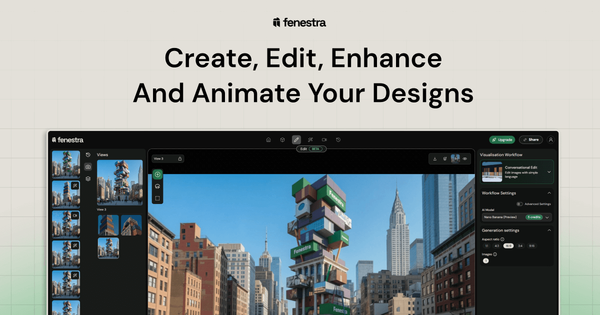
Core functionality revolves around four intuitive modes—Create, Edit, Enhance, and Animate—powered by specialized models (such as Flux Kontext for architectural geometry and Nano Banana for editing). Users upload sketches or 3D files (.FBX, .GLB, .3DM), apply presets for lighting and style, add natural language prompts or reference images, and generate multiple variations. Outputs include photorealistic images, enhanced upscales, conversational edits (e.g., “add people and modify the facade”), illustrative styles, and cinematic videos or flythroughs with camera controls. Projects support multiple views, layers, and 3D sharing for interactive client reviews, all within a browser-based canvas. Custom style training and advanced team collaboration tools are available on higher plans.
Standout features that differentiate Fenestra from competitors include its all-in-one architecture-focused workflow (no need to switch between tools like general AI generators or traditional renderers such as Lumion or Enscape), web-based accessibility without installation, and direct 3D model support with interactive sharing. It excels at maintaining design intent across sketch-to-render pipelines and offers prompt enhancement for better results. Compared to broader tools like Midjourney or Runway, Fenestra prioritizes spatial consistency and professional AEC outputs.
Limitations include a strict credit-based usage system (roughly 1 credit per render, 10 per video), which caps volume on lower plans; occasional AI variability requiring iterative prompting or enhancement for complex details; and several features marked “coming soon” (full real-time rendering, custom AI model training on all tiers, native 3D generation). Offline use is unavailable, and outputs may need minor post-processing in other software for ultra-precise production work. No major missing core features for its intended conceptual-to-presentation scope, but heavy enterprise teams may need custom onboarding.
User Experience
Fenestra offers a low learning curve thanks to its clean, modern web interface featuring a central canvas, layer management, preset workflows, camera controls, and simple prompt fields. Users familiar with design tools like Figma or basic CAD will feel at home immediately—no complex setup or software downloads required. The conversational editing and AI-assisted prompting further reduce the need for technical expertise, making it accessible for students and professionals alike.
Interface quality is high, with responsive design optimized for quick iterations and side-by-side comparison of variations. Documentation is solid, including an official “Getting Started” guide and blog tutorials covering workflows from sketch-to-render to multi-view animations. Support is email-based with faster response times on paid plans; enterprise includes personalized onboarding. Community resources are growing via the blog, LinkedIn, Instagram, and TikTok demos, though third-party forums show limited discussion due to the tool’s niche focus. Overall, the experience prioritizes speed and creativity over steep technical hurdles.
Performance & Reliability
Renders typically complete in seconds, with videos and enhancements scaling efficiently thanks to distributed cloud GPUs and proprietary architecture-trained models. This represents a dramatic improvement over traditional rendering engines that can take hours. Reliability is strong for conceptual and presentation work, with consistent spatial understanding and material rendering praised in AEC listings. The platform handles large projects and multiple views without reported crashes, and data privacy is emphasized (user content remains private unless explicitly shared).
Known issues are minimal in public feedback as of March 2026. Occasional AI inconsistencies (common to generative tools) appear in complex scenes but are mitigated by enhancement and iterative editing modes. No widespread complaints about downtime, data loss, or quality degradation surfaced in reviews or social searches; early beta testers noted some variability across updates, but core functionality remains stable. Internet connectivity is required, and performance scales with plan tier (faster priority on Pro and above). Overall, Fenestra delivers reliable, high-speed results for its target professional use cases.
Pricing & Value
Fenestra offers a tiered subscription model with a limited free/trial tier for testing (non-commercial, restricted renders). Paid plans include:
- Individual: $10/month (or $20/month yearly with 20% discount) — 200 credits (~200 renders, ~20 videos), commercial use, basic features.
- Pro (most popular): $35/month (or $70/yearly) — 1,000 credits (~1,000 renders, ~100 videos, ~500 enhancements), image editing, fast support/rendering, 3D sharing.
- Studio: $60/month (or $120/yearly) — 2,000 credits, priority speeds/support, professional editing.
- Team: $250/month (or $500/yearly) — 5,000 shared credits, up to 5 seats.
- Enterprise: Custom pricing with flexible licensing, admin tools, and dedicated support.
Credits reset monthly; additional student discounts (20% off) are available. All plans provide unlimited projects and no attribution requirements.
Value is excellent compared to alternatives: it saves hours versus manual rendering or outsourcing, at a fraction of the cost of traditional software licenses or artist fees. The integrated workflow and architecture-specific quality provide strong ROI for frequent users, though light users may find the credit system restrictive. Higher tiers unlock team features and priority performance, making it scalable for studios.
Practical Tutorial
Official documentation and blog provide clear, step-by-step guidance. Below is a real walkthrough for a common task—creating photorealistic renders from a hand-drawn sketch—drawn directly from Fenestra’s “Getting Started” guide and expanded with elements from their edit/animate blog tutorial. This example uses a simple sketch of a modern timber home; the full official guide is available at https://www.fenestra.app/documentation/getting-started/getting-started-with-fenestra, with additional workflows at https://www.fenestra.app/blog/edit-illustrate-animate-architectural-images-ai.
-
Sign up and start a new project: Go to fenestra.app, create a free account (or log in), and click “Create New Project” or “Render Now.” The canvas loads automatically.
-
Upload your sketch: Click the Image upload button (or drag-and-drop). Select your sketch file—it appears on the canvas, creates a new view, and is added to the layer structure. For our example, upload a hand-drawn elevation of a modern home in the Scottish Highlands.
-
Configure workflow settings: Choose a preset workflow (e.g., “Exterior” or “Morning Warm Sun”). Enter a descriptive prompt such as “Modern timber home in the Scottish Highlands with natural lighting and atmospheric fog.” Optionally, upload reference images for style or materials. Use AI prompt enhancement if available on your plan.
-
Generate renders: Click “Render.” Fenestra produces four variations in seconds. Use the Compare tool to evaluate fidelity to your sketch.
-
Enhance and iterate: Select your favorite variation and switch to Enhance mode (or conversational Edit mode) to refine details—“sharpen textures” or “add people and subtle landscaping.” For multi-view consistency, switch to Camera Controls workflow to generate additional angles from the same base image.
-
Animate (optional extension): Switch to Animate mode, select a cinematic preset (e.g., smooth walkthrough), and generate an MP4 video. Download the final assets or share the interactive 3D project link.
This process typically takes under 5 minutes for initial results and can be iterated endlessly within credit limits. Official blog examples demonstrate extending one image into full illustration sets or animations for client presentations.
Final Verdict
Fenestra earns a strong 4.5 out of 5 stars. It excels as a fast, intuitive AI visualization tool tailored for the architecture and interior design industry, delivering professional-quality outputs that integrate seamlessly into existing workflows while offering creative flexibility through custom styles and natural-language control. Designers and studios should use it to accelerate concept development and client approvals, especially when time-to-presentation is critical. Avoid it if you require fully offline operation, pixel-perfect engineering accuracy without iteration, or unlimited high-volume rendering on a tight budget—traditional software or in-house render farms may still be preferable in those scenarios. Fenestra is highly recommended for architects and designers seeking to move from sketch to stunning presentation visuals faster than ever before.