Figma Sites Review: Turn Your Designs Into Live Websites Fast

Overview & Purpose
Figma Sites is an all-in-one platform integrated directly into the Figma ecosystem that enables users to design, prototype, and publish fully responsive, production-ready websites without leaving the familiar Figma interface or writing code. Launched in open beta on May 7, 2025, at Config 2025, it transforms static designs into live, interactive sites with built-in hosting, content management, and collaboration features. Primary use cases include creating personal portfolios, product landing pages, event websites, business sites, and quick prototypes—allowing rapid iteration from concept to live URL in minutes rather than weeks. It is targeted primarily at designers, design leads, product teams, marketers, and non-developers who already work in Figma, eliminating the traditional design-to-development handoff while maintaining brand consistency through existing design systems and libraries. As of March 2026, it remains in open beta but is actively used for small-to-medium projects where speed and collaboration are priorities.
Key Features & Capabilities
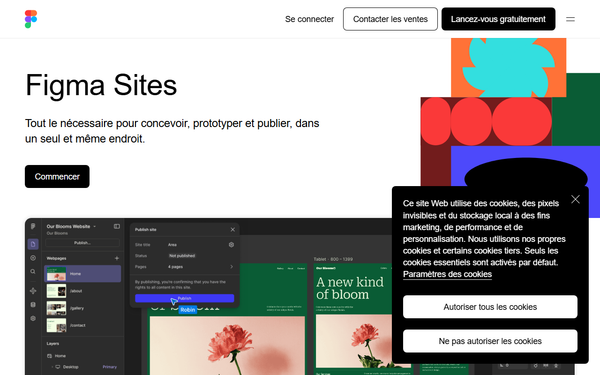
Core functionality revolves around seamless conversion of Figma Design files into live websites: users can copy-paste frames, leverage Auto Layout and components for responsive behavior across breakpoints (desktop, tablet, mobile), and preview sites rendered in real HTML/CSS. Standout features include pre-built responsive blocks and templates (for landing pages, portfolios, and events), preset interactions (hover states, marquee scrolling, custom cursors, parallax, lightbox, draggable elements), AI-assisted custom interactions and code layers (with chat-to-code capabilities powered by Figma Make), and a dedicated Sites CMS that locks the design canvas so collaborators can edit text, images, and content without risking layout changes. Publishing is one-click, with built-in hosting on figma.site subdomains, password protection, video embeds, and custom domain support. These differentiate Figma Sites from competitors like Framer or Webflow by keeping everything within Figma’s real-time collaboration environment and design system ecosystem—no exports, plugins, or context switching required.
Limitations include its beta-stage maturity: advanced e-commerce (no native carts or checkouts), robust multi-language support, complex API integrations, and page-specific custom code are absent or basic. Semantic HTML output can be div-heavy, impacting accessibility and SEO without manual tweaks, and there is no clean code export for developers. Some users report rendering quirks with overlapping vectors or constraints that require workarounds.

User Experience
The interface feels instantly familiar to any Figma user, with the same left sidebar (now including CMS and publishing tabs), properties panel, and canvas—resulting in a minimal learning curve for existing Figma practitioners. Breakpoints, interactions, and CMS views are intuitive and visually guided, with multi-edit tools that propagate changes across screen sizes instantly. Documentation and support are excellent: comprehensive Help Center articles cover every workflow, an official “Intro to Figma Sites” video series exists, a free Community playground file provides hands-on practice, and YouTube masterclasses offer deep dives. Community forums and in-product feedback channels further aid troubleshooting. Minor friction arises from occasional beta bugs (e.g., interaction previews not perfectly matching live output), but overall the experience prioritizes speed and joy for creative iteration.

Performance & Reliability
Design-to-publish workflows are impressively fast for small-to-medium sites, with responsive previews rendering quickly in-browser and publishing updates propagating in seconds. Figma-hosted infrastructure handles basic traffic reliably, with version history for safe rollbacks. However, as of March 2026, common user complaints include rendering inconsistencies (especially mobile breakpoints and complex interactions), occasional lag in files with heavy components, and preview-vs-live discrepancies that require extra QA. Some Reddit and forum users describe early versions as “buggy,” though Figma has steadily improved stability through updates. It is not yet recommended for high-traffic production sites without additional monitoring.
Pricing & Value
Figma Sites is included at no extra cost beyond existing Figma subscriptions and is available on Professional, Organization, and Enterprise plans (requires a “Full” seat). The Starter (free) plan allows design and CMS editing but blocks publishing to live domains. Professional plans start at approximately $16 per editor per month (billed annually), with Organization and Enterprise scaling higher; custom domains are supported (up to 10 on Professional, unlimited on higher tiers, with some free connections offered through 2025). Hosting, SSL, and basic analytics are included with no additional per-site fees. Compared to standalone tools like Framer or Webflow, the value is exceptionally high for teams already paying for Figma—eliminating separate tool costs and accelerating delivery. It delivers strong ROI for rapid prototyping and simple launches but offers less value for SEO-heavy, e-commerce, or enterprise-scale needs where competitors provide deeper specialization.
Practical Tutorial
Official resources include an excellent “Intro to Figma Sites” video and a Community playground file for practice. Below is a step-by-step walkthrough for a common task—building and publishing a simple product landing page—based on official Help Center guidance (tested conceptually with real Figma Sites behavior as of March 2026).
-
Start a new project: In Figma, create a new file and select “Figma Sites” as the file type (or duplicate a template from the Community library, such as an event or landing page template). Alternatively, copy frames from an existing Figma Design file and paste them directly into the Sites canvas.
-
Set up structure and responsiveness: Add pages via the left navigation. For each page, create breakpoints (Desktop, Tablet, Mobile) using the breakpoint toolbar. Use Auto Layout and responsive components (or pre-built blocks from the Insert panel) so elements reflow automatically. Apply multi-edit to adjust styles across breakpoints in one go.
-
Add interactions: Select elements and open the Interactions panel. Apply presets (e.g., “Hover” for button glows, “Marquee” for scrolling text, or “Parallax” on scroll). For custom behavior, use the AI prompt field (“Make this card flip on hover”) or edit code layers directly.
-
Configure content with CMS: Switch to the CMS tab in the left sidebar. Create a collection (e.g., “Features”), add fields (text, images, links), and connect them to your design elements. Content updates appear live on the canvas while the layout stays locked—perfect for marketing teams.
-
Preview and refine: Enter Preview mode (top-right button) to test responsiveness and interactions in a browser-like view. Check meta settings (title, description, Open Graph) under Site Settings for basic SEO.
-
Publish: Click “Publish” in the top bar. Choose a figma.site subdomain or connect a custom domain (via Settings > Domains). Enable password protection if needed. Once published, any CMS or design changes can be republished with one click; previous versions are archived.
For full details and variations, see the official Help Center collection or the Intro video. This process typically takes under 30 minutes for a basic site once familiar with the tools.
Final Verdict
Overall rating: 8/10. Figma Sites shines for Figma-centric designers, product teams, and non-developers who want lightning-fast iteration and zero-tool-switching for simple-to-medium websites like portfolios or landing pages—delivering professional results with built-in collaboration and CMS that traditional handoffs cannot match. Avoid it if you require advanced e-commerce, robust SEO/ accessibility compliance, complex dynamic functionality, or clean code export, where more mature platforms like Framer or Webflow remain superior. One-sentence recommendation: “If you already live in Figma, Sites is the fastest path from design to live website—give it a try for your next quick-launch project and watch your workflow transform.”