Findaily Review: Automate Your Financial Email Reports Easily

Overview & Purpose
FinDaily.io is a specialized automation platform that pulls real-time financial data from connected accounting and banking APIs, merges it into custom-designed email templates, and delivers personalized digests on a user-defined schedule (daily or weekly). It eliminates manual report generation by handling data retrieval, formatting, and distribution entirely on autopilot. Primary use cases include monitoring cash flow, tracking outstanding invoices, reviewing bank balances, and delivering consolidated financial snapshots to stakeholders or clients without opening spreadsheets or accounting software.
The tool targets business owners managing one or more companies, accounting professionals (such as bookkeepers and firm owners) who serve multiple clients, and anyone needing consistent, accurate financial visibility delivered directly to their inbox. It is particularly appealing to non-technical users who value simplicity over full business intelligence dashboards.
Research for this review was conducted as of March 9, 2026, drawing from the official website, help center, integration marketplaces, and limited third-party mentions.
Key Features & Capabilities
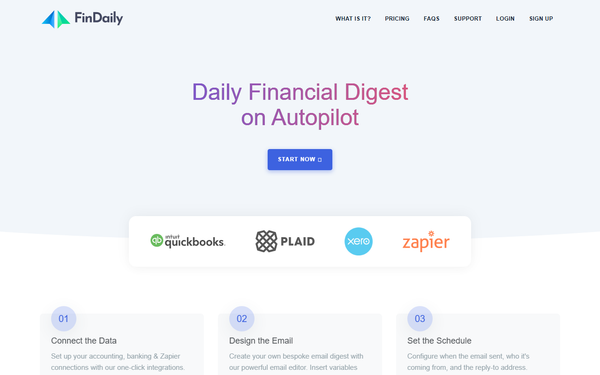
Core functionality revolves around three simple steps: one-click API connections, drag-and-drop-style email template building with live data variables, and flexible scheduling with sender customization. Supported integrations include QuickBooks Online, Xero, Plaid (for bank and credit card accounts), and Zapier (for importing data from virtually any other source). The standout email editor supports variable insertion (e.g., {{CashBalance}}), dynamic data lists that automatically loop through items like unpaid bills with due dates and amounts, live previews using real synced data, and responsive HTML output that works across devices. Advanced plans unlock a full theme editor, custom variables, unlimited recipients per profile, and more sophisticated scheduling.
Differentiators include its laser focus on email delivery (no dashboards or logins required for recipients), automatic deletion of prior data after each send for privacy, and AES-256 encryption with responsible API practices. Unlike broader tools such as Power BI or general Zapier workflows, FinDaily requires zero coding for complex templating and handles the entire digest pipeline end-to-end.
Limitations include only four native integrations (relying on Zapier for everything else), fragile banking connections that can cause skipped emails (with user notification), no mobile app, and absence of advanced analytics or export options beyond email. No native support for multi-currency rollups or AI-generated insights (despite some review titles referencing “AI”) beyond basic variable merging. The platform also lacks a public API for deeper automation.

User Experience
Setup follows a clear three-step wizard (connect data → design email → schedule), with one-click OAuth flows for major accounting platforms making onboarding fast—typically under 10 minutes for a basic profile. The email editor feels intuitive for anyone familiar with basic word processors: type text, insert variables via a searchable panel, and see live data previews instantly. Auto-save, publishing controls, and a clean toolbar reduce friction, while the help center provides concise guides on variables, data lists, and theming. Learning curve is minimal for the target audience; accountants already using QuickBooks or Xero will feel at home immediately.
Interface quality is modern and distraction-free, with responsive design and dark/light mode options implied by theme customization. Documentation lives at https://help.findaily.io/, covering setup through advanced topics, though some subpages are sparse. Support is email-only ([email protected]) with quick responses noted in user mentions; no live chat or phone. A 60-day money-back guarantee lowers the barrier to trying it. Overall, the experience prioritizes speed and simplicity over feature bloat.
Performance & Reliability
Email generation and delivery are fast—data is fetched fresh at send time, merged, and dispatched within minutes of the scheduled window. Users report consistent daily delivery once connections are stable. Security practices (data deleted post-send, encrypted storage) contribute to reliability without performance overhead.
Known issues center on banking connections via Plaid occasionally failing (emails withheld with notification), a limitation explicitly documented by the team. No widespread outages or complaints appear in searches across review sites, YouTube comments, or app marketplaces as of the research date. Sparse user feedback consistently praises time savings and reliability for QuickBooks/Xero users. One verified reviewer on the QuickBooks app store stated: “Findaily saves me time. Great tool.” No major common complaints surfaced.
Pricing & Value
FinDaily offers two plans with no free tier:
- Template Plan: $5 per email profile per month. Limited to one business, one recipient, weekly scheduling, and QuickBooks Online or Xero only—ideal for solo users or very simple monitoring.
- Custom Plan: Starts at $35 per email profile per month (volume discounts: 2–5 profiles at $20 each, 6–20 at $15, etc.). Includes all integrations, unlimited recipients, daily scheduling, advanced editor, theme customization, and custom variables.
A 60-day money-back guarantee applies. Compared to alternatives (manual Excel reports, Zapier + email tools, or enterprise BI platforms costing hundreds monthly), FinDaily delivers strong value for its niche: set-it-and-forget-it financial emails at a fraction of the cost and complexity. The tiered volume pricing makes it scalable for accounting firms managing dozens of client profiles.
Practical Tutorial
Official documentation and video tutorials are available; a recommended starting point is the official “Setting up Your First FinDaily Email Profile” walkthrough on YouTube (https://www.youtube.com/watch?v=olSfLuEm58I). Below is a practical, step-by-step walkthrough for a common task—creating a daily outstanding bills digest for a single QuickBooks Online business—based on the platform’s documented flow.
-
Sign up and create your first Email Profile: Go to https://findaily.io/register, create an account (email/password), and click “Add New Email Profile.” Name it (e.g., “Client A – Daily Bills”).
-
Connect your data: Choose QuickBooks Online, click “Connect,” and complete the OAuth authorization. Select which data objects to sync (e.g., enable “Bills” and “Accounts”). Data pulls only when emails are scheduled—no constant syncing.
-
Design the email template: Open the editor. Type your greeting and body text. Click the variables panel, search for “Bills,” and insert a data list block:
{{#Bills}} - {{VendorName}}: ${{Amount}} due {{DueDate}} {{/Bills}}. Add conditional logic if desired (e.g., show only overdue). Use the live preview pane (populated with your actual recent data) to verify formatting. Switch to the advanced editor for HTML tweaks or themes if on Custom plan. Publish when ready. -
Configure recipients and schedule: Add email addresses (unlimited on Custom). Set daily delivery at 8 AM, choose sender name/reply-to, and enable. Test by triggering a manual send from the profile dashboard.
-
Monitor and iterate: Check the dashboard for delivery logs. If a Plaid bank connection flakes, you’ll receive a notification. Adjust variables anytime—changes publish instantly.
This setup typically takes 15–20 minutes and produces professional, responsive emails. For multi-business or Zapier use, repeat the profile creation step and scale with volume pricing.
Final Verdict
Overall rating: 4.3 out of 5. FinDaily excels at its core promise—effortless, beautiful financial email automation with excellent security and a genuinely simple editor—but feels early-stage due to limited integrations and occasional banking hiccups.
Business owners and accounting professionals who want hands-off daily or weekly financial snapshots delivered to inboxes (without building reports themselves) should use this tool; it saves hours weekly and improves client communication accuracy. Avoid it if you need interactive dashboards, dozens of native integrations, advanced analytics, or a completely free solution—traditional BI tools or custom Zapier flows may suit better.
FinDaily is a smart, low-risk choice for anyone tired of manually chasing financial numbers—start with the Template plan and the 60-day guarantee to see the time savings firsthand.