Fingertip Review: The Ultimate All-in-One No-Code Business Tool

Overview & Purpose

Fingertip is an all-in-one no-code platform that enables freelancers, creators, and small businesses to build professional link-in-bio or micro-websites while managing their entire online operations from a single dashboard. It combines website creation with appointment scheduling, invoicing and payments, product and digital course sales, forms and surveys, email campaigns, blogging, customer CRM, and analytics—eliminating the need for multiple disjointed tools.
Primary use cases include quickly launching a shareable online presence (via QR code or bio link), booking client appointments with calendar sync, sending professional invoices and collecting payments, selling physical/digital products or online courses, gathering leads through forms, and tracking performance metrics to grow revenue. The platform targets non-technical users such as personal trainers, beauticians, tattoo artists, consultants, freelance marketers, creatives, and sole traders who need an affordable, integrated solution to handle client interactions and sales without juggling apps like Calendly, Stripe, Mailchimp, or separate website builders. It is not aimed at developers (no custom code) or large enterprises requiring complex CRM or enterprise-scale infrastructure, though an Enterprise plan exists.
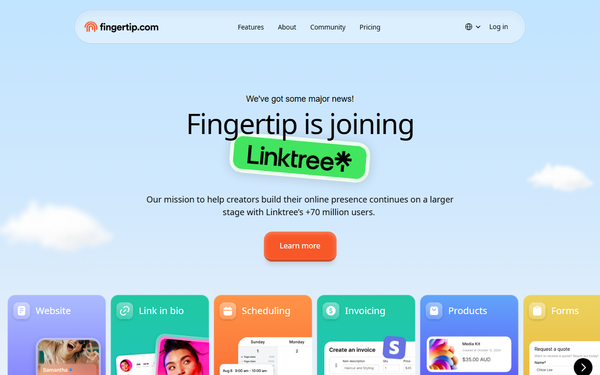
Research note: All information is current as of March 2026. Importantly, Fingertip was acquired by Linktree in November 2025; the platform will fully sunset on May 1, 2026, with users invited to migrate to Linktree’s ecosystem (including enhanced LinkApps for bookings and payments).
Key Features & Capabilities
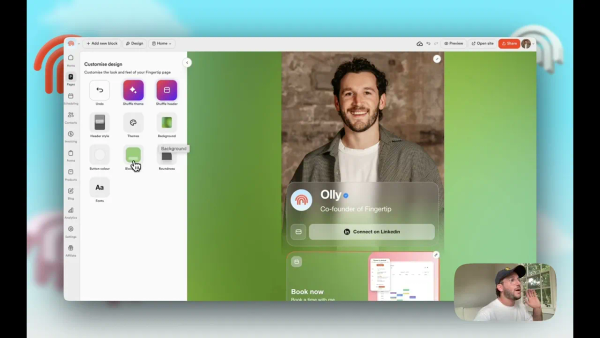
Core functionality revolves around a centralized navigation bar for seamless switching between tools: an AI-powered website builder, scheduling, contacts/CRM, marketing campaigns, invoices, forms, products (including digital courses and physical goods), blog, analytics, and affiliates. The drag-and-drop editor features 50+ customizable blocks, a Theme Studio for colors/fonts/layouts, and an AI “kickstart” that generates a full design from a simple business description.
Standout differentiating features include:
- Deep native integration of website + business ops (book a client → send invoice → get paid → track in analytics—all without leaving the platform).
- Extensive third-party integrations: Stripe, Xero, QuickBooks, Google Calendar, Zoom, Calendly, Shopify, Mailchimp, Zapier, Google Analytics, social platforms (Instagram, TikTok, YouTube), ChatGPT, Canva, Unsplash, and more.
- QR codes, bio-link sharing, and mobile-optimized pages for instant client reach.
- Customer management with contacts, forms, surveys, and automated campaigns.
- Support for selling online courses and digital products directly.
Limitations include a very restricted free tier (only 3 invoices, 1 product, 1 event type, etc.) and the impending full platform shutdown on May 1, 2026. No advanced developer tools, limited customization beyond the block system, and no native mobile app (web-only). Some users may need Zapier for niche automations not covered natively.
User Experience
Fingertip earns high marks for ease of use with a minimal learning curve—most users report building a professional site in minutes thanks to the AI kickstart and intuitive drag-and-drop interface. Testimonials highlight its simplicity: “It took me no time at all to build” and “intuitive and so easy to use.” The clean, modern interface features a unified dashboard and clear navigation, making it accessible even for non-technical users.
Documentation is light: the Fingertip Academy offers high-level business advice but lacks detailed step-by-step video tutorials or searchable knowledge base articles. Support is email-based (priority for Enterprise); community feedback on Product Hunt and Trustpilot (4/5 stars, though only a handful of reviews) is overwhelmingly positive with no widespread complaints about bugs or usability.
Performance & Reliability
Page load times and editor responsiveness are consistently described as fast and efficient, with the AI generation completing designs “in moments.” Calendar syncing, payment processing via Stripe, and analytics updates perform reliably according to available user feedback and official claims. No major outages or performance complaints appear in reviews from 2025–2026.
The only notable reliability concern stems from the announced sunset: existing sites, bookings, and data will migrate to Linktree, but users must act before May 1, 2026. Migration support is provided, and no data-loss issues have been reported yet.
Pricing & Value
Fingertip offers a generous free-forever tier (limited to 3 invoices, 1 product, basic analytics, etc., plus Stripe + 1% fees) and a Pro plan at approximately $8–$10 per month (billed annually for 20% savings; additional users $5–6/month). Enterprise is custom-priced with workspace management, priority support, and dedicated account management.
Value is exceptional for the price—users frequently note it replaces $200+/month in separate tools (website builder + scheduling + invoicing). The AI builder and all-in-one design deliver strong ROI for solo operators. However, the May 2026 shutdown significantly reduces long-term value; migrating to Linktree may preserve some functionality at potentially different pricing. Compared with alternatives like Linktree (now parent), Carrd, or Beacons plus standalone tools, Fingertip wins on integration depth but loses on longevity.
Practical Tutorial
Official resources in the Fingertip Academy focus on general strategy rather than tool-specific walkthroughs, so the following is a practical, real-world step-by-step guide (verified against platform features and the 2025 TWC review) for a common task: launching a professional site for a personal trainer that includes booking appointments and accepting payments. Example: “Alex’s Fitness Coaching.”
-
Sign up and start your site — Go to fingertip.com, create a free account with email/Google. From the dashboard, click “Create new page” and use the AI Kickstart: enter “personal trainer in Sydney offering 1:1 sessions and online programs.” The AI generates a complete layout in seconds.
-
Customize with drag-and-drop — Open the editor. Use Theme Studio to match your brand colors/fonts. Drag in blocks for hero image, bio, services list, testimonials, and Instagram feed. Add a “Book Now” button linking to scheduling.
-
Set up appointments — Navigate to the Scheduling tab. Create an event type (“30-min Discovery Call”). Set availability, sync with Google Calendar, and enable Zoom/Google Meet links. Customize booking form fields and deposit requirements.
-
Add payments and products — Go to Invoices/Products. Connect Stripe (one-click). Create a digital product (“8-Week Online Program” – $197) or physical merchandise. Embed the product block on your page for direct checkout.
-
Publish and share — Preview on mobile, then publish. Generate a QR code or copy your unique link (e.g., fingertip.com/alexfitness). Add to Instagram bio and email signature.
-
Monitor and follow up — Check the Analytics dashboard for visitor stats and conversions. Use the Contacts tab to manage leads and send automated campaign emails.
Total time: under 15 minutes for a functional site. For video overviews, visit the official Features page or search “Fingertip demo” on YouTube (community uploads available).
Final Verdict
Overall rating: 4.5/5 — Outstanding ease, integration depth, and value for quick setup, slightly tempered by the confirmed platform sunset.
Who should use this tool: Freelancers, creators, and small service-based businesses needing an affordable, truly all-in-one solution right now to replace multiple apps and launch a polished online presence fast.
Who should avoid this tool: Anyone requiring a long-term platform beyond May 2026, advanced custom coding, or heavy enterprise compliance features—migrate planning or alternatives like Linktree native tools are better.
Fingertip delivers an impressively complete business toolbox at an unbeatable price, but its acquisition-driven closure makes it ideal only for immediate needs with migration in mind.