Floode Review: The AI Executive Assistant for Email Automation

Overview & Purpose
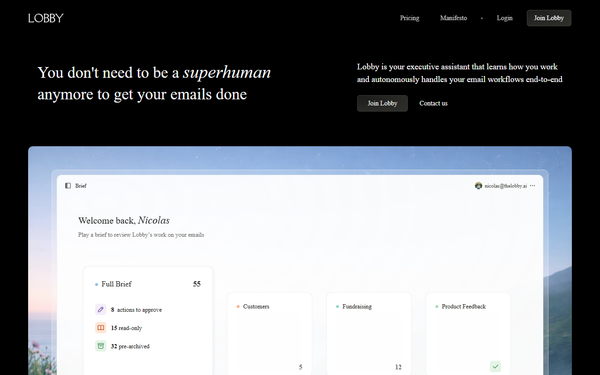
Floode is an AI executive assistant designed to revolutionize the way individuals manage their workflows, particularly with emails and calendar events. By autonomously filtering, sorting, and labeling emails based on the user's priorities, drafting correspondences, preparing tasks and critical information, and anticipating needs, it keeps to-do lists current and schedules optimized through seamless integration with services like Gmail and Google Calendar. Primary use cases include slashing time spent on inbox triage, meeting coordination, task extraction, and administrative follow-ups, freeing users to focus on strategic or creative work. The target audience encompasses busy professionals such as executives, founders, managers, marketers, developers, and other knowledge workers overwhelmed by email volume and multitasking demands. Research conducted as of March 2026 across official descriptions and AI directories confirms its evolution from early listings as Floode to operation primarily under Lobby AI branding (with floodehq.com linking to thelobby.ai).
Key Features & Capabilities
Core functionality revolves around end-to-end email workflow automation—including priority reply drafting, automatic event scheduling, task prioritization and extraction, intelligent conversation tracking, email organization, and archiving—plus calendar integration for proactive rescheduling and reminders. Standout features that differentiate it from competitors include the personalized "The Brief" (a daily digest of AI-handled items with one-click approvals), deep context-aware learning (adapting to habits, projects, travel, or hiring contexts), and one-key interaction via "Call the Lobby" (spacebar activation for ad-hoc requests without complex prompts). These create a proactive "coordination OS" rather than passive suggestions, setting it apart from tools like basic Gmail AI or reply-focused assistants. Limitations and missing features include potential occasional AI misinterpretations in nuanced or ambiguous scenarios, a primary focus on the Google ecosystem (with limited explicit support for Outlook or other providers), sparse advanced team collaboration or analytics tools in base offerings, and less customization for highly specialized workflows compared to some enterprise alternatives.
User Experience
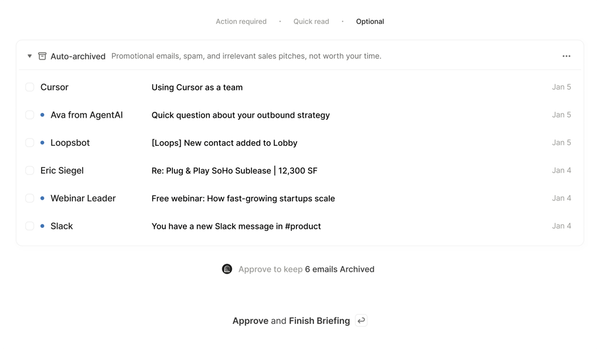
Ease of use is excellent with a shallow learning curve: quick Google OAuth setup followed by simple preference input allows the AI to begin learning immediately, requiring only brief daily reviews rather than manual management. The interface quality stands out for its clean, focused dashboard that replaces inbox chaos with categorized briefs (actions to approve, read-only summaries, pre-archived items), making it intuitive and non-overwhelming even for non-technical users. Documentation and support resources are somewhat limited publicly—primarily in-app guidance and contact options (such as concierge emails)—with demo videos available for orientation but no extensive knowledge base or community forums noted; support appears responsive via the platform's "Join Lobby" flow.
Performance & Reliability
Performance excels in speed and efficiency for routine tasks, processing inboxes rapidly to generate briefs, drafts, and actions that users report (in directory summaries) can save multiple hours weekly through automation and anticipation. Reliability is strong for standard workflows thanks to continuous learning that refines accuracy over time, with no widespread outages or major complaints surfacing in searches across review platforms, Reddit, or social channels. Known issues or common complaints are minimal and typical of emerging AI agents: occasional priority misjudgments or tone adjustments needed in complex threads, plus a brief initial learning period; users are advised to monitor and provide feedback early for optimal results.
Pricing & Value
Floode employs a freemium model with a free tier or trial for basic automation and premium paid plans for full autonomous capabilities, unlimited processing, and advanced features—pricing typically starts around $30–42 per month when billed annually (exact figures and enterprise options require sign-up or contact for confirmation). The value proposition is compelling compared to alternatives like Superhuman, Shortwave, or manual Gmail tools: for professionals spending 1+ hours daily on email, the time savings and reduced mental load deliver strong ROI through proactive orchestration that basic filters or summarizers cannot match. It shines for high-volume users but may feel premium-priced for lighter needs or those preferring one-time tools.
Practical Tutorial
No comprehensive official text-based tutorials are prominently available on the site (though demo videos exist for visual guidance), so here is a practical step-by-step walkthrough for a common task: setting up and reviewing your Daily Brief to handle email workflows autonomously. This is based directly on the tool's described capabilities and can be completed in under 15 minutes initially.
- Visit https://floodehq.com/ (or thelobby.ai) and click "Join Lobby" to sign up using your Google account for quick authentication.
- Grant permissions to connect Gmail (for reading, drafting, labeling, and sending) and Google Calendar (for scheduling and updates).
- During onboarding, provide initial context via simple prompts—e.g., "Prioritize client and team emails; flag anything related to hiring or travel; I'm based in Europe this week"—to help the AI learn your priorities.
- Allow an initial scan (usually a few minutes) for the system to analyze your inbox and begin automating.
- Navigate to the dashboard and access "The Brief" section, which appears daily or on demand. It will categorize items: e.g., "Approve draft reply to investor on Q2 metrics," "Read-only update from marketing team," or "Pre-archived low-priority newsletters."
- Play or review the Brief interactively—for a real example, if an email thread discusses rescheduling a meeting due to your travel, the AI might prepare a calendar invite and draft response; edit if needed and approve with one click or spacebar.
- For ad-hoc needs, press the spacebar to "Call the Lobby" and request something like "Extract action items from last week's sales threads and add to my to-do list" or "Draft a polite decline for this vendor proposal."
- Provide quick feedback on approved actions (thumbs up/down) to refine the AI's learning—repeat daily for seamless optimization.
This transforms hours of email sorting into minutes of high-level oversight. For visual walkthroughs, search for Floode/Lobby AI demos on YouTube.
Final Verdict
Overall rating: 4.3/5. Floode (Lobby AI) is ideal for executives, founders, and knowledge workers drowning in email and calendar chaos who want a truly proactive assistant to reclaim focus for high-impact work—its anticipation and automation deliver tangible productivity gains in the Google ecosystem. Avoid it if you demand full manual control, support for non-Google tools, extensive customization, or upfront pricing transparency without signing up, or if you're privacy-sensitive about full inbox access. One-sentence recommendation: If your inbox rules your day, Floode offers a smart, autonomous upgrade worth trying to finally put email on autopilot.