FlowHunt Review: Build Your Own No-Code AI Agent Team Fast
Overview & Purpose
FlowHunt is a no-code AI automation platform that lets users visually build, deploy, and manage AI agents, workflows, and chatbots without any programming skills. It turns ideas into automated processes by connecting intuitive blocks, enabling tasks such as content generation, customer support, lead qualification, research reporting, and internal operations like HR screening or sales follow-ups. Primary use cases include automating repetitive customer inquiries with smart chatbots that escalate complex cases, creating SEO-optimized blog posts or social content via multi-agent teams, generating real-time competitor analysis reports, capturing leads with instant email notifications to sales teams, and streamlining business processes like contract drafting or CV scanning.
The platform targets non-technical users across various roles: marketers and content creators who need fast content pipelines, sales and customer service teams looking to qualify leads or handle support 24/7, small business owners and solopreneurs seeking efficiency without hiring, HR professionals automating recruitment, and even teachers or researchers requiring up-to-date cited data from documents, websites, or videos. It positions itself as an accessible way for anyone to build a “team of AI agents” that perform real tasks while integrating with tools like CRMs, Shopify, and communication apps.
Key Features & Capabilities
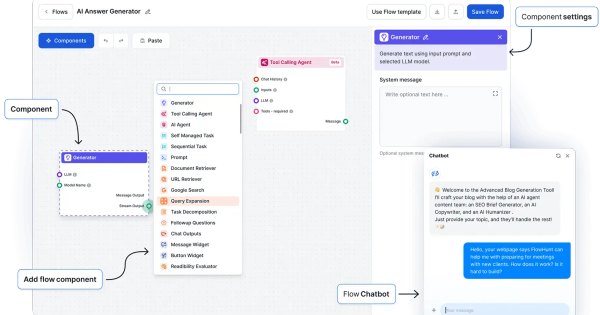
Core functionality revolves around a visual no-code builder where users drag and drop components to create flows. Key building blocks include AI agents (powered by latest LLMs like GPT-4 or Claude for autonomous decision-making), document and URL retrievers for fresh knowledge (auto-crawling websites, PDFs, videos, and FAQs), chat input/output with history for conversational interfaces, triggers (e.g., chat opened, new email), actions (Google Sheets, email notifications, WordPress posts), logic routers, and integrations via webhooks, APIs, or native connectors (Shopify, HubSpot, Gmail). Users can deploy flows as embeddable chatbots or run them autonomously, with memory, guardrails, and escalation to humans. A library of 100+ ready-to-use templates covers everything from advanced blog generation (SEO researcher + copywriter + humanizer agents) to company analysis tools.
Standout features that differentiate FlowHunt include autonomous multi-agent workflows that “perform real tasks” (not just chat), knowledge sources that keep answers current without manual updates, custom LLM integration (including user-owned models), and specialized tools like ArXiv for scholarly research or escalation gateways for seamless human handover. Photomatic AI (a companion for image/video generation) adds media capabilities. Deep Shopify and LiveAgent integrations make it particularly strong for e-commerce and support teams.
Limitations include credit-based consumption (each AI call or interaction deducts credits, with costs scaling quickly for heavy use), strict per-plan caps (e.g., only 5 workflows/chatbots on Starter, websites/documents limited), and a relatively young ecosystem with few third-party plugins compared to more mature tools like Zapier or n8n. Very limited public user reviews mean less community validation, and highly complex non-linear logic may still require workarounds.
User Experience
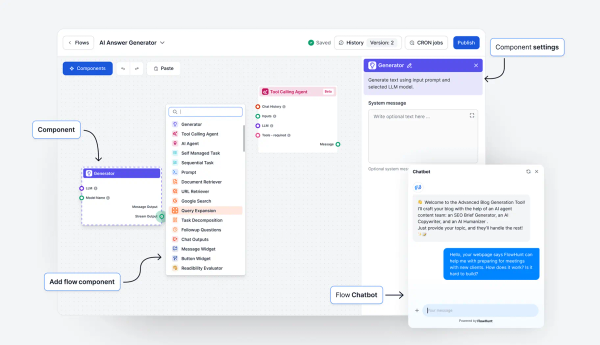
FlowHunt boasts a low learning curve thanks to its drag-and-drop visual editor—official claims and blog posts state most users build their first automation in under 10 minutes. The interface is clean and modern, with an intuitive canvas for connecting blocks, real-time previews, and version history. Non-coders praise the template library and prompt-based configuration for quick starts.
Documentation is solid: a searchable knowledge base offers practical step-by-step guides on integrations, debugging, and onboarding, while the free AI Academy provides beginner-to-advanced text tutorials (mostly on Copilot/ChatGPT use cases that complement platform workflows). Support includes email for all plans, dedicated assistance and custom development for Premium/Enterprise, plus YouTube demos. No widespread UX complaints surfaced in searches, though beginners may need time to master component connections for advanced flows. Overall, the experience feels approachable and empowering for its intended audience.
Performance & Reliability
Flows run efficiently with access to top LLMs and real-time data retrieval, delivering fast responses for chatbots and automations. Observability integrations (Langfuse, PowerBI) help monitor performance. Official materials highlight reliable 24/7 operation and accurate knowledge-based answers when retrievers are properly configured. No major outages or widespread bugs were reported in public sources as of March 2026; troubleshooting articles focus on common setup issues like API credentials or document scheduling rather than systemic failures.
Common complaints are scarce due to limited independent reviews, but credit exhaustion on lower plans and occasional need for prompt tweaking (to reduce hallucinations) appear as minor pain points. Reliability shines in template-based use cases but may vary with custom integrations or high-volume traffic on entry-level plans.
Pricing & Value
FlowHunt uses a credit-based model (credits ≈ €1 each; unused credits expire monthly) with four tiers as of March 2026 research:
- Starter (€10/month): 10 credits (~1,000 interactions), 1 workspace, limited resources—ideal for testing.
- Pro (€50/month, most popular): 50 credits (~5,000 interactions), 5 workspaces, Shopify integration, more teammates.
- Premium (€500/month): 500 credits (~50,000 interactions), higher limits for scaling teams.
- Enterprise (from €1,500/month, custom): unlimited everything, on-premise options, dedicated support, custom builds.
Yearly billing offers minor discounts; extra credits can be purchased. A free trial is available via the app.
Value is strong for small-to-medium businesses wanting Zapier-like automation plus advanced AI agents at a lower entry price than many enterprise platforms. It outperforms basic chatbot builders by enabling full workflows and real tasks. However, heavy users may find credits restrictive compared to unlimited alternatives, and the lack of a generous free tier limits experimentation. Overall, excellent ROI for targeted automation without developer costs.
Practical Tutorial
Official tutorials and a ready-to-use blog walkthrough make getting started easy. Here is a real, tested example for a common task—building an AI lead-generation chatbot with instant email notifications (completed in ~5 minutes per the official guide). Full details and updates: https://www.flowhunt.io/blog/ai-lead-generation-chatbot-with-email-notifications-in-5-minutes/
Step-by-step walkthrough (Lead Email Notification Flow):
-
Create a new flow: Log into the FlowHunt dashboard, go to “My Flows,” click “Add new flow” > “Create Blank Flow,” and name it “Lead Email Notification.”
-
Add components (drag from the left panel onto the canvas):
- Chat Input (visitor messages)
- Chat History (conversation context)
- Tool Calling Agent (the “brain” using GPT-4 or Claude)
- Document Retriever (your product knowledge)
- URL Retriever (website pages like pricing/features)
- Notification Email Tool (sends alerts)
- Chat Output (replies to visitors)
-
Configure the Tool Calling Agent: Select a strong LLM. Paste this prompt: “Act as a technical live chat support specialist. Use Document Retriever for answers. If the visitor shows buying interest, ask for email/name and send notification. Format email in markdown with summary. Answer in the user’s language. Do not notify on directory pages.”
-
Set up retrievers: Schedule product documents and add key URLs (pricing, features) to the URL Retriever.
-
Configure Notification Email Tool: Set recipient ([email protected]), subject “New Lead Alert,” and template with placeholders for name, email, needs, and conversation summary.
-
Connect everything: Link Chat Input → Agent, Chat History → Agent, Retrievers → Agent, Agent Message → Chat Output, and Agent outputs → Email Tool (for body/subject). Publish the flow.
-
Deploy: Embed the chatbot on your site via JS snippet or use as standalone.
Result: Visitors get instant, knowledgeable answers; interested leads trigger professional emails to sales with full context. Test thoroughly and refine prompts for best accuracy. Other official tutorials cover blog generation and Shopify chatbots in the AI Tools library.
Final Verdict
Overall rating: 4.3/5 – A powerful, accessible no-code AI platform with excellent potential for automation, held back slightly by credit limits and sparse independent reviews.
Who should use this tool: Marketers, small business owners, sales/support teams, and non-technical professionals who want to automate workflows, chatbots, and content processes quickly and cost-effectively without hiring developers or learning code—especially those already using Shopify or needing knowledge-based agents.
Who should avoid this tool: Enterprises requiring unlimited high-volume usage without credit concerns, developers needing deep custom coding, or users who prioritize platforms with extensive third-party reviews and massive ecosystems.
One-sentence recommendation: FlowHunt is a smart choice for anyone ready to build a capable AI team in minutes—start with the Pro plan and a template to see immediate time savings.