Fluid Review: The Ultimate Private Offline AI Assistant for Mac

Overview & Purpose
Fluid is a private AI assistant for Mac that operates completely offline on Apple Silicon-powered Macs running macOS 14 or later. Powered by Meta’s Llama 3 model, it delivers ChatGPT-like conversational intelligence with all processing and data staying entirely on your device—no servers, no tracking, no data leaks. Primary use cases include answering questions, brainstorming ideas, drafting emails or content, coding assistance, and hands-free voice interactions for everyday productivity tasks, all while maintaining strict data control.
The target audience is privacy-conscious Mac users, particularly professionals who handle sensitive information (lawyers, healthcare workers, researchers, and developers protecting intellectual property), as well as general users who want reliable offline AI without relying on cloud services or internet connectivity.
Key Features & Capabilities
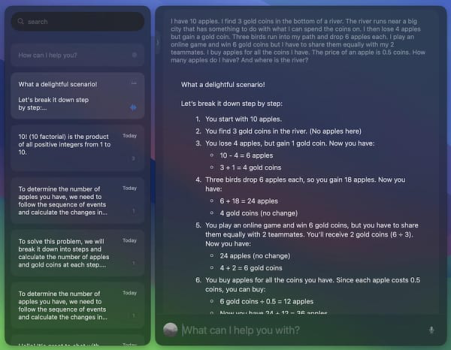
Core functionality centers on a Spotlight-like interface activated instantly with ⌃ Space. Users type questions or use voice input (hold Control while speaking after granting microphone permission) for natural conversations, with full chat history accessible via ⌘ H and the ability to interrupt generation with Esc. The app remains idle with zero CPU, GPU, or battery impact until queried.
Standout features that set it apart include 100% local processing for unparalleled privacy, Apple sandboxing and notarization for hardened security, automatic secure updates, and one-click installation with no admin rights required. Voice recognition runs locally (Whisper-based), and the app is designed to feel native to macOS. Compared to competitors like ChatGPT (cloud-dependent), Ollama (requires technical setup), or other local tools, Fluid offers seamless integration, simplicity, and true zero-data-exfiltration guarantees without any configuration hurdles.
Limitations include reliance on Llama 3 (knowledge cutoff around 2023, solid but not frontier-level for highly complex or creative tasks), no real-time web search or external integrations in the free offline version (planned as optional private additions), sandbox restrictions that currently prevent direct file or screen access, and a one-time disk footprint of 4.9 GB (8 GB RAM Macs) or 8.6 GB (16 GB+ RAM). The Mac app remains in beta, so advanced memory or context-awareness features are still evolving.
User Experience
Installation and setup are effortless: download the DMG from the official site, drag the app to your Applications folder, launch it, and the model downloads automatically. The learning curve is minimal—most users are productive within minutes thanks to familiar macOS shortcuts and a clean, minimalist popup window.
Interface quality is polished and native-feeling, prioritizing speed and clarity over flashy design. Voice mode adds genuine hands-free convenience once permissions are granted via the menu bar icon. Documentation is concise via the website’s FAQ covering installation, voice setup, uninstallation, and safety notes; support is available through email at [email protected]. Community feedback on Reddit and the developer site highlights the intuitive, “Spotlight-like” experience as a major strength.
Performance & Reliability
On M2 and newer Macs with 16 GB+ RAM, responses are snappy and efficient, with GPU/Neural Engine acceleration delivering generation speeds suitable for daily use. The app consumes no resources when idle and allows instant interruption, preventing any noticeable slowdowns. Testimonials consistently describe it as “very fast” and “smooth” even on MacBook Air hardware.
Known issues are minimal: performance drops on base 8 GB RAM models due to model quantization, and the initial model download requires a one-time stable internet connection. As a beta product, occasional edge-case quirks may appear, but auto-updates and sandboxed design ensure high reliability. No widespread complaints or security incidents have surfaced in user reviews or tech coverage; the app’s Apple-notarized status and local-only architecture contribute to strong stability.
Pricing & Value
The core Mac app is completely free in beta, including full offline Llama 3 capabilities—no subscriptions, no hidden costs. Optional Fluid Pro API is available at $19 per month for enhanced private hosted models and features, while Fluid Box offers enterprise self-hosted solutions (pricing on request).
The value proposition is exceptional for the free tier: it delivers privacy-focused AI without the recurring fees of ChatGPT Plus or similar cloud tools, while requiring only storage space as a one-time investment. Compared to DIY local setups, Fluid provides a polished, zero-config experience that justifies the download for anyone prioritizing data security and offline access. Paid tiers add compelling upgrades for power users or teams needing larger models and private web search without compromising the core offline ethos.
Practical Tutorial
No official video tutorials exist, but the website FAQ covers basics. Below is a complete step-by-step walkthrough for a common task—drafting a professional email response—using real examples. Everything happens offline and privately.
-
Visit https://getfluid.app/, download Fluid.dmg, open it, and drag Fluid.app to your Applications folder. Launch the app and grant microphone permission if using voice (one-time step). Wait for the Llama 3 model to download automatically (4.9–8.6 GB depending on your RAM; ensure sufficient free space).
-
From anywhere on your Mac, press ⌃ Space to summon the Fluid window.
-
For text: Type your query. For voice: Click the menu bar icon to enable Voice Recognition, then hold the Control key while speaking.
-
Example query (type or speak): “Draft a polite professional email responding to a client who requested a two-week project extension. Explain our current workload constraints and propose a one-week extension with a revised timeline.”
-
Fluid generates a complete draft instantly (e.g., “Dear [Client], Thank you for your email. Due to our current commitments on other deliverables, we can accommodate a one-week extension. The revised timeline would be… Best regards…”). Continue the conversation naturally: “Make it more concise and add a bullet-point timeline.”
-
Press ⌘ H to review full conversation history or start a new thread with ⌘ N. Select and copy any portion directly to your email client. Press Esc at any time to stop generation.
This workflow demonstrates Fluid’s contextual understanding and natural conversation flow. For additional shortcuts or updates, refer to the in-app menu or site FAQ.
Final Verdict
Overall rating: 4.3 out of 5.
Fluid is ideal for privacy-focused Mac users on Apple Silicon who want a simple, always-available local AI companion without compromising data security or paying recurring fees—perfect for professionals handling sensitive information or anyone working offline. It should be avoided by users needing cutting-edge model performance, real-time web knowledge without the Pro tier, cross-platform support, or deep file-system integrations (until upcoming features arrive).
One-sentence recommendation: If data privacy and offline reliability are your priorities on a compatible Mac, Fluid is an outstanding free choice that delivers ChatGPT-quality intelligence without ever sending your information anywhere.