FormX.ai Review: Automate Document Data Extraction with Ease

Overview & Purpose

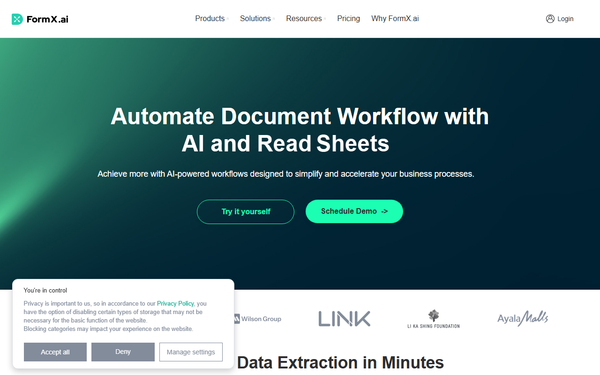
FormX.ai is an AI-powered intelligent document processing (IDP) tool designed to automate the extraction of structured data from physical and digital documents such as receipts, invoices, ID cards, bank statements, business certificates, address proofs, contracts, and more. It converts unstructured or semi-structured document images and PDFs into usable JSON, CSV, or Excel formats, eliminating manual data entry and streamlining workflows. Primary use cases include automating accounts payable/receivable in finance, HR onboarding and payroll processing, retail receipt analysis for customer rewards or inventory, legal contract reviews, and operational tasks like purchase order or delivery note handling.
The tool targets developers and technical teams for API integration, as well as business users in finance, HR, operations, legal, retail, and customer service departments who need to process high volumes of documents efficiently. It appeals to SMEs and enterprises seeking cost-effective automation without heavy custom development.
Key Features & Capabilities
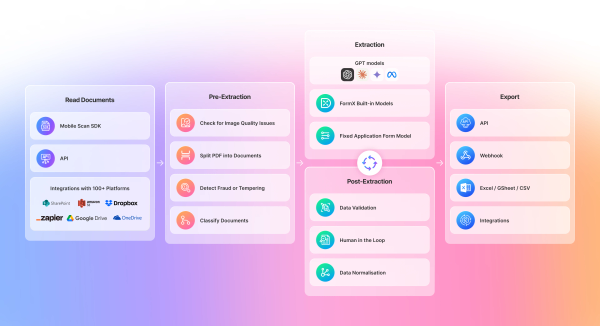
Core functionality revolves around creating "extractors" — either pre-built models for common document types (e.g., invoices, receipts, passports, bank statements) or custom models trained on user-uploaded samples. Users upload documents via the web portal or API, define data fields (including tables and line items), and receive structured output. Key capabilities include image quality checks, document classification, data normalization, and output to JSON for easy system integration.
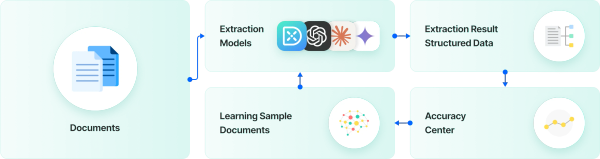
Standout features that differentiate FormX.ai include its Smart Learning (or SmartAdapt) system, which uses real-time user feedback and production data to continuously improve model accuracy toward near-perfect results; guardrails to prevent LLM hallucinations and ensure production stability; the ability to mix vision and LLM models for optimal latency/accuracy trade-offs; and a fixed-layout extractor ideal for consistent forms like business registrations. Mobile SDKs (iOS, Android, Flutter, React Native) and a companion scanning app enable on-device capture and extraction. Additional pipeline features like fraud/AI image detection and advanced table extraction are available in higher tiers.
Limitations include dependency on good image quality for optimal results (accuracy typically 70-90%+ depending on document clarity), potential need for multiple training samples or custom templates for highly variable or complex layouts, and fewer out-of-the-box integrations compared to some enterprise IDP platforms (though webhooks and planned connectors like Google Sheets/Zapier help). It may not suit fully handwritten or extremely irregular documents without significant tuning.

User Experience
FormX.ai offers a low learning curve thanks to its intuitive web portal, which guides users through extractor creation in minutes via drag-and-drop field definition and sample uploads. Pre-built models require almost no setup, while custom ones can be trained with as few as 0-3 samples using "Instant Models." The interface is clean and focused, with a Document Workspace for team collaboration.
Documentation is comprehensive and accessible at help.formx.ai, featuring step-by-step guides, API references, and integration examples. Support includes email contact and demo scheduling; users praise quick implementation and helpful onboarding. Overall, reviews highlight simplicity and speed of setup as major strengths.
Performance & Reliability
Extraction typically processes in 4-8 seconds per document (excluding upload time), with throughput up to 180 RPM on Starter plans. Accuracy is strong for standard, well-scanned documents and improves over time via feedback loops. The platform recently added support for documents up to 500MB/1000 pages and achieved ISO 27001 and SOC 2 Type II compliance, enhancing enterprise trust in data security and consistency.
User feedback on G2 (average ~4.3-4.5 stars from dozens of reviews) is generally positive regarding speed, accuracy reduction of manual errors, and reliability for routine documents. Common complaints are occasional failures on intricate layouts or poor-quality scans, though these are described as rare and mitigable with training. Sparse Trustpilot data shows mixed but limited feedback. No widespread outages reported; data is processed in-memory where possible for privacy.
Pricing & Value
FormX.ai offers a generous free trial of the first 100 pages/API calls with no commitment. Pay-as-you-go pricing is $0.30 per page thereafter. The Starter plan is $299 per month and includes credits for approximately 3,000 pages (with no SLA). Enterprise plans are custom-priced, adding advanced features (e.g., fraud detection, advanced tables, private cloud), dedicated support, volume discounts, and SLAs.
Value is strong for mid-volume users: the entry cost is competitive compared to many IDP alternatives, with high ROI through time savings and error reduction. Pay-as-you-go suits sporadic use, while Starter provides predictable costs for growing teams. Enterprise options scale well for high-volume or regulated environments. Some users note it as one of the more affordable commercial solutions for custom document extraction.
Practical Tutorial
FormX.ai provides official getting-started resources at help.formx.ai. Below is a step-by-step walkthrough for a common task: creating and using a custom extractor to pull data from retail receipts (e.g., extracting merchant name, date, total amount, and line items for expense tracking or rewards programs). This uses the web portal and API.
-
Sign up and access the portal: Go to https://www.formx.ai/ and create a free account. Navigate to the Extractors section in the dashboard.
-
Create a Custom Model Extractor: Click "Create Extractor" and choose "Custom Model Extractor" (ideal for variable receipt formats). Name it (e.g., "Retail Receipt Extractor") and define data fields: add fields like
merchant_name,transaction_date,total_amount, and anitemstable with columns fordescription,quantity, andprice. -
Upload sample documents: Upload 1-3 clear receipt photos or PDFs as training samples. The portal auto-detects text via OCR; label or confirm extracted values to train the model quickly (Instant Model setup often completes in minutes).
-
Test the extractor: Upload additional test receipts via the portal. Review the structured JSON/CSV output for accuracy. Use the Accuracy Center or feedback tools to correct any errors — this trains Smart Learning for future improvements.
-
Integrate via API: Copy your API key and extractor ID. Use a simple POST request (example in docs) with the image URL or base64 data:
curl -X POST https://api.formx.ai/v1/extract \
-H "Authorization: Bearer YOUR_API_KEY" \
-d '{"extractor_id": "YOUR_EXTRACTOR_ID", "image_url": "https://example.com/receipt.jpg"}'
The response returns structured JSON ready for your CRM, accounting software, or database.
-
Optional mobile integration: For field use, integrate the Mobile SDK or use the AI Scan app to capture and extract directly from a phone camera.
For full details and variations (e.g., pre-built receipt extractor or fixed-layout forms), see the official guide: https://help.formx.ai/docs/getting-started and custom model tutorial: https://help.formx.ai/docs/custom-model-extractor. Video walkthroughs are also available on YouTube.
Final Verdict
Overall rating: 4.5/5 (strong for ease, accuracy on standard documents, and value; slightly docked for setup needs on complex cases and limited reviews).
This tool is ideal for SMEs, developers, and business teams in finance, HR, retail, or operations who process moderate-to-high volumes of standardized documents and want quick, trainable AI automation with seamless API integration and continuous improvement. It excels where speed-to-value and low-code customization matter.
Avoid it if you require zero-setup for highly variable/handwritten documents, need deep native integrations with specific accounting/ERP systems out of the box, or have extremely low volumes where free tools might suffice (though the trial is generous).
One-sentence recommendation: FormX.ai is a reliable, user-friendly, and competitively priced choice for automating document data extraction with smart learning capabilities that deliver real production value.