Frontly Review: Build Custom AI-Powered Apps Without Coding
Overview & Purpose
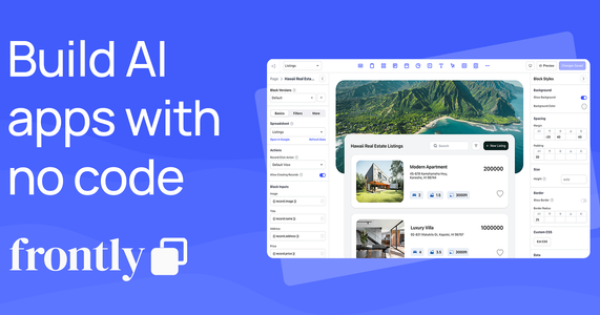
Frontly is a no-code AI-powered app builder that lets users create custom web applications by simply describing their idea in plain English. The AI generates a functional app instantly, which users can then refine visually without writing code. Primary use cases include building internal tools (dashboards, trackers), client portals, expense managers, event platforms, real estate listings, and data-driven interfaces from spreadsheets. It excels at turning repetitive business processes into interactive apps with forms, tables, charts, and automations.
The target audience includes non-technical users such as small business owners, startups, marketers, operations teams, and solopreneurs who need quick digital solutions but lack coding skills. It is also useful for developers seeking rapid prototyping or MVPs. Frontly positions itself as an accessible alternative to traditional development, enabling fast launches and tests for internal efficiency or customer-facing tools.
Key Features & Capabilities
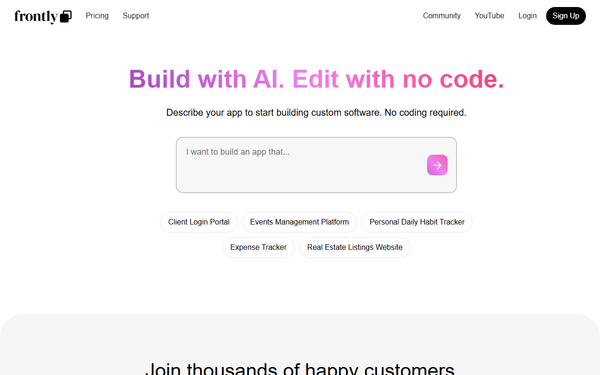
Core functionality revolves around an AI-first workflow: describe an app → AI builds it → no-code visual editor for customization. Standout features include:
- AI App Generator and Copilot: Generate entire apps or individual blocks/repeaters from text prompts; edit content with OpenAI-powered generation and summarization.
- Data Integration and Visualization: Connect Google Sheets, Supabase, Airtable, or other sources; transform spreadsheets into dynamic tables, charts, forms, and dashboards.
- Automations and Logic: Built-in logic actions for real-time data manipulation, webhooks, Zapier integrations, and custom AI requests to automate tasks.
- User Management and Security: Granular access controls, login portals, role-based permissions, and unlimited users (even on free tier).
- Branding and Design: Custom themes, colors, layouts, and professional branding options; V2 editor uses HTML/CSS principles for flexible, unlimited design potential.
- Publishing and Scalability: Publish unlimited apps; add custom domains on higher plans.
These differentiate Frontly from pure no-code tools like Bubble or Glide by emphasizing instant AI generation and seamless spreadsheet-to-app conversion, making it faster for non-coders.
Limitations include heavy reliance on AI credits (which deplete quickly even for simple edits), monthly operation caps on lower plans, occasional inconsistent AI outputs requiring retries, and less suitability for highly complex, high-traffic enterprise apps needing custom backend scaling. Advanced API access or unlimited AI usage requires paid upgrades.

User Experience
Frontly boasts an intuitive interface with a low learning curve—most users can build a basic app in minutes via the AI prompt and drag-and-drop blocks. The V2 editor feels modern and responsive, though some find it cumbersome for intricate layouts compared to traditional builders. Overall, it prioritizes simplicity for non-technical users while offering enough depth for power users.
Documentation is available via a comprehensive help center (help.frontly.ai) with articles on V2 builder, block creation, logic actions, and FAQs. Community support is active (1,850+ members), and paid plans add priority help. However, some users note a lack of complete end-to-end video tutorials for beginners, leading to initial frustration; external YouTube walkthroughs help fill gaps. Support receives praise for responsiveness when contacted.
Performance & Reliability
App generation and editing are fast, with real-time previews and quick deployments ideal for prototyping. Data syncing from spreadsheets works reliably for most use cases, and there are no widespread reports of major downtime.
Common complaints include rapid AI credit consumption (even basic tasks can exhaust quotas), occasional errors in data processing or AI-generated elements (usually fixed by retrying), and limits that bottleneck scaling on free/starter plans. Reliability is solid for internal tools and MVPs but may frustrate heavy users without upgrading. As of March 2026 research, frequent updates address many issues.
Pricing & Value
Frontly offers a generous freemium structure:
- Starter: Free — unlimited apps and users, 1,000 monthly operations, 250 AI credits, community support, Frontly branding.
- Basic: $30/month — increased limits and features.
- Professional: $100/month — more operations, AI credits, advanced tools.
- Enterprise: Custom pricing — personalized onboarding, priority support, unlimited/custom limits.
Historical AppSumo lifetime deals (around $99–$529 tiers) have also been available for one-time purchases. No credit card is required to start.
Value is excellent for quick builds and testing ideas—far cheaper and faster than hiring developers or using heavier platforms. It shines for small teams needing internal tools or portals, though credit/operation limits can increase effective cost for active use. Compared to alternatives, it provides superior AI speed at a competitive entry price.
Practical Tutorial
Official resources include the Help Center (https://help.frontly.ai/) and YouTube tutorials such as “How to Create Web Apps with AI - Frontly Review & Tutorial” (https://www.youtube.com/watch?v=aAKTVHQmLcY). Below is a step-by-step walkthrough for a common task: turning a Google Sheet into an Expense Tracker app (based on official V2 builder flow and real examples).
- Sign Up and Start: Go to https://frontly.ai/, create a free account, and click “Start For Free” to launch the dashboard.
- Create New App with AI: Click “New App” → describe your idea (e.g., “Build an expense tracker app with a table of expenses from Google Sheets, add new entries via form, show monthly charts, and allow user login”). Hit generate—the AI builds the full structure in seconds.
- Connect Data Source: In the editor, go to Data section → connect your Google Sheet (or Supabase). Map columns (date, amount, category, description) to the app’s table block.
- Customize UI with Blocks: Use the visual editor (V2) to drag in blocks: add a Table for listing expenses, a Form for new entries, Charts for summaries. Use AI Copilot to refine (e.g., “Make the chart show spending by category”).
- Add Logic and Automations: In Actions tab, create Logic flows (e.g., “On form submit, calculate total and update chart”). Add AI actions for smart features like “Auto-categorize expense description using OpenAI.”
- Set Access Controls: Under Users → enable login portal and define roles (e.g., view-only for team, full edit for admins). Test granular permissions.
- Brand and Publish: Customize colors/logo in Settings → remove Frontly branding if on paid plan. Preview, then publish with a custom domain (paid) or Frontly subdomain. Share the live link.
- Iterate: Monitor usage in dashboard; tweak via AI prompts or blocks as needed.
This process typically takes 15–30 minutes for a functional MVP. For deeper dives, check Help Center articles like “Creating a Block” and “Logic Action.”
Final Verdict
Overall rating: 4.5/5
Frontly is ideal for non-technical users, small businesses, startups, and teams needing fast internal tools, client portals, or spreadsheet-powered apps—its AI speed and no-code simplicity deliver massive productivity gains without developers. Avoid it if you require unlimited AI usage, highly custom complex logic at scale, or zero tolerance for occasional credit limits and AI variability, as these can become frustrating without paid upgrades.
One-sentence recommendation: If you want to launch polished, AI-driven apps from a simple description in minutes, Frontly is one of the smartest no-code choices available today.