FurniMesh Review: Turn Furniture Photos into 3D Models Instantly
Overview & Purpose

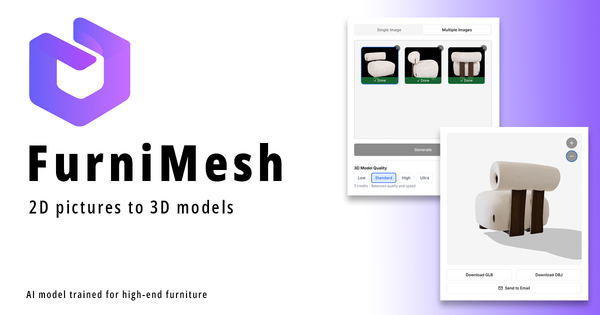
FurniMesh is an AI-powered cloud service that transforms single or multiple photos of furniture into production-ready 3D models. It automatically separates components—such as legs, seats, backrests, and drawers—into color-coded, editable parts that are immediately texture-ready and suitable for professional workflows. The tool’s machine-learning model is trained exclusively on high-end furniture datasets from global trade fairs, delivering accurate geometry, topology, textures, and proportions tailored to the furniture industry.
Primary use cases include digitizing product catalogs for e-commerce configurators, creating interactive AR previews for retailers, accelerating interior-design visualizations and client presentations, and enabling rapid virtual prototyping for manufacturers. The service also supports seamless website embedding via iframe code for 360° views and one-tap AR on mobile devices.
Target audience encompasses furniture manufacturers, retailers, online shop owners, interior designers, architects, 3D artists, design studios, and production managers who need to convert existing product photography into editable 3D assets without manual modeling. Research conducted as of March 2026.

Key Features & Capabilities
Core functionality revolves around one-click image-to-3D conversion with intelligent part separation: the AI identifies and color-codes individual components directly from photos, allowing users to apply different materials or modify parts independently in tools like Blender or SketchUp. Exports are available in industry-standard formats including GLB, OBJ, SKP, and Blend. Additional capabilities include cloud-based GPU processing for fast turnaround, an integrated AR web viewer, website embedding, a personal or company-wide model library, and a built-in 3D file converter for basic format handling.
Standout differentiators include the furniture-specific training data (covering complex modern designs from Milan, Paris, Cologne, and other trade fairs) and the automatic, color-coded component separation—claimed to achieve significantly higher accuracy than generic 3D AI tools. Paid plans unlock all quality levels (Low to Ultra), private models, AR viewing, website integration, and team collaboration. A free 3D model converter is available even on the free tier.
Limitations include dependence on input-image quality (poor lighting or angles can reduce accuracy), a strict credit-based system that caps monthly output, and furniture-only specialization (not suitable for non-furniture objects). The service provides no guarantees on exact accuracy or commercial suitability, and some users have noted “a lot of limitations” for certain complex pieces, often requiring minor post-processing.
User Experience
FurniMesh offers a straightforward web interface with minimal learning curve: users sign up, upload photos, and receive models within minutes. The dashboard provides clear progress tracking, an interactive 3D viewer highlighting color-coded parts, and one-click export or embed options. Testimonials repeatedly praise the “instant” workflow and “insane” quality for quick catalog digitization.
Documentation consists primarily of concise blog posts explaining the underlying technology and benefits, with practical tips such as using high-resolution, well-lit images for best results. Support scales by plan—community only for Free, basic for Individual, and priority for Company users. No extensive video library or in-depth help center exists yet, but the process is intuitive enough that most users report success on their first try.
Performance & Reliability
Processing times are impressively fast thanks to on-demand cloud GPUs: an armchair can complete in under a minute, a bar stool in about nine minutes, and a sectional sofa in roughly eighteen minutes—claimed to be 50 times faster than local machines. Models load quickly in target software and support AR viewing with accurate dimensions.
No widespread outages or major technical complaints appear in public forums as of March 2026. Reliability is generally high for catalog-style furniture, with users noting good topology and texture fidelity when input photos are clear. However, the terms explicitly state that service is provided “as is” with no uptime guarantees, and model quality can vary based on image complexity. Occasional post-editing may still be required for ultra-complex designs.
Pricing & Value
FurniMesh uses a credit-based subscription model (approximately 5 credits per model, varying by complexity and quality setting):
- Free: 50 one-time credits (~10+ models), basic converter, no library or AR—ideal for testing.
- Individual: $24.99/month or ~$19.99/month billed annually ($239.90/year); 250 credits/month (~50 models), personal library, AR, website embedding, all quality levels.
- Company: $199.99/month or ~$159.99/month billed annually ($1,919.90/year); 2,000 credits/month (~400 models), unlimited team members, company-wide library, priority support, invoicing.
A two-month free period is offered on paid annual plans. All paid tiers include private models and full export options; downloads and sharing require an active subscription.
Value is strong for furniture professionals: the time and cost savings versus manual 3D modeling or hiring freelancers are substantial, and the furniture-specific AI plus automatic parts separation outperform generic alternatives for this niche. For high-volume users the Company plan provides excellent per-model economics; occasional users can start free or with Individual credits. The credit system may feel restrictive for very large catalogs without careful planning.
Practical Tutorial
No official video tutorial series exists, but the process is simple and well-supported by the site’s demo and “How It Works” blog. Here is a complete step-by-step walkthrough for the most common task—converting a single product photo into an editable 3D model ready for a website configurator (tested conceptually against the live dashboard flow as of March 2026).
- Visit https://www.furnimesh.com/ and click “Start FREE now.” Create an account (email or Google sign-in); you immediately receive 50 one-time credits.
- From the dashboard, click the prominent “Upload” button. Select a high-resolution photo (ideally front or three-quarter view, well-lit, minimum 1024×1024 pixels; multiple angles improve results but a single clear image works).
- Choose quality level (Free users limited to Standard; paid unlock Ultra) and whether the model should be public or private. Click “Generate.” Processing begins instantly on cloud GPUs.
- Monitor progress in the dashboard (typically 1–18 minutes). Once complete, open the interactive 3D viewer: observe the color-coded parts (legs in one color, seat in another, etc.) that confirm automatic separation.
- Review and refine: rotate, zoom, and test AR mode on mobile. Apply basic material previews directly in the viewer if desired.
- Click “Export” and choose your format (GLB for web/AR, OBJ for general use, SKP for SketchUp, or Blend). For website integration, copy the provided iframe embed code and paste it into your HTML.
- (Optional) Open the exported file in Blender or SketchUp: the color-coded materials map automatically to separate editable objects for further texturing or customization.
Example in action: uploading a clear photo of a modern armchair typically yields a fully separated model ready for configurator use in under a minute. For detailed technical background, consult the official blog post at https://www.furnimesh.com/blog/how-it-works-furnimesh/.
Final Verdict
FurniMesh earns a solid 4.2 out of 5 stars. It excels as a specialized, time-saving tool for anyone working with furniture catalogs, delivering professional 3D assets with uniquely useful automatic part separation that generic AI platforms still struggle to match.
Furniture manufacturers, retailers, interior designers, and 3D artists handling product visualization, e-commerce configurators, or rapid prototyping should use it—the speed, AR integration, and editable components provide immediate ROI. Avoid it if you require pixel-perfect guarantees, unlimited free usage, non-furniture objects, or have only occasional low-volume needs that don’t justify credits.
Highly recommended for furniture professionals seeking to turn existing photos into interactive 3D assets in minutes.