Gamma App Review: Create Stunning AI Presentations in Minutes

Overview & Purpose

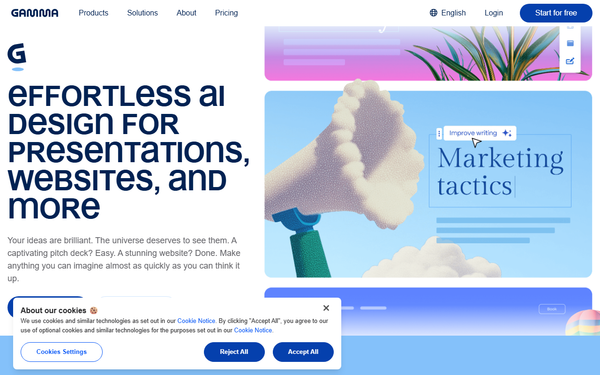
Gamma App (gamma.app) is an AI-powered platform that transforms raw notes, prompts, outlines, or imported text into visually engaging, interactive presentations, documents, websites, social media graphics, and more. It eliminates the "blank page" problem by using advanced AI to handle design, layout, content structuring, and even image generation, allowing users to create polished, on-brand content in minutes rather than hours.
Primary use cases include building client pitches, internal team decks, educational materials, proposals, landing pages, portfolios, and shareable memos or reports. Its card-based, scrollable format supports interactive elements like embedded videos, GIFs, charts, websites, and forms, making it ideal for modern, web-first sharing rather than static slides.
The target audience spans marketers, educators, founders, consultants, content creators, and non-design teams in startups or enterprises who need fast, professional-looking output without design expertise. With nearly 100 million users as of early 2026, it appeals to anyone frustrated by traditional tools like PowerPoint or Google Slides.
Key Features & Capabilities
Core functionality revolves around AI-driven generation: users input a topic, paste notes, or describe an idea, and Gamma produces a complete draft using over 20 AI models. Features include one-click themes (100+ options), brand kit imports for consistent styling, real-time collaboration, built-in analytics for engagement tracking, and seamless publishing as shareable links, websites, or social posts. Embedding supports GIFs, videos, charts, interactive websites, and forms, while exports cover PPT, PDF, PNG, and Google Slides.
Standout differentiators include its "card" system for flexible, mobile-friendly interactive content (unlike rigid slide decks), rapid AI co-creation for editing layouts/text/images, and the recent Gamma Imagine tool (launched March 2026) for brand-specific AI image generation, charts, and infographics. API access enables automation at scale. These make it faster and more modern than competitors like Canva or Beautiful.ai for quick ideation-to-presentation workflows.
Limitations include occasional repetitive or generic AI output, inconsistent image quality (with hallucinations noted in some user tests), and suboptimal PowerPoint exports where layouts, spacing, or vertical card formats break. Advanced design customization is limited compared to dedicated tools, and enterprise-grade brand governance or offline functionality is absent. It is fully cloud-dependent.
User Experience
Gamma boasts an intuitive, low-learning-curve interface with a clean, modern dashboard focused on cards rather than complex timelines or layers. Most users can go from idea to polished output in under 10 minutes, with AI assistance handling heavy lifting via simple prompts or "sparkle" edit buttons.
Interface quality is praised for its speed and visual appeal, though some advanced users note constraints in fine-grained control. Documentation is solid via a comprehensive Help Center covering getting started, editing, AI tools, publishing, billing, and troubleshooting, supplemented by community tips and official guides. Support resources include email/help tickets, but user feedback highlights slow or unresponsive service as a frequent pain point.
Performance & Reliability
Generation is typically lightning-fast, producing full decks or pages in seconds to minutes, with efficient handling of large prompts and real-time collaboration. Analytics and sharing perform reliably for most users.
Common complaints involve platform bugs (e.g., image uploads failing, unexpected feature changes), export glitches, and occasional slowdowns on weaker connections. User reviews on Trustpilot average around 2/5, citing instability, while G2 and Product Hunt scores are higher (around 4+), reflecting praise for core speed but frustration with reliability for mission-critical work. As of April 2026, these issues persist for some despite ongoing updates.
Pricing & Value
Gamma uses a freemium model with clear tiers (prices shown as monthly, with up to 28% savings on annual billing):
- Free: $0 – Limited to simple projects; includes starter AI credits (e.g., ~400 one-time for ~10 decks), up to 10 cards per prompt, basic exports, and Gamma branding.
- Plus: $9/seat/month – Unlimited AI generations, removes branding, advanced image models, and more storage.
- Pro: Higher tier (typically $15–20/seat/month) – Premium AI models, custom branding, detailed analytics, API access, larger decks, and priority features.
- Team/Enterprise (Ultra/Business): Custom pricing for workspaces, admin controls, SSO, higher limits, and dedicated support.
No credit card is required to start. Value is strong for speed-focused users: it saves significant time versus manual design in PowerPoint or even Canva, especially for internal drafts or interactive web content. However, for heavy PPT workflows or teams needing flawless exports, alternatives may offer better ROI despite higher base costs. Free tier suits testing, but paid plans are essential for professional use.
Practical Tutorial
Gamma provides official documentation and video guides; below is a step-by-step walkthrough for a common task—creating a presentation from raw notes (e.g., turning meeting notes into a client pitch deck). This is based on current Help Center instructions as of April 2026.
-
Sign up and access dashboard: Go to gamma.app and create a free account (Google/Email sign-in). Verify email and land on the dashboard.
-
Start a new project: Click "Create New AI." Choose "Presentation" as the type (or Document/Webpage). Select "Paste" mode for raw notes or "Generate" for a topic prompt.
-
Input content: Paste your notes/text or enter a prompt like "Create a sales pitch deck for our new AI tool based on these key points: [paste notes]." Optionally select number of cards, theme style, image type (e.g., realistic), and text density. Click Generate.
-
Review and edit the draft: Gamma produces a card-based deck. Click any card to edit text, rearrange, or delete. Use the sparkle AI icon to rewrite sections, generate new images/layouts, or translate. Add embeds (videos/GIFs/charts) via the insert menu.
-
Customize design and branding: Apply a theme or upload your brand kit (colors, fonts, logo—available on paid plans). Adjust global styles for consistency. Add sections or new cards as needed.
-
Preview, collaborate, and share: Use Present mode for full-screen viewing. Invite teammates for real-time edits. Share via link (with analytics tracking views/engagement) or publish as a website. Export to PPT/PDF if required (note: refine formatting post-export if needed).
-
Iterate and finalize: Use AI co-creation for refinements. For social graphics or variations, duplicate and regenerate specific cards.
For more, see official guide at help.gamma.app or search YouTube for "Gamma App Tutorial 2026" (multiple step-by-step videos available).
Final Verdict
Overall rating: 4.2/5 – Excellent for speed and accessibility, with minor deductions for export limitations and support inconsistencies.
Who should use this tool: Marketers, educators, founders, consultants, and teams seeking rapid creation of beautiful, interactive content from raw ideas or notes—especially for web sharing, internal collaboration, or quick pitches where modern aesthetics trump pixel-perfect traditional slides.
Who should avoid this tool: Professionals or enterprises requiring flawless PowerPoint exports, highly customized designs, offline access, or reliable premium support for high-stakes client deliverables.
Gamma shines as a game-changing AI accelerator for visually compelling storytelling in the AI era—try the free tier if you value speed over perfection.