Glean AI Review: Automate Accounts Payable and Save Costs
Overview & Purpose

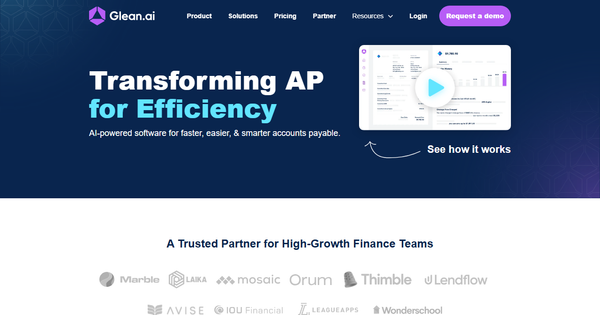
Glean AI is an AI-powered accounts payable (AP) platform designed to transform how high-growth finance teams manage vendor spend. It combines advanced intelligence and automation to simplify invoice processing, provide deep spend visibility, and drive cost savings through data-driven insights. The tool’s primary purpose is to eliminate manual AP tasks while uncovering hidden trends, overspending, and negotiation opportunities, enabling accounting and FP&A teams to collaborate seamlessly on budgeting, forecasting, and vendor management.
Key use cases include automated invoice intake and GL coding, bill approvals and payments (ACH, checks, and international), prepaid amortizations and accruals, duplicate bill detection, anomaly alerts, vendor benchmarking for better deal negotiations, and centralized spend planning with real-time dashboards. It targets high-growth finance teams at small-to-mid-sized businesses (SMBs) and scaling companies that process moderate volumes of invoices and seek more than basic automation—particularly those tired of fragmented tools or manual processes that consume significant team time.
Key Features & Capabilities
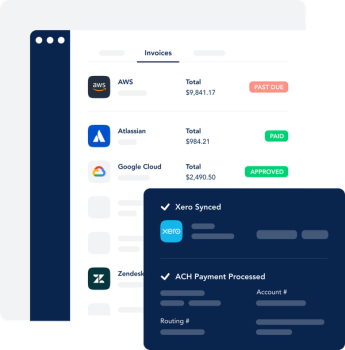
Core functionality revolves around four pillars: intelligence, automation, benchmarking, and collaboration. Intelligence features deliver line-item analysis to surface spend trends, core cost drivers, billing errors, duplicate invoices, and anomalous activity, with proprietary benchmarking data showing how your vendor pricing compares to peers. Automation handles end-to-end AP workflows—no data entry required—including data extraction, GL coding, custom approval routing, payments, accruals, prepaid amortizations, and direct syncing with major GL systems like QuickBooks, Xero, NetSuite, Sage Intacct, and Dynamics.
Benchmarking provides actionable vendor pricing comparisons to support negotiations, while collaboration tools offer unlimited users, mobile access, shared budgeting/forecasting, flux analysis, renewal alerts, and one-click spend reports. Standout differentiators include its focus on strategic intelligence (beyond simple automation) and automated financial close tasks like amortizations and accruals, which many competitors lack at this depth. Unlimited users at no extra cost and payments that are largely fee-free (except a low-percentage transaction option on the free tier) further set it apart.
Limitations include volume-based pricing that may require upgrading quickly for higher invoice counts, absence of credit card program integration (limiting full spend consolidation), and no SSO support noted in some reviews. It may not suit enterprises with extremely high volumes or complex multi-entity needs without custom pricing.
User Experience
Glean AI earns consistently high marks for ease of use and a gentle learning curve. Users report being up and running in minutes by forwarding invoices to a dedicated Glean email, connecting GL and bank accounts, and mapping vendors—far simpler than traditional AP tools. The interface is described as clean, intuitive, and modern, with mobile support for on-the-go approvals and spend checks, making it accessible even for non-accounting stakeholders.
Documentation is straightforward with clear onboarding guidance, and support stands out as responsive and “high-touch,” with personalized help and fast feature feedback implementation. No steep training is typically required, and the platform’s focus on reducing manual work contributes to quick adoption. Minor friction points mentioned include initial GL integration setup for some users and the lack of SSO.
Performance & Reliability
Performance is a strong suit: automation reliably extracts rich invoice data, syncs seamlessly with GLs, and processes approvals/payments with minimal errors, often reducing AP workload from 20+ hours per week (and multiple team members) to under 5 hours for a single user. Real-time insights, alerts, and flux analyses perform efficiently, with users praising speed and accuracy for month-end close tasks.
Known issues are limited; reviews from 2023–2026 show no widespread reliability complaints. Occasional notes on foreign currency handling or very complex multi-account scenarios exist, but the responsive support team mitigates these quickly. Overall, the platform is viewed as stable and effective for its target scale, with automatic tier upgrades preventing overage surprises.
Pricing & Value
Glean AI uses volume-based pricing with no per-user fees (unlimited users included). The Basic plan starts at $295 per month (billed annually) for up to 35 invoices per month. The Pro plan is custom-priced for higher volumes. A free option exists with $10 + 0.20% per transaction fees (ACH/checks and international payments otherwise free). Add-ons include $50 per additional entity and $1.50 per historical invoice. There are no overage fees—customers auto-upgrade after two consecutive high-volume months.
Value is excellent for teams seeking ROI through time and cost savings: users frequently report 50% FTE reductions, caught billing errors, and negotiated savings via benchmarking that outweigh subscription costs. Compared to alternatives like BILL or basic AP tools, Glean offers deeper intelligence and automation at a competitive price—often cheaper than hiring a dedicated AP clerk. It shines for growing teams needing insights beyond transaction processing.
Practical Tutorial
Glean AI provides official video demos demonstrating core workflows (see https://www.glean.ai/videodemo and https://www.glean.ai/automateap-seevideodemo). Below is a step-by-step walkthrough for a common task—setting up automated invoice processing and approving your first bill—based on official getting-started guidance and user-reported flows. This assumes you have signed up for a Basic or trial plan.
-
Onboard your email inbox: Forward your existing AP email (or create a new one) to the unique Glean.ai inbox provided during setup. All incoming invoices now route automatically to the platform.
-
Connect integrations: In settings, link your General Ledger (e.g., QuickBooks or Xero) and bank account(s). Map default GL codes to vendors for auto-coding.
-
Set up departments and users: Create departments or cost centers and invite unlimited team members (approvers, viewers, etc.) via email—no extra cost.
-
Vendor management: Upload or let AI auto-detect vendors. Map them to GL accounts and enable benchmarking for pricing insights.
-
Process your first invoice: An invoice arrives via email. Glean’s AI extracts line-item data, suggests GL coding, flags duplicates or anomalies, and routes it per your custom approval workflow. Review details (no manual entry needed), add comments, and approve with one click.
-
Pay and close: Once approved, trigger ACH/check/international payment directly. The system auto-books accruals or amortizations and syncs to your GL. Monitor in real-time via dashboards or mobile app.
-
Gain insights: After payment, drill into spend analytics, run flux analysis, or request a benchmarking consultation for vendor negotiations.
For visual guidance, watch the official demos linked above. Users typically complete initial setup in under 30 minutes with support assistance.
Final Verdict
Glean AI earns a strong 4.8/5 rating based on aggregated user feedback from G2 (4.8/5 across 27 reviews) and TrustRadius (9/10). It excels for high-growth finance teams that want intelligent, automated AP combined with strategic spend visibility and benchmarking—delivering measurable time savings, error reduction, and vendor negotiation power.
Teams that should use it include scaling SMBs or mid-market companies processing 30–200+ invoices monthly, especially those frustrated with manual processes or basic tools lacking insights. Avoid it if you rely heavily on credit card spend programs, need SSO out of the box, or operate at massive enterprise invoice volumes without custom engagement.
One-sentence recommendation: Glean AI is a standout choice for finance teams ready to replace tedious AP work with powerful AI intelligence and automation that actually drives cost savings.