Gling Review: The Ultimate AI Video Editor for YouTubers
Overview & Purpose

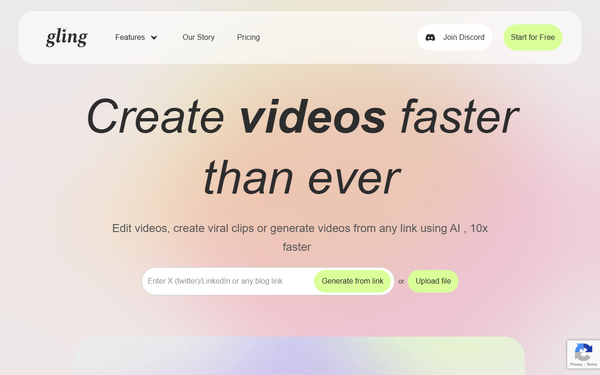
Gling is an AI-powered video editing tool specifically designed to accelerate the post-production process for "talking head" content creators. It automatically transcribes raw footage, analyzes the content, and removes silences, filler words (such as "um" or "uh"), bad takes, and unwanted pauses, delivering a clean rough cut in minutes rather than hours. Primary use cases include editing long-form YouTube videos, creating short-form clips, generating titles and chapters optimized for YouTube SEO, and producing professional exports with AI captions, automated camera zooms, and noise reduction. It also supports generating videos from links using AI prompts (measured in word counts) and voiceover audio files.
The target audience is primarily YouTubers and solo content creators who produce talking-head style videos—think educational, vlog, or review content where the focus is on clear delivery rather than complex visuals or effects. It is not aimed at developers, marketers outside video, or designers working on motion graphics; instead, it serves filmmakers, educators, and influencers who film themselves speaking directly to camera and want to reclaim hours previously spent on manual timeline scrubbing.
Research for this review was conducted as of April 14, 2026, drawing from the official Gling website, recent YouTube reviews, Capterra, and user discussions on platforms like Reddit.
Key Features & Capabilities
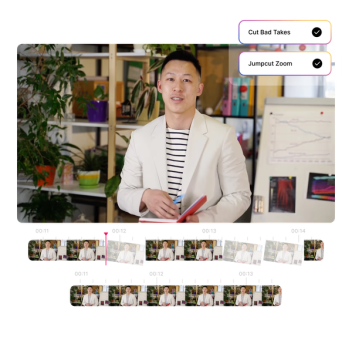
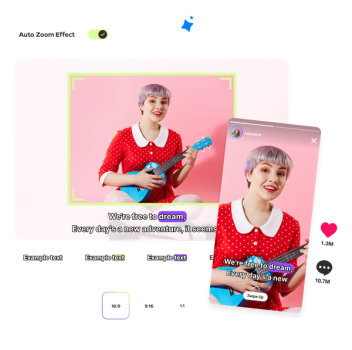
Core functionality revolves around AI-driven transcription and intelligent editing: upload video or audio, let the AI detect and excise imperfections, then refine via a text-based timeline where deleting or adjusting words directly cuts the corresponding video segments. Standout features include seamless integration with professional editors (Final Cut Pro, DaVinci Resolve, Adobe Premiere Pro via XML export), automatic AI captions and subtitles, noise removal, smart zoom-ins/outs for visual engagement, and YouTube-specific optimizations like title and chapter suggestions.
Differentiators from competitors (such as Descript or general AI editors) include its laser focus on talking-head workflows—prioritizing natural pacing and filler removal with high reported accuracy on pauses—plus the ability to generate new video content from links. Exports support MP4, MP3, and SRT files, making it a true "rough cut assistant" rather than a full replacement for creative editing.
Limitations include monthly processing caps (hours of media edited), occasional AI over-editing that removes desired content (requiring manual review), and no advanced creative tools like multi-track mixing or visual effects. It also lacks robust collaboration features for teams beyond the highest-tier plan.
User Experience
Gling boasts a low learning curve, with a simple three-step workflow: upload, AI-process, and refine/export. The interface is text-centric and intuitive—editors work directly on the transcript, seeing real-time video previews, which feels more like document editing than traditional timeline scrubbing. A desktop app is available for Mac and Windows, with cloud processing handling the heavy lifting.
Users consistently describe it as "magic" for beginners and pros alike, with minimal documentation needed beyond in-app guidance and abundant YouTube tutorials. Support resources include responsive customer service (noted positively even by dissatisfied users) and a clean dashboard for tracking usage. Interface quality earns praise for speed and simplicity, though some note minor glitches in early versions (improved by 2026 per recent reviews).
Performance & Reliability
Processing is fast—most videos are analyzed and cleaned in minutes, with creators reporting 5-10x speed gains over manual editing. AI accuracy for silences and fillers is highlighted in testimonials from large YouTubers (e.g., Shelby Church, DamiLee), who call it "surprisingly accurate."
Common complaints from users include occasional export issues like framerate drops causing jitter, subtle voice audio artifacts after enhancement, or pacing mismatches that require tweaks. AI sometimes cuts wanted segments, necessitating a quick review pass. Reliability is generally high for the target use case, with few widespread outages reported, though heavy users may hit plan limits quickly.

Pricing & Value
Gling uses a freemium model with clear usage-based tiers (billed monthly or annually at ~50% discount):
- Free: 1 hour of AI-edited media per month; unlimited exports with watermark.
- Plus: $20/month ($10/month annually) for 10 hours of media (or 300 words of link-generated video).
- Pro: $40/month ($20/month annually) for 30 hours (or 900 words) + priority support.
- Elite: $100/month ($50/month annually) for advanced high-volume needs.
Overage charges apply beyond limits (~$2 per extra hour). No long-term contracts or hidden fees.
Value is strong for consistent YouTubers: the annual Plus plan effectively costs pennies per minute of processed footage while saving dozens of editing hours. It outperforms general editors for its niche but may feel pricey for casual or low-volume creators compared to fully manual free tools. Compared to Descript, Gling offers better specialization and lower entry cost for pure cleanup tasks.
Practical Tutorial
While Gling does not host official in-app video tutorials on its site, numerous high-quality walkthroughs exist on YouTube (search "Gling AI tutorial 2026"). Below is a step-by-step guide for the most common task—creating a clean rough cut from raw talking-head footage—based on verified user demonstrations and official workflow:
-
Sign up and install: Go to gling.ai, create a free account, and download the desktop app (Mac/Windows). Log in and connect your YouTube account if desired for SEO features.
-
Upload raw footage: Drag and drop your unedited video or audio file (MP4 recommended). Select options for filler word removal and pacing if prompted.
-
Let AI process: The tool transcribes automatically, analyzes for bad takes/silences, and generates an initial cut. Processing time is typically 1-5 minutes depending on length.
-
Review and refine: Open the text timeline. Read through the transcript—delete unwanted sentences/words to instantly trim video. Adjust pacing sliders if the voice sounds off. Add AI captions or auto-zooms via one-click tools. Preview segments in real time.
-
Enhance and optimize: Enable noise removal, generate title/chapter suggestions, or create short clips. For voiceovers, upload separate audio files.
-
Export: Download as MP4 with embedded captions, MP3 audio, or SRT file. For pro editing, export XML to Premiere Pro, Final Cut, or DaVinci Resolve. Remove watermark on paid plans.
Example: A 30-minute raw interview can be reduced to a polished 20-minute video in under 15 minutes of hands-on time. For visual guidance, see recent tutorials such as "Gling AI Tutorial For Beginners" on YouTube.
Final Verdict
Overall rating: 4.5/5 — Excellent for its specialized purpose but not flawless due to occasional AI quirks and usage caps.
Who should use this tool: YouTubers and talking-head creators who film frequent long-form content and want to eliminate the most tedious part of editing (cutting silences and mistakes) to focus on storytelling and growth.
Who should avoid this tool: Beginners with very low volume (under 1 hour/month), creators needing full creative control or complex multi-camera edits, or those sensitive to subscription limits and minor export bugs.
One-sentence recommendation: If you make talking-head YouTube videos and dread manual cuts, Gling is a must-try time-saver that delivers professional results with minimal effort.