Goveagle Review: Automate Federal RFP Responses with AI
Research conducted as of March 2026.
Overview & Purpose

GovEagle is an AI-powered proposal automation platform purpose-built for government contractors. It leverages proprietary fine-tuned generative models and agentic workflows to automatically “shred” RFPs, generate compliance and capability matrices, create annotated outlines, and produce compliant narrative drafts in the user’s own voice, style, and existing Microsoft Word template. It also surfaces relevant past performance, resumes, graphics, and snippets from the organization’s knowledge base via secure knowledge management.
Primary use cases include full RFP/RFI response cycles (from bid/no-bid analysis through pink-team drafts), rapid gap identification for pursuit decisions, amendment tracking, compliance reviews, and institutional knowledge capture. By turning what traditionally takes 60 hours into roughly 60 minutes for an initial compliant draft, the platform enables teams to pursue more opportunities without sacrificing quality or compliance.
The target audience is proposal managers, business-development (BD) teams, capture managers, and subject-matter experts at mid-to-large federal contractors—particularly in IT services, defense, consulting, and engineering firms that respond to 15+ federal solicitations per year. It is not designed for general developers, marketers, designers, or commercial-only organizations.
Key Features & Capabilities
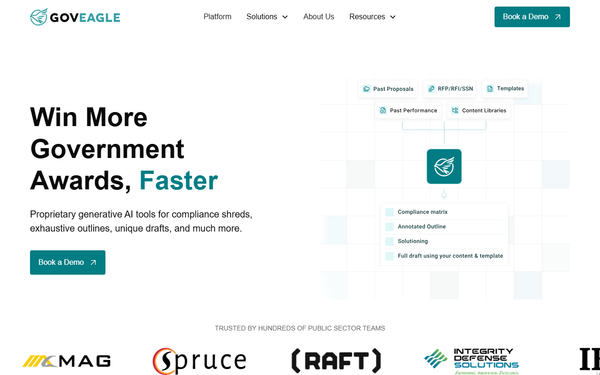
Core functionality revolves around an end-to-end RFP workflow: upload a solicitation, and the platform instantly produces an Excel compliance matrix (extracting every requirement from Sections L, M, and C), a capability matrix that maps past performance evidence to task objectives, an annotated Microsoft Word outline pre-populated with relevant past content, and fully drafted narrative sections grounded in the user’s library. Agentic AI handles multi-step reasoning, amendment redrafts, gap analysis, and built-in color-team compliance checks.
Standout features that differentiate GovEagle include native Microsoft Office add-ins (Word, Excel, PowerPoint) that work directly inside existing templates with tracked changes and comments preserved; deep integration with SharePoint and CRMs such as Salesforce; FedRAMP Moderate Equivalent infrastructure with NIST 800-53/171 and CUI support; zero data retention or model training on customer content; automatic prompt expansion (no prompt engineering required); and hallucination protection through explicit citations and grounding to the organization’s own documents. The platform also offers solutioning brainstorming and instant knowledge searches for graphics or snippets.
Limitations and missing features: it is highly specialized for federal government contracting and less optimal for purely commercial RFPs or non-GovCon workflows. It relies on the quality and volume of an organization’s existing past-performance library for best results. No public free tier exists, advanced graphics generation is secondary, and while it supports amendment tracking, it does not replace full proposal-management suites for extremely large multi-volume submissions. Human review for win themes and strategic nuance remains essential.
User Experience
GovEagle earns high marks for ease of use and a minimal learning curve. Because it lives inside familiar Microsoft Office tools via native add-ins and requires no data migration or process changes, most teams report being fully operational within one week. Users consistently praise the “just works” nature—no prompt engineering, no rigid schemas, and natural adoption even for new team members.
The interface quality is clean and context-aware: the Word add-in surfaces AI assistance directly in the document, while Excel handles matrices and SharePoint keeps everything version-controlled. Documentation consists of in-app guidance, a helpful blog with workflow explanations, and extensive case studies; support resources stand out with hands-on onboarding, dedicated Teams channels, weekly office hours, and rapid response times (often under 30 minutes for issues). Testimonials repeatedly highlight responsive, “world-class” customer support as a key reason for satisfaction.
Performance & Reliability
Performance is consistently described as transformative: case studies report 50%+ reductions in proposal development time, 80% less SME involvement in early stages, 10–20 hours saved per BD employee monthly, and the ability to pursue two additional RFPs per month. One 15-page RFI was fully drafted, reviewed, and finalized in seven hours versus the previous 2–3× longer timeline. Amendment handling and compliance checks run in minutes rather than hours.
Reliability benefits from grounding and citation mechanisms; users note outputs require normal editing but rarely contain hallucinations when the knowledge base is populated. No widespread issues or common complaints appear in public forums or review sites as of March 2026. The platform’s FedRAMP-equivalent security and zero-retention policies give confidence when handling Controlled Unclassified Information (CUI).
Pricing & Value
Pricing is not publicly listed; the platform operates on a custom enterprise subscription model. Interested organizations must book a demo for tailored quotes, which testimonials describe as transparent with no hidden costs or long-term lock-ins. Industry benchmarks for comparable AI proposal tools place annual licensing in the $15K–$60K range depending on team size and features, with pilots and volume discounts often available.
Value proposition is exceptionally strong for qualifying teams. The time savings alone typically deliver ROI within months compared with hiring additional proposal staff or external consultants ($150–$400/hour). Teams report submitting higher-quality proposals, winning new contracts, and scaling volume without proportional headcount growth—advantages that generic tools (ChatGPT, Grok) or commercial RFP libraries (Loopio, Responsive) cannot match due to compliance gaps, security limitations, and lack of GovCon-specific training.
Practical Tutorial
No free public video tutorials are available (the company directs users to book a personalized demo), but the official workflow is clearly documented in their February 2026 comparison blog and case studies. Below is a realistic step-by-step walkthrough for the most common task—turning an uploaded RFP into a compliant pink-team draft—based directly on the platform’s described process and verified customer implementations.
-
Onboard and connect your knowledge base – After signing up (via demo or sales), link your SharePoint library and CRM. Upload past proposals, past-performance write-ups, resumes, and graphics once; the system automatically indexes them with no manual tagging required.
-
Upload the RFP – In the Word or web interface, upload the full solicitation (PDF/Word) or paste a link to SharePoint. The AI immediately begins analysis.
-
Generate the Compliance Matrix – Click “Create Compliance Matrix.” GovEagle produces a fully populated Excel file extracting every instruction, evaluation criterion, and task-area objective from Sections L, M, and C, with line-by-line mapping and cross-references. (Real example: for a GWAC IT services RFP, it extracted 180+ discrete requirements in under two minutes.)
-
Run the Capability & Gap Analysis – The platform cross-references the RFP against your past performance and creates a color-coded capability matrix showing alignment strength and any gaps for bid/no-bid decisions.
-
Create the Annotated Outline – One click exports an annotated Microsoft Word outline directly into your company template. Each section header includes embedded instructions, evaluation criteria, and suggested content pulls from your library.
-
Generate Narrative Drafts – Using the Word add-in, highlight a section and click “Generate Draft.” The AI produces compliant, compelling prose in your exact voice and style, complete with inline citations to source documents. Continue section-by-section or generate the full pink-team draft at once.
-
Review, edit, and iterate – Use built-in compliance checker and knowledge-search sidebar to verify facts, insert graphics, or pull additional snippets. When amendments arrive, re-upload and the platform automatically updates matrices and redrafts affected sections.
-
Export and collaborate – Finalize in Word with tracked changes; SharePoint sync keeps everything version-controlled for team review.
For hands-on practice, book a demo at https://www.goveagle.com/—the company typically provides a sandbox with sample RFPs during onboarding. Customers in case studies (e.g., Precise Software) report moving from research to final draft in hours rather than days.
Final Verdict
Overall rating: 4.5 out of 5
GovEagle is an outstanding choice for mid-to-large government contractors that regularly respond to federal RFPs and need to scale proposal volume while maintaining compliance and quality. Teams with solid past-performance libraries, CUI-handling requirements, and existing Microsoft/SharePoint workflows will see immediate 40–50% time savings and the ability to pursue more awards.
Avoid it if you are a very small team handling fewer than 10 proposals per year, operate exclusively in commercial markets, or prefer fully transparent public pricing and a free tier—traditional tools or manual processes may still be simpler.
One-sentence recommendation: Government contractors serious about winning more federal awards faster should book a GovEagle demo today—it delivers the secure, GovCon-specific automation that generic AI tools simply cannot match.