GPT Researcher Review: The Ultimate Free AI Research Agent
Overview & Purpose

GPT Researcher is an open-source autonomous AI agent that conducts deep, comprehensive research on any topic by leveraging multiple large language models (LLMs) and web (or local) data sources. It automates the full research pipeline: generating targeted questions, scraping and crawling dynamic web content (including JavaScript-enabled pages), summarizing relevant information, filtering for bias and relevance, aggregating insights from 20+ sources, and producing detailed, citation-rich reports exceeding 2,000 words. Reports can be exported to PDF, Word, Markdown, JSON, or CSV formats, with optional inline AI-generated images for visual enhancement.
Primary use cases include market analysis, stock research, competitive intelligence, academic overviews, travel planning, medical studies, talent recruitment, and trend spotting—reducing research time from hours or days to minutes. It also supports hybrid research combining web sources with local documents (PDF, TXT, CSV, Excel, MD, PPT, DOCX) and integrates with specialized data via the Model Context Protocol (MCP), such as GitHub repositories or databases.
The target audience spans developers (who can integrate it via Python package or APIs into custom workflows), researchers and analysts, marketers, business professionals, startups, and enterprises seeking unbiased, factual automation. Non-technical users can access it through the web interface, while power users benefit from its extensibility for building agent teams.
Key Features & Capabilities
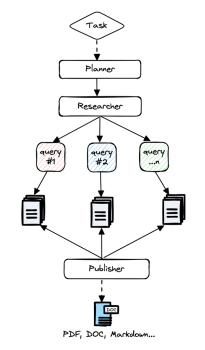
Core functionality revolves around a multi-agent architecture (inspired by Plan-and-Solve and RAG papers) using frameworks like LangGraph and AG2: a planner agent generates research questions and an outline; parallel execution agents crawl, scrape, and summarize sources; and a publisher agent aggregates, filters, and formats the final report with tracked citations. It supports any OpenAI-compatible LLM (including local models via custom base URLs), multiple retrievers (Tavily default, Google, Bing, DuckDuckGo), and deep recursive exploration mode for tree-like depth.
Standout features that differentiate it from competitors include:
- Hybrid web + local research with chunking for documents, enabling private/offline data analysis.
- Smart image handling: automatic scraping of relevant visuals plus AI-generated inline images (via Google Gemini).
- Multi-agent collaboration and MCP integration for connecting external tools/databases.
- Observability via LangSmith tracing and full customization (LLMs, sources, outlines, lessons learned).
- Benchmark leadership: Ranked #1 in Carnegie Mellon’s DeepResearchGym (May 2025) for citation quality, report clarity, insightfulness, and coverage—outperforming Perplexity, OpenAI Deep Research, and others.
Limitations and missing features: It requires API keys (OpenAI + search provider like Tavily), incurring per-report costs (~$0.1–0.4). Setup involves technical steps for full functionality, and while multi-source aggregation reduces hallucinations and bias, users must still validate outputs for critical use (official disclaimer notes it is not a substitute for formal academic validation). No built-in hosted SaaS version—purely self-hosted—and advanced features like image generation need extra keys. Local-only mode lacks web depth without internet.
User Experience
Installation is straightforward for developers: clone the repo, add API keys to a .env file, pip install dependencies, and run via uvicorn or Docker Compose for the full stack (backend + Next.js frontend). The web interface (accessible at localhost:3000) is clean and modern—featuring real-time progress tracking, query input, customizable settings, interactive report viewing, and one-click exports. It feels polished and production-ready, with a lightweight static HTML/JS alternative for simplicity.
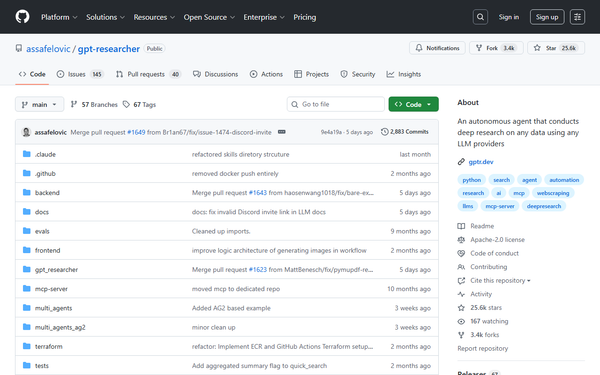
Learning curve is low for basic web usage (minutes after Docker setup) but moderate for custom Python integration or MCP configurations. Documentation is excellent—comprehensive, well-structured guides at docs.gptr.dev cover everything from quickstarts to advanced multi-agent setups, image generation, and deep research. Community support includes an active Discord, GitHub issues/PRs (206 contributors, frequent updates), and email. No major usability complaints surfaced in recent reviews; users praise the intuitive flow and transparency.
Performance & Reliability
Research runs complete in 3–5 minutes for standard tasks and slightly longer for deep recursive mode, thanks to parallel agent execution and efficient LLM usage (e.g., cheaper models for summarization). It reliably aggregates diverse sources for objectivity, with strong citation tracking that has been academically validated. Real-time observability helps debug issues quickly.
Known issues are minor and infrequent: occasional logging setup quirks for custom apps, dependency conflicts in older Python environments, or higher costs with verbose deep mode. Community feedback (Reddit, Medium, GitHub) highlights high reliability compared to single-shot chatbots, with no widespread complaints about crashes or bias in 2025–2026 reviews. Active development (latest release v3.4.3 as of March 13, 2026; commits as recent as March 14) keeps it stable.
Pricing & Value
Fully free and open-source under Apache 2.0 license—no tiers, subscriptions, or enterprise plans for the core tool. Costs are limited to usage-based API fees: OpenAI (or compatible) for LLMs plus Tavily/Google for search (~$0.1 standard report, ~$0.4 for deep mode). Docker and PIP installs incur zero additional fees.
Value proposition is outstanding for cost-conscious users: self-hosted control, unlimited runs, full customization, and benchmark superiority make it far more economical than proprietary alternatives (Perplexity Pro ~$20/month, ChatGPT Plus/Team with Deep Research limits, or enterprise tools). Developers gain extensibility absent in closed platforms, while the open nature enables local/offline tweaks and community contributions. It excels as a free, powerful alternative for heavy research needs.
Practical Tutorial
Official documentation provides detailed guides (https://docs.gptr.dev/docs/gpt-researcher/getting-started). Below is a step-by-step walkthrough for the easiest common task: generating a web report via the production-ready web interface using Docker (tested as of March 2026).
-
Prerequisites: Install Docker and Docker Compose. Obtain free API keys: OpenAI (for GPT-4o or compatible) and Tavily (search; sign up at tavily.com).
-
Setup:
- Clone the repo:
git clone https://github.com/assafelovic/gpt-researcher.git && cd gpt-researcher - Copy
.env.exampleto.envand fill keys:OPENAI_API_KEY=your_key TAVILY_API_KEY=your_key IMAGE_GENERATION_ENABLED=true # Optional for visuals - (Optional) Add
GOOGLE_API_KEYfor Gemini image gen.
- Clone the repo:
-
Launch:
- Run:
docker-compose up --build - Backend starts at http://localhost:8000; frontend at http://localhost:3000.
- Run:
-
Run Research (example query: "Impact of AI agents on productivity in 2026"):
- Open http://localhost:3000 in your browser.
- Enter the query in the search bar.
- (Optional) Select "Deep Research" mode, add focus areas (e.g., "enterprise use cases"), or upload local docs for hybrid mode.
- Click "Research" and watch real-time progress (planner questions, crawling, summarization).
- Review the generated report (2K+ words with citations and images if enabled).
- Export to PDF/Word/Markdown with one click.
-
CLI Alternative (for developers):
from gpt_researcher import GPTResearcher
import asyncio

async def main():
   researcher = GPTResearcher(query="Impact of AI agents on productivity in 2026", report_source="web")
   await researcher.conduct_research()
   report = await researcher.write_report()
   print(report)

asyncio.run(main())
This produces a professional report in under 5 minutes. For advanced customization (e.g., MCP GitHub integration), refer to the docs multi-agent section.
Final Verdict
Overall rating: 9/10. This tool shines for developers, researchers, marketers, analysts, and businesses needing customizable, unbiased, citation-rich reports without vendor lock-in—delivering enterprise-grade depth at zero software cost.
Avoid it if you prefer zero-setup SaaS (opt for Perplexity or ChatGPT Deep Research instead) or lack basic technical comfort for API keys/Docker, as the self-hosted nature adds a small upfront hurdle.
One-sentence recommendation: If you value open-source control, hybrid research, and benchmark-topping performance for in-depth analysis, install GPT Researcher today—it's the most powerful free autonomous research agent available.