Grain AI Review: The Best AI Meeting Recorder for Sales Teams
Overview & Purpose

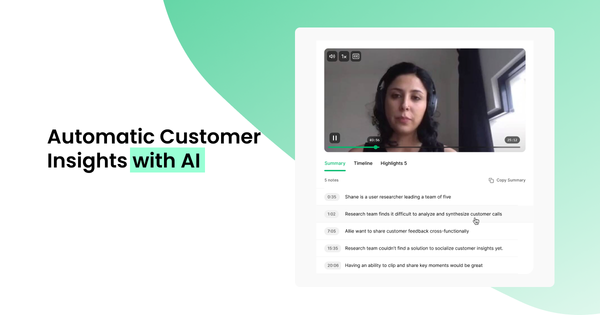
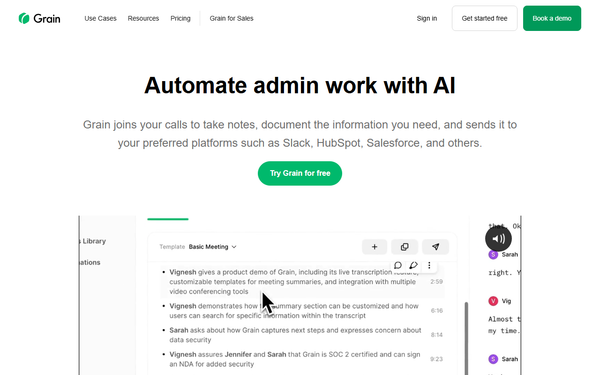
Grain AI is an AI-powered meeting recorder and notetaker designed specifically to help customer-facing teams capture, organize, and share insights from video calls. It automatically joins or records meetings (via desktop capture or bot), generates accurate transcripts, creates customized AI summaries, highlights key moments, and turns conversations into shareable video clips. The tool automates post-meeting admin work—such as sending notes to Slack, HubSpot, or Salesforce—allowing users to focus on the conversation itself rather than note-taking or data entry.
Primary use cases include sales discovery calls, customer success check-ins, user research interviews, product feedback sessions, and team knowledge sharing. It excels at transforming raw meeting recordings into structured, searchable insights that can be quickly socialized across organizations to inform decisions.
The target audience is primarily customer-focused roles such as sales leaders, account executives, customer success managers, user experience researchers, product managers, and founders at growing companies. It is particularly well-suited for teams that need to advocate for customer needs internally and scale insight-sharing without manual effort. Over 100K sales leaders and researchers reportedly use it.
Key Features & Capabilities
Core functionality revolves around seamless meeting capture, AI-driven transcription and summarization, and insight distribution. Grain records meetings on Zoom, Google Meet, or Microsoft Teams, produces speaker-identified transcripts, and applies customizable note templates to structure outputs exactly as teams prefer. Standout AI features include prompt-based querying (essentially “ChatGPT for your meetings”) to ask questions across transcripts and generate answers, automatic key-moment highlighting with AI summaries, and one-click creation of timestamped video clips for sharing.
Differentiators include its emphasis on video clips and shareable highlights (rare among competitors), highly customizable note templates, a searchable knowledge library of past meetings, and deep workflow automation that pushes data directly into CRMs without manual copying. Unlike pure transcription tools, Grain focuses on turning meetings into collaborative assets that live in a team workspace. Desktop recording options help avoid visible bots in some scenarios, creating a more natural experience for external participants.
Limitations include occasional AI inaccuracies with heavy accents, jargon, or crosstalk (common to the category but noted by users); a smaller integration ecosystem than enterprise-heavy competitors like Gong; limited deeper conversation analytics or coaching dashboards; and no native mobile app for in-person recordings. The free tier restricts advanced features and meeting lengths, pushing most teams toward paid plans for full value. Some users report minor recording or integration hiccups.
User Experience
Grain earns consistently high marks for ease of use and a low learning curve. Setup involves connecting a calendar and toggling recording preferences—most users are productive within minutes. The interface features a clean, collaborative workspace with intuitive transcript navigation, live highlighting during calls, and one-click actions for clips, summaries, and shares. Reviewers describe it as “very easy to use” and “intuitive,” with fast loading and responsive design.
Documentation includes an official support center, blog tutorials, and community resources. Third-party YouTube walkthroughs and official guides cover onboarding and advanced workflows. Customer support is responsive according to reviews, with priority options on higher plans. Overall, the experience prioritizes speed and minimal friction, making it accessible even for non-technical team members.

Performance & Reliability
Transcription speed is fast, with accurate speaker identification and near-real-time summaries in good audio conditions. Users report significant time savings—up to 25 minutes per sales call—through automated CRM logging and note structuring. Reliability is strong for virtual meetings, with low failure rates in recent testing (under 1% in one long-term review).
Common complaints center on occasional recording failures (calendar sync issues), AI phrase recognition misses with accents or noisy environments, and rare integration glitches with certain CRMs or tools like Productboard. Accuracy typically reaches 90-95% in clear conditions but drops in challenging audio scenarios. No widespread outages or major reliability crises were noted in 2025–2026 reviews; most users find it dependable for daily customer calls.
Pricing & Value
Grain offers a tiered, per-seat subscription model with a usable free plan:
- Free: $0 – unlimited meetings (45-minute limit per call), basic transcription and limited AI summaries, collaborative workspace. Suitable for light individual use or trials.
- Starter: $15 per seat/month (billed annually; $19 monthly) – unlimited recordings, advanced AI notes, custom prompts, shareable clips, basic CRM sync. Targeted at product, design, and research teams.
- Business: $29 per seat/month (billed annually; $39 monthly) – everything in Starter plus deeper CRM rules, analytics, team coaching features, custom branding, and priority support. Aimed at sales and customer success.
- Enterprise: Custom pricing – advanced security, dedicated support, and tailored workflows.
Value is strong for teams that leverage video clips and CRM automation; the ability to socialize insights quickly justifies the cost compared to manual processes or less feature-rich alternatives. It is more affordable than high-end revenue intelligence platforms like Gong but pricier than basic transcription tools for very small teams. The two-week trial and free tier lower the barrier to entry.
Practical Tutorial
Grain provides official guidance and community resources for getting started. Here is a step-by-step walkthrough for a common task—recording a customer interview, generating a customized summary, creating a highlight clip, and sharing insights via Slack and email (based on official blog and user guides as of April 2026).
-
Sign up and set up: Create a free account at grain.com. Connect your Google/Outlook calendar and grant permissions for Zoom/Google Meet/Teams. Toggle auto-record for selected meetings or choose manual recording via the desktop app.
-
Record the meeting: For an upcoming call, enable recording in the “Today” view. During the meeting, Grain joins (or records locally from desktop). Use the live notepad to tag moments or type notes in real time if desired.
-
Review and generate summary: After the call ends, open the recording in your Grain workspace. Grain automatically transcribes and generates an AI summary. Select or create a custom template (e.g., “SPICED sales notes” or “User Research Insights”) to structure key points, decisions, action items, and quotes.
-
Create highlight clips and query with AI: Highlight transcript sections of interest. Click to generate AI-summarized clips with timestamps. Use the “Ask” prompt feature (e.g., “What were the top three pain points mentioned?”) to pull insights across this meeting or your entire library.
-
Share and automate: One-click copy notes (including timestamps and video links), draft a follow-up email, or send automated recaps to participants. Enable Slack or HubSpot integration in settings to push notes and clips automatically. Export or share clips directly for internal alignment.
For visual demos, official YouTube videos and the Grain blog offer additional walkthroughs. Practice with the free tier to test custom templates before scaling.
Final Verdict
Grain AI earns a strong 4.6 out of 5 rating based on aggregated user feedback from G2, Product Hunt, and independent reviews as of April 2026. It shines for teams that value shareable video insights and customized, automated workflows over raw transcription volume or heavy analytics.
Teams in sales, customer success, user research, and product management who regularly run customer calls and need to socialize insights quickly should use Grain—its clip creation, templates, and CRM automation deliver measurable time savings and better cross-team alignment. Avoid it if you need ultra-deep revenue intelligence, mobile/in-person recording, unlimited free advanced features, or the absolute cheapest transcription-only tool; competitors like Fireflies or Otter may better suit pure search-and-archive needs.
Recommendation: Grain AI is an excellent choice for customer-centric teams seeking to turn meetings into actionable, visual knowledge assets—try the free plan to see if its clip-and-share focus fits your workflow.