Greptile Review: The Ultimate AI Agent for Automated Code Reviews
Overview & Purpose
Greptile is an AI-powered code review agent and codebase intelligence platform that automatically analyzes pull requests (PRs) in GitHub and GitLab with complete understanding of your entire repository. It builds a detailed codegraph—a graph of every function, class, file, dependency, and interconnection—to provide context-aware feedback that goes far beyond simple diff analysis. Primary use cases include automated PR reviews to catch bugs, antipatterns, security issues, and style violations; generating PR summaries with confidence scores, file-by-file breakdowns, and Mermaid diagrams; enforcing custom team coding standards; answering questions about the codebase via chat (in PR comments or dedicated interface); generating documentation; debugging; and building custom AI developer tools via its API (e.g., Linear issue creation or Sentry alerting).
It helps engineering teams ship code faster while maintaining quality, with reported reductions in median time-to-merge from 20 hours to 1.8 hours and up to 3x more bugs caught. The target audience is software development teams of all sizes—from startups to enterprises—including individual developers, engineering managers, and CTOs working on large or complex codebases in 30+ languages (strongest support for Python, JavaScript/TypeScript, Go, Java, Rust, C/C++, etc.). Companies like Brex, WorkOS, Browserbase, and PostHog use it to level up code quality and free engineers for higher-level work. Research conducted as of March 11, 2026.
Key Features & Capabilities
Core functionality revolves around the codegraph for holistic codebase understanding. On every PR, Greptile posts an inline-comment summary (with 0-5 confidence score, diagrams, and suggested fixes) plus targeted line comments for logic, syntax, or style issues—all in approximately 3 minutes. Standout features include:
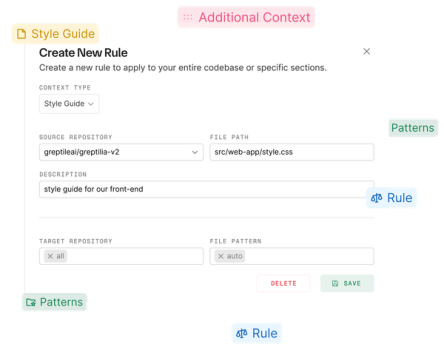
- Custom rules and adaptive learning: Define standards in plain English, Markdown files, or greptile.json; the AI infers preferences from 👍/👎 reactions and replies, improving signal-to-noise after 2-3 weeks.
- Conversational chat: Reply to comments with @greptileai for follow-ups, explanations, or fixes; separate web chat for general codebase queries.
- Agentic capabilities (v3/v4): Autonomous validation, auto-generated diagrams (sequence, ER, class, flow), docstring generation, and pattern detection for inconsistencies.
- Integrations and extensibility: Native GitHub/GitLab (including Enterprise and self-managed); API for custom workflows; MCP/IDE integration for applying fixes directly; self-hosted deployment (Docker, Kubernetes, air-gapped) with custom LLMs.
- Enterprise extras: SOC 2 Type II compliance, SSO/SAML, audit logs, unlimited repos, and support for GitHub Enterprise Server.
Differentiators from competitors (CodeRabbit, Cursor, GitHub Copilot, Graphite) include true full-codebase context (leading to 82% bug-catch rate in 2025 benchmarks vs. 58% for Cursor and 44% for CodeRabbit) and an independent review agent philosophy—focused purely on validation rather than code generation. It outperforms in cross-file logic bugs and architecture insights.
Limitations include no persistent free tier (only 14-day trial), potential overage costs on high-volume PRs, occasional false positives or noise (especially early on or in edge-case languages), initial indexing delay (1-2 hours for large repos), and heavier focus on PR reviews than real-time IDE assistance. It lacks built-in issue management or debugging beyond chat/API extensibility, though these can be added custom.
User Experience
Setup is exceptionally easy with a true 5-minute quickstart: sign up at greptile.com, install the GitHub or GitLab app, select repositories, and enable reviews—no code changes required. The learning curve is minimal; most teams see their first actionable review immediately after indexing. The interface shines through seamless GitHub/GitLab integration—reviews appear as native PR comments with emoji status indicators (👀 analyzing, 👍 complete), copyable fix suggestions, and one-click @greptileai follow-ups. The dashboard (app.greptile.com) offers clean controls for rules, thresholds, diagram preferences, and team access.
Documentation is comprehensive and developer-friendly, with clear sections on anatomy of reviews, developer essentials, tips/recipes, deployment, and API reference. Support includes responsive team replies (praised in testimonials), enterprise dedicated Slack channels, and self-serve troubleshooting (e.g., retry failed reviews by tagging @greptileai). Minor drawbacks: GitLab setup involves slightly more webhook/token steps, and very large monorepos may require patience during initial graph building. Overall, the experience feels polished, low-friction, and integrated into existing workflows.
Performance & Reliability
Reviews consistently complete in ~3 minutes with high reliability; failures are rare and retryable via simple comment tag. The platform handles massive scale—reviewing billions of lines monthly across 1,000+ teams—with no widespread outage reports. Benchmarks and real-world data show strong efficiency: 4x faster merges, 3x more bugs caught, and superior critical-bug detection (100% in tests vs. lower for peers). The codegraph enables deep insights into dependencies and side effects that shallow tools miss.
Known issues from user feedback include occasional overzealous or context-missed comments (e.g., style nitpicks or suggestions ignoring prior handling), though v4 updates and learning mechanisms have improved signal-to-noise. Some teams report it as "pure noise" initially before training, and a few note it can be overly verbose on trivial PRs. Reliability in air-gapped/self-hosted setups is enterprise-grade with SOC 2 compliance. No major security incidents or downtime complaints surfaced in reviews as of March 2026.
Pricing & Value
Greptile uses a transparent, developer-centric model:
- Cloud Plan: $30 per seat/month, including 50 reviews per seat (unlimited repositories and users). Additional reviews cost $1 each.
- Chat: Fixed monthly subscription (unlimited queries).
- API: Usage-based per request (bulk discounts available).
- Trial: 14 days free (no credit card required).
- Enterprise: Custom pricing with self-hosting, SSO/SAML, GitHub Enterprise Server support, dedicated support, and custom terms; up to 20% discount for annual prepay.
There is no ongoing free tier beyond the trial (though qualifying open-source projects may receive credits). Compared to alternatives like CodeRabbit (often cheaper but shallower context) or Cursor (stronger for generation but weaker on reviews), Greptile delivers superior value for teams prioritizing accuracy and codebase depth—time saved on reviews and bug fixes quickly offsets costs for active engineering teams (less than 10% of users hit overages). The proposition shines for mid-to-large teams: high ROI through productivity gains and quality improvements. Small solo teams or budget-constrained groups may find the usage-based element less predictable.
Practical Tutorial
Official documentation provides excellent guided resources at https://www.greptile.com/docs/introduction and https://www.greptile.com/docs/code-review/first-pr-review. Here is a complete step-by-step walkthrough for the most common task—setting up automated PR reviews and receiving your first feedback (based on current official quickstart as of March 2026). This works for GitHub (easiest) or GitLab.
-
Sign up and install the app — Go to https://www.greptile.com/, create an account (or log in with GitHub/GitLab). Click "Install GitHub App" (or GitLab equivalent) and grant permissions. Select the repositories you want Greptile to index.
-
Configure basic settings — In the dashboard (app.greptile.com), enable the repos. Optionally add custom rules (e.g., "Prefer async/await over promises in new code" or link a .md file). Set review triggers (non-draft PRs only) and comment types (Logic/Syntax/Style). Indexing starts automatically and takes 1-2 hours for typical repos (longer for very large ones).
-
Create or open a test PR — Make a small change in your repo and open a non-draft pull request on a monitored branch. Greptile detects it instantly and shows a 👀 reaction in the PR.
-
Wait for and review the output — After ~3 minutes, Greptile posts:
- A top-level summary comment with plain-English overview, 0-5 confidence score, file-by-file issues list, and auto-generated Mermaid diagram (e.g., sequence for API flows).
- Inline comments on affected lines with suggested code fixes (copy-paste or apply via IDE with MCP). Example summary: "This PR adds user filtering... Confidence: 4/5. Minor issue in edge case handling."
-
Interact and train — Reply with @greptileai "Explain this security flag" for follow-up, or react 👍/👎 to train the model. For custom diagrams, comment "@greptileai generate class diagram." Fix issues directly and merge.
-
Advanced customization (optional) — Upload team standards via greptile.json or dashboard; enable auto-docstring generation; integrate API for issue creation. Test on your real codebase—first reviews improve rapidly with feedback.
This process typically takes under 15 minutes total and delivers immediate value. For video demos or more recipes, see the official docs or Greptile's YouTube channel.
Final Verdict
Overall rating: 4.5/5. Greptile excels for mid-to-large software teams with complex, interconnected codebases who want to accelerate merges, reduce production bugs, and enforce consistent standards without manual review overload—its deep context and adaptive learning provide measurable productivity and quality gains that shallower tools can't match. Avoid it if you're a solo developer or tiny team sensitive to variable costs, prefer zero-noise tools, or work primarily in the IDE rather than PR workflows.
Greptile is a game-changing investment for any engineering organization serious about leveraging AI for better code.