Grug Notes Review: The Ultimate AI-Powered Self-Organizing Wiki

Research as of March 10, 2026
Overview & Purpose

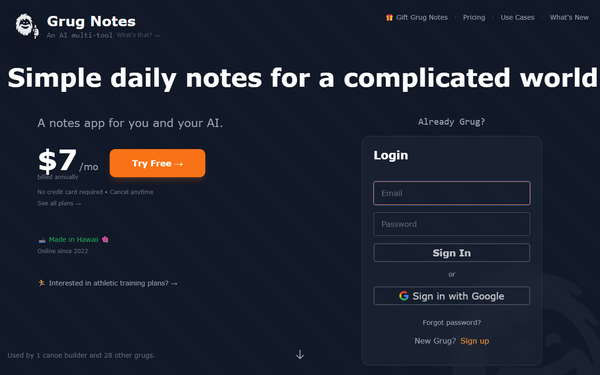
Grug Notes is a web-based, minimalist note-taking application that functions as a self-organizing "wiki for your life." Users dump raw text or voice notes into daily entries, and the system automatically extracts entities (people, companies, dates), creates dedicated pages with backlinks, and enables semantic search via vector embeddings—eliminating the need for folders, tags, or manual organization. It positions itself as "Notion without the productivity theater," focusing on instant capture and AI-assisted retrieval for meetings, brainstorms, personal CRM, goal planning, and daily reflection. Primary use cases include transcribing and summarizing meetings with action items, building athletic training schedules, managing family or client contacts, and turning unstructured ideas into structured plans like meal prep or quarterly goals.
The tool targets practical individuals and small businesses who prioritize simplicity over customization—such as manufacturers (inspired by its origins at canoe-building company Kamanu Composites), athletes, solopreneurs, or anyone overwhelmed by complex apps like Notion or Roam Research. It is less suited for heavy customization needs typical of designers or developers seeking advanced plugins, though HN users appreciated its low-friction appeal.
Key Features & Capabilities
Core functionality revolves around plain-text daily notes that self-organize: mention a name and it auto-generates a contact page pulling in all related conversations, phone numbers, and details. Voice-to-text uses Groq Whisper for accurate multi-speaker transcription, while semantic search powers natural-language queries across your entire history.
Standout features include an affordable "AI multi-tool" bundling access to multiple large language models (Grug Speed for fast replies, Grug for balanced tasks, Grug Oracle powered by Gemini for insights, and Grug Sage via Claude for nuanced reasoning) in one interface for just the subscription price—far cheaper than separate ChatGPT Plus, Gemini Advanced, or Claude Pro subscriptions. Additional differentiators are the Big Brain planning agent for complex tasks, voice editing ("tell Grug what's wrong and it fixes it"), one-click Smart Diff edits with visual before/after comparisons, "2nd Opinion" from alternate models, and external AI control via email or Telegram (Grug can read/add notes or schedule reminders). Export is clean Markdown, and the tech stack (Django + MySQL on Google Cloud Run with HTMX) keeps it lightweight and fast even on slow connections.
Limitations include no native mobile app (PWA via "add to home screen" only), zero offline support or end-to-end encryption (notes are processed by third-party LLMs), no manual folder system or heavy customization, and reliance on internet connectivity. AI non-determinism can occasionally require verification, and the tool is intentionally small-scale for sustainability rather than enterprise features.
User Experience
Grug Notes excels in ease of use with an extremely low learning curve: new users are encouraged to "just dump everything" into daily notes and let the system handle organization—no decisions required. The interface is clean, text-focused, and server-rendered for speed, performing well on mobile browsers and feeling app-like when added to a home screen. Early feedback noted occasional UI density (multiple CTAs on one screen), but the developer addressed launch issues quickly.
Documentation is lightweight but practical: inline philosophy and tech explanations on the homepage, dedicated use-cases pages, a public YouTube playlist with intro and feature videos, and direct AI support via email/Telegram. No extensive traditional help center exists, fitting the minimalist ethos, but onboarding feels intuitive within minutes.
Performance & Reliability
The app delivers on its "lightning fast" claims, with optimized cold starts, responsive semantic search, and quick AI responses even on modest connections. Voice transcription is accurate, and plan generation (e.g., via Big Brain) completes in minutes. Reliability is strong for daily use, with no widespread outages reported as of 2026. Minor scaling hiccups occurred during the 2024 HN launch but were promptly fixed.
Common user feedback highlights consistent search quality and entity extraction; complaints are rare and mostly center on privacy rather than crashes or slowdowns. The indie, non-VC model (capped for sustainability) contributes to focused, bug-free evolution.
Pricing & Value
Grug Notes offers a single straightforward plan at $7 per month when billed annually (or higher monthly equivalent), with a generous free trial providing 30 credits and no credit card required. This includes unlimited notes, full AI access across multiple models, voice features, and Big Brain planning—delivering exceptional value compared to paying $20+ each for individual AI subscriptions or competing tools with similar capabilities.
The proposition shines for cost-conscious users: one subscription replaces several premium services while adding seamless note integration. Compared to free alternatives like Obsidian (local but no built-in multi-LLM or auto-org) or paid Notion, Grug Notes wins on simplicity and AI affordability for its target users. Cancel-anytime flexibility and indie transparency enhance trust.
Practical Tutorial
Official tutorials are available via the site's use-cases section and YouTube playlist (https://www.youtube.com/playlist?list=PL6SwG5rFt2tN11eNNhALmg74_dJVvMWfC). Below is a step-by-step walkthrough for a common task—creating a personalized 20-week athletic training plan (e.g., for paddling or marathon prep)—drawn directly from the official guide at https://grugnotes.com/use-cases/training-plans/. This demonstrates core AI integration in under 10 minutes.
-
Start a new conversation: Open Grug Notes, click the chat button (bottom right), and select a suitable model like Grug (balanced) or Grug Oracle (Gemini-powered). Avoid the Speed model for detailed planning.
-
Provide rich context: Type specifics upfront: experience level, recent training load, available days/times, injuries, family constraints, and success criteria. Example: "25+ years paddling experience but minimal training since 2019. Two days a week available, with a 4-year-old. Prep for Maui to Molokai OC1 race."
-
Trigger Big Brain: Once context is set, instruct: "Turn this discussion into a concrete 20-week calendar for paddling training." The agent summarizes, builds phase-by-phase periodization, creates daily workouts, and verifies consistency.
-
Review and refine: Use "2nd Opinion" (new chat with another model) or ask for adjustments ("Swap CrossFit for more paddle time"). View the calendar layout for peak/rest weeks and print if needed.
-
Apply to notes: Click "Apply All" to integrate workouts into your daily notes. They now appear on your homepage (mobile-friendly) with backlinks and searchable context.
-
Iterate daily: Voice-edit entries or query semantically ("Show my next paddle workout") as you progress.
This process auto-links everything—no manual copying required—and scales to other tasks like meeting summaries or meal plans. For video walkthroughs, start with the official "Grug Notes Intro and Onboarding" on YouTube.
Final Verdict
Grug Notes earns a solid 4.5 out of 5 stars for delivering on its promise of effortless, AI-augmented note-taking without the bloat.
It is ideal for individuals, athletes, small-business owners, and practical professionals (e.g., in manufacturing or hands-on fields) who want a reliable "second brain" that organizes itself and bundles powerful AI tools at an unbeatable price—especially if you value speed, simplicity, and real-world usability over offline access or heavy customization.
Avoid it if you require end-to-end encryption, full offline functionality, native mobile apps, or enterprise-scale features; in those cases, tools like Obsidian or Notion remain better fits.
Grug Notes proves that sometimes the simplest notebook, powered thoughtfully by AI, is all you need to tame a complicated world.