Guidejar Review: Create Interactive AI-Powered Step-by-Step Guides

Overview & Purpose

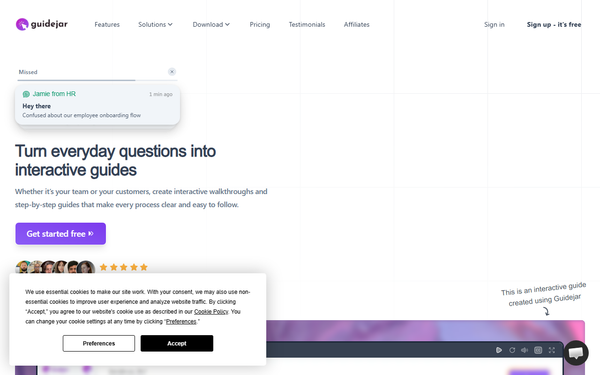
Guidejar is an AI-powered platform that simplifies the creation of interactive step-by-step guides, SOPs, product demos, and walkthroughs. Users install a Chrome extension or desktop app, perform their workflow naturally, and the tool automatically captures every click, input, and screen change in real time to generate an editable, shareable guide. It supports multiple formats including text-based guides, clickable interactive walkthroughs, and video demos with voiceovers.
Primary use cases include building internal wikis and SOPs for teams, streamlining user onboarding and activation for SaaS products, enhancing customer support through self-service help centers, enabling product marketing with feature explanations, and generating lead-capture demos that let prospects explore products interactively. The target audience spans SaaS companies, product and marketing teams, customer support and CS professionals, HR and training departments, agencies, and freelancers—essentially any group that needs to document processes or educate users without spending hours on manual screenshots or video editing. As of March 2026, it serves over 10,000 users worldwide.
Key Features & Capabilities
Core functionality revolves around one-click recording: start capture, walk through any web or desktop process, stop, and instantly receive a professionally formatted guide with screenshots, auto-labeled steps, and interactive elements. The built-in editor lets users refine text (action-oriented descriptions), add blur/redaction for sensitive data, highlights, arrows, pan/zoom effects, hotspots, autoplay, background music, and export options (PDF, HTML/Markdown, MP4 video).
Standout features that differentiate Guidejar from competitors like Scribe or Tango include robust AI capabilities (professional voiceovers, translation into multiple languages, paraphrase, auto-generated FAQs and summaries, video-to-guide conversion, and PII auto-redaction), conditional branching for personalized multi-path experiences, chapters for logical sections, dynamic variables for user-specific personalization, and a complete no-code help center builder with searchable layouts, custom domains, branding, authentication (password/IP/custom/SAML SSO in higher tiers), and embeddable widgets. Additional differentiators are analytics for engagement tracking, feedback forms, team workspaces with role-based access, and integration with ChatGPT via Guidejar MCP for direct guide creation inside the AI chat interface.
Limitations include capped AI credits per seat per month (starting at 5,000 on lower paid plans), desktop app access restricted to Premium Plus tiers, Chrome extension compatibility limited to Chromium-based browsers only, and occasional need for manual step cleanup if the auto-capture mislabels a complex interaction. Advanced embedding customization and simultaneous multi-user collaborative editing are not as deep as in enterprise tools like Whatfix. No native offline editing or mobile recorder exists.

User Experience
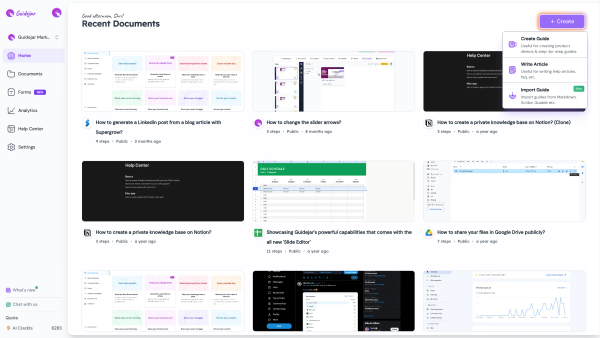
Guidejar boasts an exceptionally low learning curve—most users can go from installation to publishing their first guide in under 10 minutes. The interface is clean, modern, and intuitive: the extension sits quietly in the browser toolbar, the editor uses simple drag-and-drop for help center organization, and previews show exactly how end users will experience the interactive guide. Reviewers consistently highlight the “just do the process and it’s done” simplicity that eliminates the tedium of traditional screen recording or screenshot tools.
Documentation and support resources are strong: the official help center at help.guidejar.com offers categorized guides on everything from Chrome extension usage to custom domain setup and team management, while the company blog provides practical tutorials and best practices. Email support ([email protected]) and in-app feedback receive praise for responsiveness, with users noting the team actively implements suggestions. Minor feedback mentions the editor can feel slightly cluttered when adding advanced branching or multiple AI enhancements, but this does not significantly impact the overall smooth experience.
Performance & Reliability
Capture and auto-generation are fast and efficient, even for moderately complex workflows; most guides are ready for editing within seconds of stopping recording. Editing, AI processing (voiceovers, translations), and publishing happen without noticeable lag on standard hardware. Reliability is high, with the platform handling real-time interaction tracking accurately across web apps. Common minor issues reported include occasional mislabeled steps in dense UIs (requiring quick manual correction) and processing time for very long guides or video exports. AI credit consumption can feel restrictive for heavy daily use on entry-level paid plans. There are no widespread reports of downtime or major bugs as of March 2026; user reviews describe it as “rock-solid” for daily SOP and demo creation, with far fewer maintenance headaches than manual video tools.

Pricing & Value
Guidejar offers a generous free tier limited to 5 guides with basic capture, editing, and sharing. Paid plans start around $12–19 per user per month (billed monthly; annual subscriptions save the equivalent of two months) and unlock unlimited guides, full AI features, custom branding, help center, analytics, and desktop app access. Premium Plus and Team plans (roughly $59–75 for small teams) add higher AI credits, video exports, conditional branching, custom domains, and SAML SSO. Enterprise is custom-priced starting at 20 users with volume discounts, priority support, and advanced security.
Guides remain in your account after cancellation but revert to free-tier functionality. Historical lifetime deals via AppSumo (around $49–$98 one-time) provide an alternative for long-term value. Compared to alternatives, Guidejar delivers superior interactivity, AI depth, and help-center capabilities at a lower per-seat cost for most teams—offering excellent value for anyone replacing Slack threads, lengthy videos, or static docs. The 3-day full refund policy further reduces risk.
Practical Tutorial
Guidejar provides official step-by-step guidance through its blog and help center. Below is a complete walkthrough for a common task—creating an interactive onboarding guide for “How to Add a New Team Member” in an HR tool (adaptable to any process like CRM contact creation or Slack channel setup).
-
Sign up for a free account at guidejar.com (or upgrade for unlimited guides). Install the Chrome extension from the Chrome Web Store or the desktop app (Premium Plus required for non-browser tasks). Pin the extension for easy access.
-
Open your target application (e.g., your HR platform) and click “Create Guide” or “Start Capture” in the Guidejar extension. Plan your workflow mentally first: navigate to team settings, click “Add Member,” fill form fields with sample data, assign roles, and send the invite.
-
Perform the actions naturally—Guidejar records every click, keystroke, and screen in real time. Move the cursor deliberately and pause briefly for page loads to ensure clean captures.
-
When finished, click “Stop Capture.” The platform instantly auto-generates a professional guide with screenshots, numbered steps, and basic labels.
-
In the editor, refine each step: rewrite descriptions to start with strong action verbs (e.g., “Click ‘Add Member’”), merge or split steps, add highlights/arrows, blur any test data, and insert pan/zoom effects for clarity.
-
Enhance with AI: generate a professional voiceover, translate the guide, add chapters for logical sections (e.g., “Prepare Details” vs. “Send Invite”), set conditional branching if paths differ by user role, or include dynamic variables for personalization.
-
Customize branding (logo, colors), preview the fully interactive version (end users can click through exactly as you did), and add feedback forms or analytics tracking.
-
Publish: generate a shareable link, embed the guide on your website/Notion/internal wiki, or add it to your custom Help Center. Track views and completion rates in the dashboard.
This entire process typically takes 5–15 minutes. For more details and visuals, see the official blog tutorial.
Final Verdict
Guidejar earns a strong 4.7 out of 5 overall. It excels for SaaS teams, support departments, marketers, and freelancers who want to replace time-consuming videos or static documentation with engaging, interactive, AI-enhanced guides that improve onboarding, reduce support tickets, and boost engagement. Avoid it if you need unlimited AI usage without credit limits, heavy offline/desktop-only recording, or enterprise-grade simultaneous collaboration beyond basic team roles—simpler free screenshot tools or dedicated video platforms may suffice. Guidejar is a must-try for any team looking to replace clunky videos and static docs with engaging, interactive guides that boost productivity and user satisfaction.