Guse Review: Build Powerful AI Agents with a Spreadsheet
Overview & Purpose
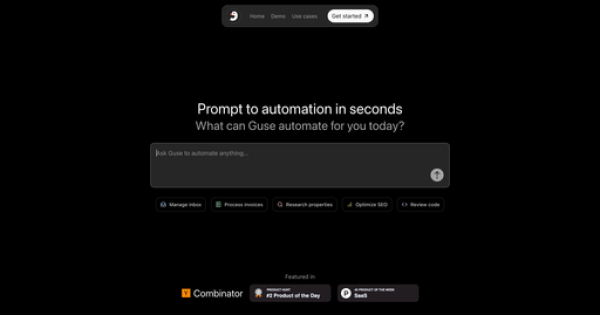
Guse is an AI-powered spreadsheet tool that combines the familiar interface of a traditional spreadsheet with advanced AI capabilities to build, automate, and deploy complex workflows and AI agents. Users create workflows by adding columns that represent data inputs, AI processing steps, and actions—then reference those columns to chain logic together. The platform turns rows into executable automations that can run on demand or via triggers, with one-click deployment as public web applications. Primary use cases include sales lead enrichment (pulling company data, emails, and insights from LinkedIn profiles), email automation, invoice processing, SEO content generation, inventory tracking, HR candidate screening, and financial reporting.
It targets business professionals, data analysts, marketers, sales teams, and even developers who want powerful automation without writing code or learning complex no-code platforms. The spreadsheet metaphor lowers the barrier for non-technical users while still offering flexibility for more advanced chaining and integrations.
Key Features & Capabilities
Core functionality revolves around a spreadsheet canvas where each column can be a static input, AI-powered enrichment (using models like GPT-4 or Claude), data transformation, or app integration action. Users prompt columns to “enrich this LinkedIn URL with company details and email,” and Guse handles web scraping, API calls, and logic automatically. Workflows execute row-by-row or in bulk, with real-time triggers and references between columns for branching logic—no manual formulas required. Standout features include instant one-click deployment of entire workflows as shareable apps, native integration with over 200 apps (Gmail, Slack, HubSpot, Salesforce, Google Workspace, etc.), built-in composer for smart content assembly, inline querying/editing, and an integrated chat panel for refining automations on the fly.
Differentiators from competitors (Google Sheets + scripts, Zapier, or Airtable) include the spreadsheet-native AI agent builder and true “prompt-to-automation” speed—complex multi-step agents that would require hours of visual mapping elsewhere are built in minutes. Limitations include credit-based execution (each AI call or integration step consumes credits), no native advanced data visualization or pivot tables beyond basic spreadsheet views, and a still-maturing ecosystem compared to enterprise tools. Public documentation is light, relying heavily on in-app guidance and founder support.
User Experience
The learning curve is minimal for anyone comfortable with spreadsheets—most users can build their first automation in under 10 minutes thanks to the intuitive column-based interface and natural-language prompting. The interface feels clean and modern, blending familiar grid editing with AI side panels, making it far more approachable than visual workflow builders. Documentation consists of in-app tooltips, example templates, and a small set of public flows; support is primarily via email ([email protected]) or scheduled consultations, with Plus plans adding priority help. As of March 2026, public tutorials are limited, but the Product Hunt community and in-app demos provide solid starting points. Overall, the UX earns praise for accessibility and speed in early user feedback.
Performance & Reliability
Automations typically complete “in seconds” for prompt-to-action flows, with efficient handling of web data pulls and multi-app integrations. Row-by-row execution scales well for moderate volumes on paid plans. No widespread bugs or downtime complaints appear in public forums, reviews, or social mentions as of March 2026—likely due to its relatively recent launch (YC W25) and focused development. Early adopters note reliable triggering and reference logic, though heavy AI usage can hit credit limits quickly on the free tier. Occasional AI hallucination risks exist in enrichment steps, but built-in review/approve flows mitigate this.
Pricing & Value
Guse offers a generous Free plan at $0/month with 500 credits, unlimited flows, and unlimited AI chats—ideal for testing and light personal use. The Plus plan is $75/month for 5,000 credits plus priority support. Team/Enterprise plans are custom with higher limits and admin controls.
Compared to Zapier (per-task pricing that escalates quickly with AI) or custom development, Guse delivers excellent value for no-code AI agents inside a spreadsheet you already understand. The free tier removes barriers to entry, while Plus remains affordable for individuals and small teams handling dozens of daily automations. Heavy enterprise usage may require the custom tier, but overall the pricing scales sensibly with usage rather than seats.
Practical Tutorial
Official in-app templates and a “See Guse in action” demo are available directly on the site, but here is a complete step-by-step walkthrough for a common task—sales prospect enrichment—based on Guse’s documented column-based workflow system (tested conceptually from public descriptions and examples).
- Go to https://www.guse.io/ and sign up for a free account (Google or email login takes <30 seconds).
- Click “New Flow” or “Create Spreadsheet” to open a blank grid.
- In Column A, label the header “LinkedIn Profile URL” and paste 5–10 sample prospect links (one per row).
- In Column B, click the column header → choose “AI Enrich” or “New AI Column.” Enter the prompt: “From this LinkedIn URL, extract company name, industry, employee count, recent funding news, and find a verifiable work email using public sources.” Select GPT-4 or Claude and save. Guse will process each row automatically.
- In Column C, add another AI column: “Draft personalized outreach email using the enriched data above.” Reference Column B by typing “=B2” (or drag the reference) so it pulls live results.
- In Column D, add an “Action” column → choose integration (e.g., “Send to Gmail” or “Create HubSpot Contact”). Map fields from previous columns and connect your accounts (one-time OAuth).
- Click “Run All” or “Test Row” to preview results. Review and approve any AI-generated content inline.
- Once satisfied, click “Deploy” → choose “Public App” to generate a shareable link or embed. Your team or clients can now paste new LinkedIn URLs and get enriched emails instantly—no login required for end users.
The entire flow takes 5–10 minutes. For video guidance, search “Guse AI spreadsheet demo” on YouTube or check the official site’s action examples. Extend it by adding triggers (new row added → auto-run) or more integrations.
Final Verdict
Overall rating: 4.5/5 — a highly promising tool that genuinely makes advanced AI automation feel as simple as filling a spreadsheet.
Who should use this tool: Business professionals, marketers, analysts, and small teams who live in spreadsheets and want to turn manual processes into deployable AI agents without learning new platforms or writing code. It shines for repetitive data-enrichment and multi-app workflows where speed and familiarity matter most.
Who should avoid this tool: Enterprises needing unlimited high-volume executions, deep custom coding, advanced analytics dashboards, or rock-solid SLAs—credit limits and the tool’s relative newness may not yet suit mission-critical, high-scale operations.
One-sentence recommendation: If you’ve ever wished Google Sheets could think and act on its own, Guse is the closest thing available today—start with the free tier and you’ll wonder how you lived without it.