HeyGen Podcast Review: Turn Text and PDFs into AI Video Podcasts
Overview & Purpose
HeyGen Podcast, accessible via the labs feature at https://labs.heygen.com/guest/video-podcast (now integrated into HeyGen's main platform as the AI-Powered Video Podcast tool), is an AI-driven video generator that transforms text, PDFs, website links, or YouTube URLs into professional two-speaker video podcasts featuring realistic talking avatars. It simulates natural conversations between a host and guest avatar, complete with synchronized lip movements, gestures, captions, and customizable visuals, producing ready-to-share video content in minutes without any filming, scripting, or voice acting required.
Primary use cases include creating engaging marketing content, educational explainers, internal training podcasts, newsletter summaries, trend analyses, and branded discussions for platforms like YouTube or LinkedIn. It excels at turning static documents or existing web content into dynamic, conversational video formats that feel like real podcast episodes. The target audience spans marketers, content creators, educators, small business owners, and enterprise teams who need scalable video production—particularly those without video editing skills, budgets for actors, or time for traditional recording. Developers and designers may also leverage it via HeyGen's API for automated workflows, while non-technical users appreciate the no-code interface.
Key Features & Capabilities
Core functionality revolves around AI avatar generation and multi-speaker simulation: users input content (PDF, URL, or script), select two avatars (from 700+ stock options, custom photo uploads, or digital twins), set video parameters like aspect ratio (16:9 or 9:16), duration, language (175+ options), and captions, then generate a full video podcast with back-and-forth dialogue, transitions, and optional visuals or data overlays. Standout differentiators include effortless conversion of existing materials (e.g., a blog PDF becomes a lively host-guest debate), realistic voice cloning with emotion/pitch control, multilingual adaptation from one input, and seamless video output ready for social sharing—capabilities that set it apart from basic text-to-speech tools or single-avatar generators like early competitors.
Additional capabilities tie into HeyGen's ecosystem, such as brand kits for consistent styling, interactive elements (quizzes/links), and integrations with tools like Zapier or n8n for automation. Limitations include beta-stage quirks (occasional dialogue flow inconsistencies or gesture sync issues), maximum video lengths tied to plan (e.g., 3 minutes for Avatar IV in lower tiers), dependency on high-quality input text for best results, and lack of real-time collaboration or advanced audio mixing compared to dedicated podcast software. No native live streaming or full multi-guest support (limited to two speakers) is currently available.
User Experience
The tool offers an intuitive, low-learning-curve interface typical of HeyGen's platform—accessible via the Labs/Apps section after a quick sign-up, with a clean dashboard for uploads and previews. Most users can produce their first podcast in under 10 minutes thanks to guided prompts and one-click generation; the process feels more like filling a form than video editing. Interface quality is modern and responsive, featuring real-time previews, easy avatar customization (upload photos for instant digital twins), and drag-and-drop elements, though beta status occasionally leads to minor loading delays in the editor.
Documentation and support resources are solid: official Help Center articles, community guides with examples, video tutorials on YouTube, and in-app tooltips cover basics thoroughly. Paid plans add priority support and a dedicated success manager for enterprise users. Free-tier users may hit watermarks or limits quickly, but overall, the experience is beginner-friendly while scaling well for pros.
Performance & Reliability
Generation is efficient for short clips (under 5 minutes for most 2,000-word inputs), with fast processing on higher plans and outputs in up to 4K resolution. Avatars deliver highly realistic talking heads, lip-sync, and natural expressions, making videos feel professional and engaging. However, known issues include variable wait times (up to 1-2 hours during peak loads or for complex avatars), occasional unnatural gestures or dialogue pacing in beta outputs, and quality dips if input content is overly formal or poorly structured. User complaints on platforms like G2, Trustpilot, and Reddit commonly cite slower-than-advertised rendering for longer videos and the need for post-generation tweaks, though reliability has improved with ongoing updates. No major outages reported, but credit-based usage (auto-reload on higher plans) prevents surprises.
Pricing & Value
HeyGen uses a tiered subscription model with no separate pricing for the Podcast feature (it's included across plans):
- Free: Up to 3 videos/month (max 3 minutes each, 720p, with watermark)—ideal for testing.
- Creator: $29/month ($24 annual) for unlimited avatar videos up to 30 minutes, voice cloning, 1080p, and full Podcast access.
- Pro: $99/month for faster processing, 4K export, and 10x premium usage.
- Business: $149/month + $20/seat for teams, unlimited 60-minute videos, collaboration tools, and interactive features.
- Enterprise: Custom pricing with unlimited everything, priority support, and advanced security.
Value is strong for high-volume creators: the ability to produce professional podcasts at a fraction of traditional costs (no actors or studios) outperforms alternatives like Synthesia in avatar realism and content ingestion ease, though credit consumption for advanced avatars can add up unexpectedly on lower tiers. Compared to manual production or tools like Descript/Adobe Podcast, it offers superior speed and scalability, making the $29 entry point worthwhile for consistent users.
Practical Tutorial
A common task is turning a PDF (e.g., a blog post or report) into a two-speaker video podcast. Here's a step-by-step walkthrough based on current functionality (as of March 2026; always verify in-app as features evolve):
-
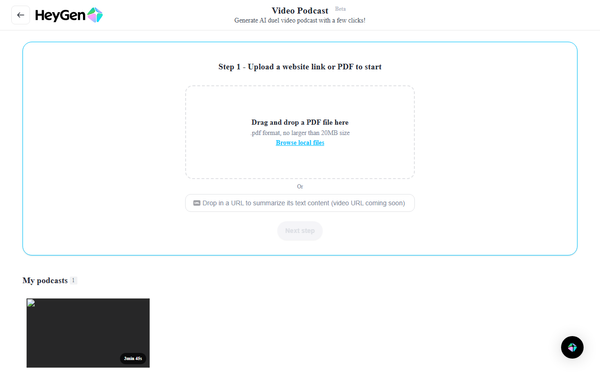
Sign up or log in at heygen.com (free account works for testing; upgrade for full access). Navigate to the Apps or Labs section and select "Video Podcast" (or search for it in the dashboard).
-
Choose your input: Upload a PDF (or paste a YouTube/website link). The AI automatically extracts and converts content into a conversational script—e.g., turning a 1,500-word industry report into a host-guest discussion.
-
Customize avatars and settings: Select two avatars (one as host, one as guest) from stock libraries, upload your own photos for custom digital twins, or generate via text prompt. Adjust voices (clone your own or pick from 175+ languages/accents), set aspect ratio (portrait for social or landscape for YouTube), target duration, caption style, and any background visuals.
-
Review and refine: Preview the generated script/dialogue flow. Tweak emphasis, transitions, or add data overlays if needed. The AI handles natural back-and-forth exchanges automatically.
-
Generate and export: Click "Generate"—processing typically takes 2-10 minutes. Download the MP4 (with or without captions) or export audio-only. For polish, use built-in editor for minor cuts or brand overlays.
Real example: Input a PDF newsletter summary on AI trends; output a 5-minute video with two lifelike avatars debating key points, perfect for LinkedIn sharing. For official guidance, see HeyGen's community resource on newsletters or YouTube demos searching "HeyGen Video Podcast tutorial." Advanced users can integrate via API for batch processing.
Final Verdict
Overall rating: 4.5/5—excellent for speed and realism but docked slightly for beta inconsistencies and generation waits.
This tool is ideal for marketers, educators, and solopreneurs seeking to scale professional video podcast content effortlessly without production overhead. Avoid it if you demand pixel-perfect, real-time collaboration or have ultra-complex multi-speaker needs better served by dedicated studios.
Highly recommended for anyone tired of traditional video workflows—start with the free tier to see the future of content creation in action.