HeyPhoto Review: The Best Free AI Tool for Easy Face Editing

Overview & Purpose
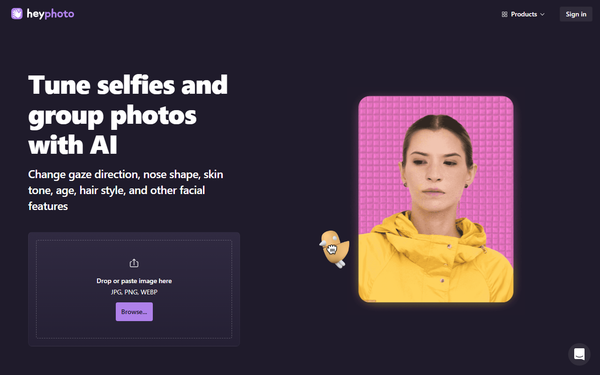
HeyPhoto is an online AI-powered face editing tool that lets users intuitively modify facial features in selfies, group photos, and AI-generated images like those from Midjourney. It uses artificial intelligence to detect faces and apply targeted changes without requiring any editing skills or software expertise. Primary use cases include quick fun adjustments for social media (such as altering expressions or trying new looks), privacy protection via face anonymization (e.g., for dating apps like Tinder), and practical tweaks like fixing gaze direction or age progression in personal photos.
The tool targets casual users, social media enthusiasts, content creators, and anyone needing fast, no-fuss face edits—such as individuals updating profile pictures or experimenting with appearances. While it sits within the broader Icons8 design ecosystem (which includes plugins for drag-and-drop assets into apps like Figma or Photoshop), it is not primarily aimed at professional developers, marketers, or designers seeking enterprise-level batch processing. Instead, it appeals to everyday consumers who want skill-free, web-based results. Research conducted as of April 9, 2026.
Key Features & Capabilities
Core functionality revolves around AI-driven facial modifications on uploaded images (JPG, PNG, or WEBP files up to 5 MB, with faces up to 1024x1024 pixels). Available tools include:
- Changing gaze direction by interactively dragging a bird icon across the screen.
- Adjusting happiness levels or full facial expressions via simple sliders.
- Modifying age to see younger/older versions.
- Altering perceived gender.
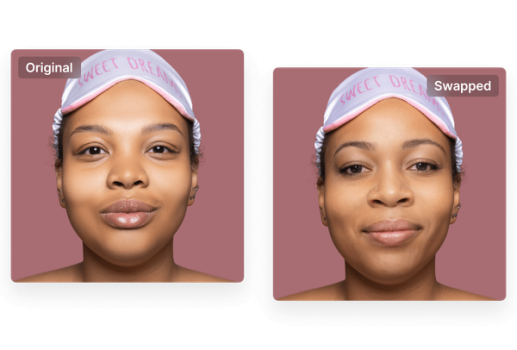
- Anonymizing faces to evade facial recognition systems.
Outputs preserve the original image size and quality. The tool supports group photos with multiple faces and works best with front-facing, high-quality inputs (slight rotations are acceptable).
Standout features that differentiate HeyPhoto include its playful, interactive controls (like the bird-dragging gaze tool) and completely free core access, setting it apart from more polished but subscription-heavy competitors like FaceApp. Integration with the Icons8 ecosystem provides potential drag-and-drop plugin convenience for users already in design workflows. Many advanced options—such as skin tone adjustment, nose reshaping, face reshaping (gain/lose weight), makeup application (eye shadows, lipstick), and new hairstyles—are currently marked as "Soon," indicating the tool is still evolving.
Limitations include file size and resolution caps, dependency on input photo quality, lack of batch editing or advanced multi-face precision controls, and no professional-grade tools like precise masking or history undo. Some results (particularly anonymization) can appear unnatural or inconsistent.
User Experience
HeyPhoto offers an exceptionally low learning curve: simply visit the site, drag and drop or paste an image, select a tool, and apply changes in real time via intuitive sliders or drag interactions—no account or installation required for basic use. The clean, minimal web interface prioritizes speed over complexity, with clear prompts and immediate previews.
Interface quality is straightforward and mobile-friendly in a browser, though it lacks the polish of dedicated desktop apps. Documentation is basic but sufficient, consisting of an on-site FAQ covering how it works, image requirements, privacy (images are stored securely but deletable at any time), and best practices. No extensive user guides or video tutorials are hosted officially, though community YouTube walkthroughs exist. Support is limited to the FAQ, with no live chat or dedicated helpdesk mentioned. Overall, it excels for quick sessions but may frustrate users seeking deeper customization resources.
Performance & Reliability
Processing is generally efficient for simple edits, returning results in seconds while maintaining source quality. However, user feedback on platforms like Product Hunt highlights occasional slow loading or repeated processing delays, especially with larger files or during peak times.
Known issues include variable consistency—edits like anonymization can sometimes produce unnatural-looking faces—and dependency on strong front-facing input photos for optimal AI detection. No major outages or data breaches are widely reported, and privacy handling (secure storage with easy deletion) receives positive notes. As a free tool, reliability is solid for casual use but not enterprise-grade, with some users noting it feels somewhat beta-like due to incomplete feature rollout.
Pricing & Value
HeyPhoto is free to use, with the trade-off of a visible watermark on all downloaded images. There are no prominently advertised paid plans on the official site as of April 2026, though older reviews referenced optional subscriptions (around $19/month or $99/year) for watermark removal, unlimited access, and extended storage (e.g., 60 days). It ties into the broader Icons8 ecosystem, where related design tool subscriptions (starting around $15–24/month) may unlock enhanced features or ad-free experiences.
Value is strong for casual users: zero cost for core functionality, realistic results, and unique interactive tools make it a bargain compared to paid apps like FaceApp or premium AI editors. For light personal or social use, it delivers excellent ROI without commitment. However, professionals or heavy users may find the watermark and feature gaps limiting compared to fully featured alternatives.
Practical Tutorial
No official step-by-step tutorials are provided on the HeyPhoto site, but the process is simple enough to follow directly. Here is a custom walkthrough for a common task—adding a smile or changing facial expression (one of the most popular uses):
- Go to https://hey-photo.com/.
- Drag and drop your photo (or click "Browse..." to select from your device). The AI will automatically detect faces.
- Select the smile/expression tool from the available options (often labeled with a happiness slider or mood selector).
- Use the on-screen slider to adjust the happiness level or choose a specific emotion—changes appear live in the preview.
- (Optional) Fine-tune other available parameters like gaze by dragging the bird icon if needed.
- Once satisfied, click to generate/download the edited image. The result will include a HeyPhoto watermark unless using any premium-linked options.
- Delete the uploaded image from your account history via the site's tools if desired for privacy.
For anonymization: After uploading, select the "Anonymize me" tool and apply it directly. Results are instant but review closely for realism. YouTube tutorials (search "HeyPhoto AI Tutorial") provide visual demos of these exact steps, including gaze changes and age edits. Best results come from well-lit, front-facing portraits under 5 MB.
Final Verdict
HeyPhoto earns a 4.2 out of 5 rating. It shines as a free, fun, and surprisingly effective tool for quick facial tweaks with natural-looking outcomes, making it ideal for casual users, social media posters, or privacy-conscious individuals who want zero-cost experimentation without learning complex software. Content creators or anyone editing selfies/group shots for personal use will appreciate its simplicity and unique interactive features.
Avoid it if you need professional-grade results, batch processing, watermark-free outputs at scale, or fully mature features like advanced makeup and hairstyles—opt instead for more robust paid tools like FaceApp or dedicated design suites. One-sentence recommendation: HeyPhoto is a delightful free entry point into AI face editing for everyday fun and utility, but its limitations keep it from replacing dedicated pro workflows.