Hoop Review: Automate Your Tasks from Meetings and Slack
Overview & Purpose

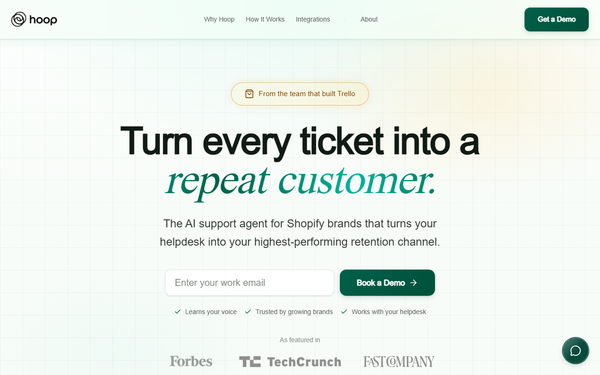
Hoop is an AI-driven task management tool that automatically captures action items and tasks from scattered sources like Google Meet, Zoom meetings, Slack conversations, and emails, then consolidates them into one intelligent, prioritized to-do list complete with transcripts, summaries, and direct context links. Its primary purpose is to eliminate the mental load of manually tracking commitments mentioned in passing during calls or chats, allowing users to focus on execution rather than organization. Common use cases include turning meeting discussions into actionable follow-ups, surfacing buried Slack requests, and maintaining a unified view of personal and team priorities across tools.
The target audience includes busy professionals such as marketers, designers, project managers, developers, and remote workers who juggle multiple communication channels and responsibilities. It particularly appeals to individuals and small-to-medium teams where scattered information across meetings and chats often leads to overlooked tasks or duplicated effort. (Research conducted as of March 2026 based on archived product documentation, Product Hunt launch materials, and third-party reviews from its active task-management phase.)
Key Features & Capabilities
Core functionality revolves around passive AI task extraction: Hoop listens to meetings and scans chats to detect commitments, auto-generates summaries and transcripts, labels tasks as “Important,” suggests due dates, and builds a consolidated Kanban-style board with sections like Incoming, To Do, and Parking Lot. Users can drag-and-drop for triage, activate Focus Mode for distraction-free work on priorities, and track progress with subtasks, dependencies, and alerts.
Standout features that differentiate it from competitors include its truly automated, AI-native capture (no manual forwarding or Zapier required), contextual richness (every task links back to the exact meeting transcript or Slack thread), and Trello-inspired intuitive design from its ex-Trello founding team. This passive approach sets it apart from traditional tools like Todoist or Asana, which rely on proactive user input, or meeting-specific assistants that don’t consolidate across platforms.
Limitations include occasional need for human triage to correct AI misinterpretations or duplicates, heavy reliance on connected platform APIs (which can introduce fragility), and less emphasis on advanced enterprise features like robust Gantt charts or deep team permissions in early versions. Some generic task-management capabilities (e.g., time tracking or reporting) are present but secondary to the AI automation core.
User Experience
Setup is straightforward with a low learning curve: users connect accounts in minutes and begin seeing captured tasks almost immediately. The interface is clean, modern, and familiar to Trello users—featuring drag-and-drop boards, quick-edit cards, and a minimalist dashboard that feels responsive on desktop (with mobile access noted in listings). Most professionals report feeling productive within the first session.
Documentation is light on public resources (primarily in-app guidance and video demos), with support handled through email or community channels typical of early-stage startups. Overall, the experience prioritizes simplicity over complexity, making it accessible even for non-technical users while still offering power features for heavier workflows.
Performance & Reliability
Hoop operates efficiently in the background with fast syncing and minimal latency, processing meetings and chats quickly to deliver tasks with accurate transcripts and summaries in most cases. Reviews consistently praise its speed in surfacing action items that would otherwise be forgotten.
Known issues include occasional false positives (tasks captured out of context) or missed nuances in complex discussions, requiring periodic review. Some users noted dependency on stable integrations, with rare complaints about API limitations from platforms like Slack. Common feedback highlights strong reliability for individual use but calls for more polishing on edge-case accuracy; no widespread outages or major reliability complaints appear in public reviews.
Pricing & Value
Hoop offers a single paid plan starting at $19 per month with no free tier but includes a 7-day free trial for full feature access. There are no publicly detailed enterprise options or annual discounts listed in available sources.
The value proposition shines for professionals spending hours weekly hunting through meeting notes or Slack threads: the time saved through automation often justifies the cost compared to layering multiple tools (e.g., a basic task app plus separate meeting transcription services). It delivers strong ROI versus alternatives like manual systems or more expensive project platforms, though users with lighter workloads may find the subscription less compelling without testing the trial first.
Practical Tutorial
Hoop does not currently maintain public step-by-step official tutorials (due to product evolution), but the following walkthrough is synthesized from Product Hunt descriptions, review videos, and user reports for a common task: automatically capturing and prioritizing action items from a team meeting and follow-up Slack thread.
- Visit https://www.hoop.app/ and sign up for the 7-day free trial using your work email.
- In the onboarding flow, connect your integrations: authorize your Slack workspace, Google account (for Meet and Calendar), and Zoom.
- Participate in a real meeting (e.g., discuss “Prepare Q3 budget proposal—assign to Sarah by Wednesday”) or type similar commitments in a Slack channel.
- Open the Hoop dashboard (desktop recommended). AI automatically populates the “Incoming” section with new tasks, each including a meeting transcript snippet, summary, timestamp, and direct link.
- Review and triage: Click any task to expand context, edit wording if needed, let AI-suggested due dates and “Important” labels stand or adjust them, then drag the card to the “To Do” column or set recurring reminders.
- Switch to Focus Mode for your top 3 priorities—this hides distractions and shows only essential tasks with progress trackers.
- As you complete items, mark them done; Hoop archives them with full history for later reference.
Real example: In a client call, someone says “Let’s schedule the demo for next Tuesday.” Hoop captures it instantly with the Zoom link and transcript excerpt, auto-labels it Important with the suggested date, and you simply confirm and move it forward. For video walkthroughs, search YouTube for “Hoop AI task manager demo” (several 2024–2025 reviews show the exact flow).
Final Verdict
Overall rating: 4.3/5. Hoop excels at solving a real pain point for professionals drowning in fragmented communications, delivering genuine time savings and reduced stress through smart automation.
Professionals who should use it are those whose days consist of back-to-back meetings and constant Slack pings, especially if they value passive capture and a clean unified list over manual organization. Those who should avoid it include users who prefer total manual control, work in environments with minimal meeting/chat volume, need heavy enterprise collaboration features, or operate on very tight budgets without first validating value during the trial.
One-sentence recommendation: Hoop turns the chaos of meetings and messages into a clear, AI-prioritized action plan—worth trying if scattered tasks are your biggest productivity drain.