Hyperlink by Nexa Review: The Ultimate Private Offline AI Assistant
Overview & Purpose

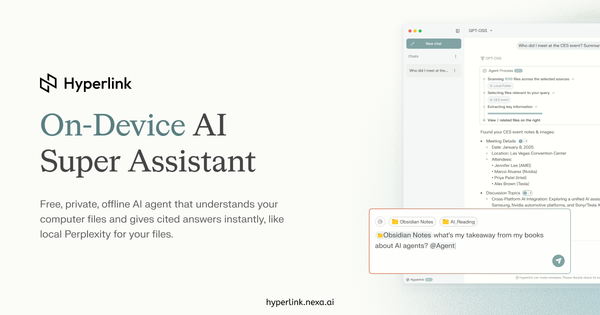
Hyperlink by Nexa AI is a free, fully offline AI super assistant that transforms your local computer files into a private, intelligent knowledge base. It automatically indexes PDFs, Word documents, Markdown notes, text files, PowerPoint presentations, and images directly on your device, then delivers natural language search, instant summaries, contextual answers, and visual analysis with direct citations to source materials—no data ever leaves your machine. Primary use cases include synthesizing insights from research papers or contracts, preparing for meetings by pulling client details across documents, organizing scanned receipts or notes, recapping study materials, and uncovering patterns in archives, all while maintaining complete privacy. The tool targets knowledge workers and professionals handling sensitive information, such as those in law, finance, healthcare, research, or education, as well as everyday users managing personal or professional document libraries who need offline access and data security that cloud alternatives cannot provide.
Key Features & Capabilities
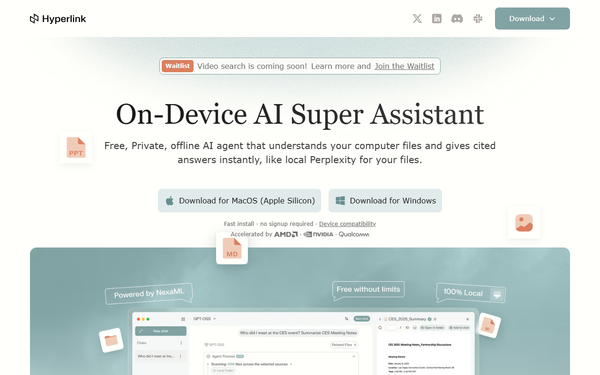
Core functionality revolves around agentic retrieval-augmented generation (RAG) powered by local AI models: automatic folder indexing with real-time sync, natural language querying across thousands of files, inline-cited responses, document and image summarization, and vision capabilities to extract insights from charts, screenshots, or scans. Standout features include unlimited file context without caps, one-click access to thousands of latest open models via Nexa ML (running on NPU, GPU, or CPU), a floating chat interface (Ctrl+Shift+H), folder-specific scoping with @mentions, and hardware acceleration for 3× faster indexing and inference on supported devices like NVIDIA RTX or Apple Silicon. These differentiate it from cloud tools (full privacy and offline operation) and other local RAG apps (consumer-grade simplicity and Day-0 model support). Limitations include support only for PDF, DOCX, PPTX, MD, TXT, and image files (no Excel, CSV, or video yet—video RAG is in beta with a waitlist), dependency on capable hardware for optimal performance, and no cross-device sync or collaboration features. As of March 2026, it remains fully free with no paid tiers required for current capabilities.

User Experience
Setup is dead-simple with no signup or account required: download, install, and connect local folders for automatic indexing. The interface features a clean, consumer-grade chat window with floating access, making it accessible even for non-developers and resulting in a minimal learning curve—users report it feels like a local Perplexity for files. Interface quality earns consistent praise for intuitiveness and speed of interaction, with clickable citations that open original files directly. Documentation consists of an FAQ section, detailed changelog on the official site, and a privacy policy; support resources include community discussions on Product Hunt and Reddit, plus a helpful YouTube demo video. While not exhaustive, the resources suffice for most users given the tool’s straightforward design.

Performance & Reliability
On compatible hardware—such as Mac with M-series chips (16 GB+ RAM), NVIDIA RTX GPUs, or Snapdragon X Elite—Hyperlink delivers sub-second responses and rapid indexing, with recent updates achieving 3× faster processing and doubled LLM inference speeds on optimized systems. It works completely offline with consistent reliability once indexed, and real-time file syncing keeps results current. Known issues from early versions (indexing freezes or setup stalls on certain Windows configurations with special characters in usernames) have been largely addressed through updates up to v1.1.0; user reports and partner benchmarks highlight strong stability on supported devices with no widespread complaints as of March 2026. Performance scales directly with hardware, remaining usable but slower on integrated graphics or lower-RAM setups.
Pricing & Value
Hyperlink is completely free for both personal and workspace use, with all current features—including unlimited queries, model switching, and full indexing—available at no cost; future Pro or Enterprise options are planned but will not remove core functionality. This creates exceptional value compared to paid cloud services (zero ongoing fees or data risks) or complex self-hosted alternatives (far simpler onboarding and superior speed/privacy). For users with suitable hardware, it offers unmatched return by saving hundreds of hours annually on document tasks without subscription lock-in or privacy trade-offs.
Practical Tutorial
A common task is extracting insights and summaries from multiple research papers or contracts. Here is a step-by-step walkthrough (verified against official descriptions and demo video as of March 2026):
- Visit https://hyperlink.nexa.ai/ and download the app for your platform (Mac or Windows; confirm hardware meets minimums like 16 GB RAM and compatible GPU/NPU).
- Install and launch Hyperlink—no account setup required.
- In the folder panel, connect or add local directories (e.g., a “Research” folder containing PDFs, notes, and chart images).
- Allow automatic indexing (progress shown; time varies from minutes for small sets to longer for thousands of files—optimized for speed on RTX hardware).
- Open the chat interface (or press Ctrl+Shift+H) and enter a natural language query, such as: “Summarize the key findings and limitations across all AI research papers in my Research folder, citing sources.” Or scope it: “@Research What patterns emerge in compliance deadlines from these contracts?”
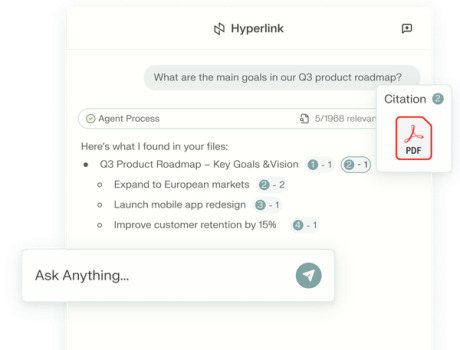
- Review the response: Hyperlink provides a clear summary with inline citations—click any to instantly open the exact source file or page.
- Refine as needed: Switch local models in settings for different reasoning styles, ask follow-ups like “Explain trends in this screenshot.jpg chart,” or focus on visuals for image analysis.
For a visual demo, watch the official YouTube video “Hyperlink - Your Offline, Private AI Agent for Files.” This process typically takes under five minutes end-to-end after initial indexing and works fully offline.
Final Verdict
Overall rating: 4.5 out of 5
Hyperlink excels for privacy-conscious professionals and researchers with capable AI PCs who need fast, cited insights from local documents without cloud risks—its free pricing, simple UI, and offline reliability make it a standout. Avoid it if you have low-spec hardware (where performance drops noticeably), require unsupported file types like video or spreadsheets today, or need team collaboration features.
If you value complete data privacy and own a modern AI-ready computer, Hyperlink is an indispensable free tool that turns your messy files into a second brain.