Turn Articles into Podcasts: An Ilisten AI Tool Review
Overview & Purpose
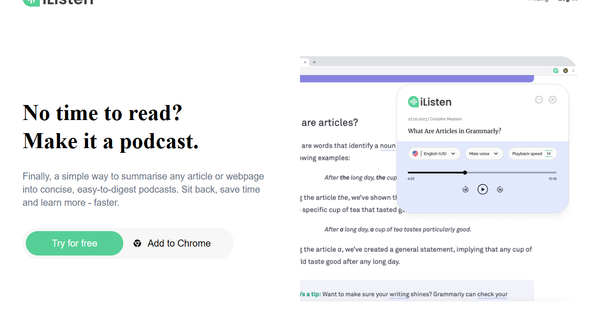
iListen is an AI-powered web application and Chrome extension that converts any online article or webpage into a concise, podcast-style audio summary. By extracting key insights and narrating them in a natural voice, it addresses information overload and enables hands-free consumption of content. Primary use cases include listening during commutes, workouts, or downtime; quickly digesting long-form reads; and improving retention through auditory reinforcement—ideal for multitasking or screen-fatigued users.
The tool primarily targets busy professionals, students, lifelong learners, commuters, and neurodiverse individuals (such as those with dyslexia or ADHD) who prefer audio over text. Organizations can leverage the Executive plan for accessibility needs like multilingual support. It is not specialized for developers, marketers, or designers but suits any knowledge worker seeking efficient, audio-based learning. This review is based on research conducted as of March 14, 2026.
Key Features & Capabilities
Core functionality revolves around pasting a URL (or using the Chrome extension while browsing) to generate an AI-summarized podcast. Users personalize by selecting a voice and accent, choosing summary length/detail level (Brief for high-level insights, Overview for broader context, or Detailed for comprehensive coverage on higher plans), and adjusting playback speed before one-click generation. All podcasts are automatically stored in a personalized library accessible anytime via the web app.
Standout features include seamless Chrome extension integration for instant summarization without leaving the page, full customization of voice and length, and a dedicated podcast library for organized replay. These differentiate iListen from purely text-based summarizers or upload-only tools like Google's NotebookLM by emphasizing browser-native, on-the-go web content conversion with simple TTS narration.
Limitations include restriction to URLs only (no support for PDFs, YouTube videos, or native audio files, though these are on the roadmap); monthly podcast quotas; no offline listening; potential for AI-driven oversimplification or missed nuances in complex topics; and limited multilingual options outside the Executive plan. No advanced editing, multi-speaker dialogues, or export to external podcast apps beyond basic library access is available.
User Experience
The interface is clean, intuitive, and designed for minimal friction: sign up, input a URL or click the extension icon, tweak a couple of options, and generate—resulting in a very low learning curve even for non-technical users. The Chrome extension further streamlines the process to just a few clicks while browsing.
Interface quality feels straightforward and modern, with clear focus on the core workflow rather than bloat. Documentation is light (primarily FAQ on the site with email-based support), and no extensive video tutorials or knowledge base were found beyond promotional demos. Overall, users report it as effortless, though the small number of public reviews limits broader UX insights.
Performance & Reliability
Generation is generally fast and efficient for most articles, delivering "snappy" audio summaries suitable for on-the-go use. The tool reliably handles standard web content with natural-sounding narration that reinforces key points through repetition.
Known issues are minimal; no widespread complaints surfaced across reviews or forums. The Chrome extension (version 1.2, last updated February 2024) maintains a 4.3/5 rating from a small sample of users. Common AI caveats apply—summary quality depends on source clarity and may occasionally miss subtle details or introduce minor inaccuracies—but no systemic reliability problems, downtime, or privacy breaches were reported in available sources. Internet connectivity is required, as expected for a cloud-based AI tool.
Pricing & Value
iListen offers a 14-day free trial on any plan with no upfront commitment. There is no permanent free tier.
- Casual Plan: $3.99/month (billed annually) or $4.99/month; up to 30 podcasts per month with Brief or Overview summaries—suitable for most users.
- Enthusiast Plan: $9.99/month (billed annually) or $11.99/month; up to 75 podcasts per month including Detailed summaries—for heavier or technical use.
- Executive Plan: $100/month (billed annually, with custom options); organizational access featuring multilingual summaries, audio translation, and Easy Read outputs.
Value is strong for the price of a coffee: it delivers convenient, personalized audio learning that saves significant reading time, especially for frequent users. Compared to alternatives (e.g., free but less web-native tools like NotebookLM or premium TTS services), iListen excels in simplicity and browser integration at an accessible cost, though quotas may feel limiting for power users.
Practical Tutorial
No official step-by-step tutorials or interactive guides were located on the site (beyond a promotional YouTube demo video), so here is a complete, self-contained walkthrough for a common task: generating a podcast summary of a news article. Example: Summarizing the Wikipedia page on "Artificial Intelligence" (URL: https://en.wikipedia.org/wiki/Artificial_intelligence) into a 5–10 minute overview podcast.
- Visit https://ilisten.ai/ and sign up for a free 14-day trial (or log in).
- Install the free Chrome extension from the Chrome Web Store for quicker access (optional but recommended).
- Navigate to the target webpage (e.g., open the Wikipedia article in your browser). Click the iListen extension icon in your toolbar, or return to the iListen web app and paste the full URL into the input field.
- Personalize: Select your preferred voice and accent from the dropdown, choose summary type (e.g., "Overview" on Casual plan), and set desired length or playback speed.
- Click "Generate Podcast." Processing takes seconds to a minute depending on article length.
- Once ready, the audio appears in your personal podcast library. Play it directly in the web app, adjust speed if needed, or download for offline use on your device.
Repeat for any article—results are stored chronologically for easy revisiting. For visual guidance, refer to the official promotional demo: https://www.youtube.com/watch?v=PNtfJoOdT94.
Final Verdict
Overall rating: 4.2 out of 5
This tool shines for users who want quick, customizable audio summaries of web content without complexity. You should use iListen if you are a busy professional, student, or commuter who consumes online articles but struggles to find reading time—its Chrome integration, voice customization, and low cost make hands-free learning genuinely effortless and memorable.
You should avoid it if you frequently need to summarize non-web formats (PDFs, videos), require unlimited free usage, advanced conversational podcasts, or offline-first functionality, or if you demand enterprise-grade accuracy without verification.
One-sentence recommendation: iListen AI delivers simple, affordable podcast summaries from any webpage URL, making it a worthwhile time-saver for audio-first learners seeking an easy alternative to traditional reading.