Organize AI Art with Image MetaHub: The Ultimate Gallery Review
Overview & Purpose
Image MetaHub is a local-first desktop application that serves as a dedicated gallery and workflow hub exclusively for AI-generated images. It automatically scans user folders, parses embedded generation metadata (prompts, negative prompts, models, seeds, samplers, CFG scales, steps, LoRAs, dimensions, and more) directly from image files, and builds a searchable index—all processed offline on the user’s machine. Primary use cases include organizing chaotic output directories from daily generations, instantly retrieving specific images from libraries of 30,000–60,000+ files, comparing prompt iterations side-by-side, tagging for reuse, and streamlining the generation loop by sending parameters directly to external tools. It also delivers performance analytics such as images-per-second, total generation time, and peak VRAM usage to help users optimize hardware and workflows.
The target audience is AI artists, Stable Diffusion power users, ComfyUI enthusiasts, prompt engineers, and researchers who maintain large local collections and prioritize privacy. It is particularly valuable for anyone tired of scrolling through unlabeled PNG folders or switching between multiple web UIs to reuse old prompts and settings. Casual users with small libraries or those preferring cloud-based tools (e.g., Civitai galleries) will find less immediate value.
Key Features & Capabilities
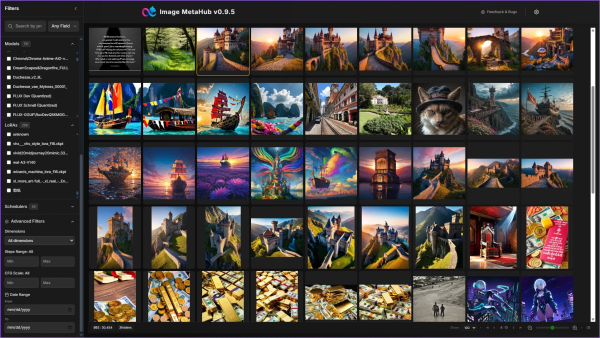
Core functionality revolves around metadata-driven retrieval: universal parsing works with Automatic1111, ComfyUI (full support via companion save node), Fooocus, Forge, SwarmUI, InvokeAI, SD.Next, DrawThings, Midjourney, and NijiJourney (when metadata is embedded). Users can instantly search or filter by any parameter, apply auto-generated TF-IDF tags, manually tag images, and leverage Smart Library clustering to visually stack near-identical prompt variants. Real-time Auto-Watch monitors output folders so new generations appear instantly. A deduplication helper estimates space savings and helps select keepers.
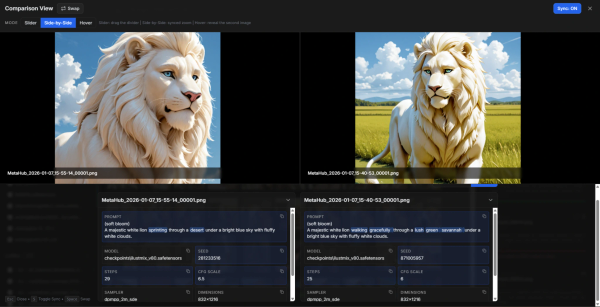
Standout differentiating features include the Pro-only Smart Diff view (side-by-side comparison with word-level prompt highlighting and parameter diffing), direct generation integration that lets users load an image’s exact settings into ComfyUI or Automatic1111, queue jobs, and track progress without leaving the app, plus a detailed analytics dashboard showing per-model speed, resolution trends, and VRAM peaks. The completely local architecture—reading files directly without importing into a proprietary database—ensures zero lock-in and full offline operation.
Limitations include some advanced capabilities (integrations, diff view, analytics) locked behind the paid Pro tier; reliance on properly embedded metadata (legacy ComfyUI workflows may require the companion save node); basic documentation compared with mature tools; and occasional edge-case performance hiccups during initial indexing of extremely large libraries, as reported in community discussions. Video/GIF support exists but is still maturing.
User Experience
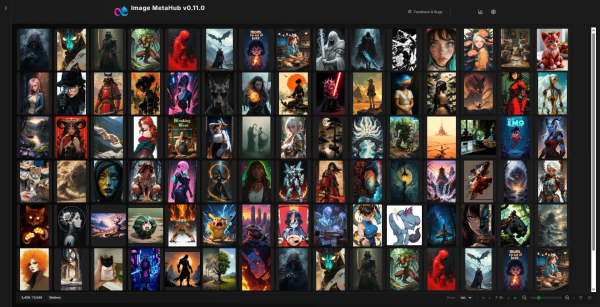
Installation is straightforward: download portable or installer packages for Windows, macOS (Intel & Apple Silicon), or Linux AppImage from GitHub releases, launch, and point the app at root image folders. The interface is a clean, modern Electron-based gallery with a responsive grid, sidebar filters, search bar supporting complex queries, and keyboard shortcuts. The learning curve is gentle for core browsing and filtering; Pro integration requires one-time API endpoint configuration in the respective backends but is well-documented in the README.
Documentation consists of a concise GitHub wiki (basic getting-started and configuration pages) and a comprehensive README covering all features and Pro setup. Community support is active via GitHub issues and positive discussions in Reddit communities (r/StableDiffusion, r/comfyui). No dedicated forum or live chat exists, but the developer responds quickly to reports. Overall, the experience feels polished for a young open-source project and far superior to manual folder browsing.
Performance & Reliability
Designed explicitly for scale, Image MetaHub uses background workers, intelligent caching, and atomic index writes to handle 60,000-image libraries without noticeable slowdowns once the initial scan completes. Search and filtering remain instantaneous even on modest hardware; Auto-Watch and clustering run efficiently in the background. Privacy is absolute—no telemetry, no network calls except optional backend APIs for Pro generation features.
Known issues are minor and mostly historical: early ComfyUI parser coverage was partial (now resolved with the official save node), and very large libraries may experience longer first-time indexing or occasional thumbnail cache hiccups. GitHub issues show an active developer fixing bugs promptly; no widespread reliability complaints appear in user forums as of March 2026. The app has proven stable for daily professional use among early adopters.
Pricing & Value
The Community Edition is completely free forever and open-source under the Mozilla Public License 2.0, delivering full gallery, search, filtering, Auto-Watch, Smart Library, tagging, and deduplication. The Pro Edition is a one-time lifetime license purchased via Gumroad that unlocks ComfyUI/Automatic1111 generation integration, Smart Diff view, analytics dashboard, and continued priority updates. This freemium structure offers exceptional value: the free tier alone outperforms most built-in web UI galleries, while the modest Pro upgrade transforms the tool into a true end-to-end workflow hub. Compared with alternatives (custom scripts, basic folder viewers, or cloud services), Image MetaHub delivers superior privacy, speed, and AI-specific depth at a fraction of the cost or zero cost.
Practical Tutorial
Setting Up Your Library and Performing Metadata-Driven Search (Common First Task)
- Visit the official GitHub releases page and download the latest version (v0.13+ recommended) for your operating system—Windows installer/portable, macOS app, or Linux AppImage.
- Install and launch Image MetaHub. On first run, click “Add Folder” and select the root directory containing your AI-generated images (or multiple folders).
- The app begins background indexing; monitor progress in the status bar. For a 10,000-image library this typically takes 5–30 minutes; larger libraries may take longer on the first pass but become near-instant on subsequent launches thanks to caching.
- Once indexing completes, use the top search bar to type prompt keywords (e.g., “cyberpunk neon city night”). Open the filter panel and add criteria such as Model: “realisticVision_V5.1”, LoRA: “add_detail”, Sampler: “DPM++ 2M Karras”, CFG: “7”, or specific Seed ranges.
- Results populate the gallery instantly. Click any image to view full metadata, zoom, or open the Smart Library stack of visually similar variants.
- To organize further, right-click images to apply manual tags or promote auto-generated TF-IDF tags. Enable Auto-Watch on output folders (eye icon) for real-time updates during generation sessions.
- (Pro users only) Purchase and enter your lifetime license key, then configure ComfyUI or Automatic1111 API endpoints in Settings. Select any image, choose “Generate with ComfyUI” (or A1111), tweak parameters, and queue the job—progress appears live inside MetaHub.
For official walkthroughs and keyboard shortcuts, refer to the GitHub README and wiki. This workflow typically reduces time spent hunting for old prompts from minutes to seconds.
Final Verdict
Image MetaHub earns a strong 4.5 out of 5. It excels for AI artists and researchers who generate hundreds of images weekly and need powerful, private, metadata-driven organization plus seamless workflow integration. Users with large local libraries will wonder how they ever lived without it.
Avoid it if you rely on cloud services, need collaborative features, or have only a handful of images—simpler tools or built-in web UI galleries will suffice.
One-sentence recommendation: Image MetaHub is the definitive local hub that turns AI image chaos into a searchable, comparable, and instantly actionable creative asset—essential for any serious offline workflow.