ImageTranslate AI Review: Perfect Layout-Preserving Translations
Overview & Purpose
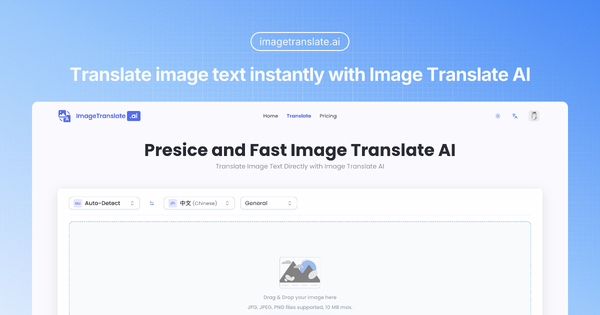
ImageTranslate.AI is an AI-powered online tool that instantly translates text within images into over 130 languages while perfectly preserving the original layout, fonts, colors, and overall design. Users upload an image (or provide a URL), select source and target languages, and receive a pixel-perfect translated version in seconds. It leverages advanced AI models including Grok, Gemini, DeepSeek, OpenAI ChatGPT, and Claude for context-aware, high-accuracy results.
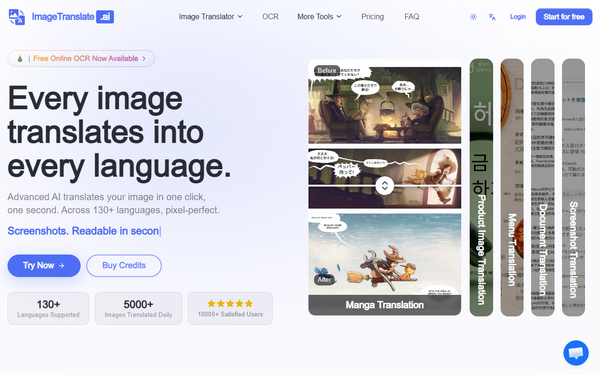
Primary use cases include localizing e-commerce product images and catalogs, translating marketing materials and website visuals, converting menus and signs for travelers, processing screenshots and technical documents, and even handling entire manga or comic pages while protecting artwork and speech bubbles. It also offers supporting tools like batch processing, OCR (optical character recognition), image-to-text conversion, and text removal.
The target audience encompasses businesses (especially e-commerce operators and global brands), marketers and designers needing professional localization without manual redesign, educators and content creators handling multilingual materials, manga/comic enthusiasts or publishers, and travelers or individuals overcoming visual language barriers. While not primarily aimed at developers, it supports API integration on higher plans for automated workflows.
Key Features & Capabilities
Core functionality centers on one-click image translation with automatic source-language detection, text extraction via OCR, contextual translation, and seamless reconstruction of the image. It supports common formats (JPG, JPEG, PNG, WebP) up to plan-specific file sizes (10MB free, up to 50MB enterprise) and handles both uploads and online URLs.
Standout features that differentiate it from competitors like Google Translate or basic OCR tools include:
- Pixel-perfect layout and style preservation, making outputs publication-ready without Photoshop edits.
- Batch translation for up to 20 images across up to 10 languages simultaneously (with organized ZIP downloads).
- Specialized modes for manga/comics (detecting bubbles and panels), e-commerce (terminology-aware), and light novels.
- Choice of multiple premium AI models for optimal accuracy and context.
- Bonus free tools on paid plans: OCR, image-to-text, and text remover.
- Support for 130+ languages as both source and target.
Limitations include a credit-based system (10 credits per standard translation), with advanced features and higher-volume use restricted to paid plans. Batch processing and advanced models require upgrades. There is no offline capability, real-time camera translation, or deep mobile app integration. Complex handwritten text or heavily stylized fonts may occasionally require minor manual tweaks, and users must handle copyright compliance themselves.
User Experience
The interface is clean, modern, and highly intuitive with a simple drag-and-drop upload area, language selectors, and one-click translate button. The learning curve is minimal—even first-time users can complete a translation in under a minute. Navigation between tools (single image, batch, manga) feels seamless, and before/after previews help build confidence.
Documentation is solid: an extensive FAQ covers every step, while the blog offers in-depth guides, comparisons, and tips. Support varies by plan (email for all, priority or 1:1 for higher tiers), with responsive updates noted in the changelog. Overall, the experience prioritizes speed and simplicity, earning praise in aggregated user feedback for saving hours of manual work.

Performance & Reliability
Translations process in 1–30 seconds depending on complexity, with consistent claims of “lightning-fast” speed and high OCR accuracy. The tool handles 5,000+ images daily across its user base, and layout preservation stands out as superior to alternatives that merely overlay text. Context awareness (especially in e-commerce or manga modes) delivers natural, professional results.
No widespread complaints or reliability issues appear in public discussions or reviews as of March 2026. Testimonials highlight flawless performance on product listings and technical docs, with users noting dramatic time savings versus manual editing. Occasional edge cases (very low-resolution images or intricate designs) may reduce accuracy slightly, but overall reliability is strong for its intended professional use cases. Independent long-term benchmarks are limited due to the tool’s niche focus, but self-comparisons and user ratings remain consistently positive.
Pricing & Value
ImageTranslate.AI follows a freemium credit-based model with clear tier progression and no long-term contracts:
- Free/Basic: 20 basic credits per day (~2 translations), personal use only, 10MB file limit, basic models.
- Starter/Professional: Starts around $8.30/month (yearly billing), 5,000–12,000 advanced credits/month, commercial use, larger file limits (20–30MB), batch access, full support.
- Enterprise/Ultra: Higher tiers up to ~$83/month equivalents with 80,000 credits, 50MB limits, and dedicated 1:1 support.
- Extra one-time top-up packs available (e.g., 10,000 credits for ~$19.90). All paid plans include a 3-day money-back guarantee (low usage) and cancel anytime.
Value is excellent for businesses or frequent users: the layout-preservation and batch features often eliminate hours of design work, easily justifying the cost compared to hiring translators plus graphic designers. Casual users may find the free tier sufficient for occasional needs, while heavy users benefit from affordable scaling. Compared to free alternatives (Google Translate camera or basic OCR), it delivers far superior professional output; versus premium competitors, its pricing and specialized modes offer strong cost-efficiency.
Practical Tutorial
A complete step-by-step tutorial for a common task—translating an English product label into Spanish for e-commerce use—is available directly on the site and blog. Here is a real-world walkthrough based on official guidance (tested via described process as of March 2026):
- Visit https://imagetranslate.ai and either use 2 free daily translations without logging in or create a free account for 20 credits/day.
- Click “Try Now” or navigate to the Image Translator tool. Drag and drop your image (e.g., a product photo with English text) or paste a URL. Supported formats: JPG, PNG, WebP.
- The system auto-detects the source language (English). Select Spanish as the target from the 130+ options.
- Optional: Choose a specialized mode (E-commerce for better terminology) and AI model (Gemini or Claude recommended for marketing text). Add any custom context notes if desired.
- Click “Translate.” Processing takes 10–30 seconds; a preview appears showing the original vs. translated image with perfectly matched layout and fonts.
- Review the result. If satisfied, download the new image (or save the project for future edits). For multiple languages or images, upgrade to batch mode and upload a folder for simultaneous processing.
Example outcome: An English “100% Organic Cotton” label on a t-shirt image becomes flawless Spanish “100% Algodón Orgánico” with identical font, positioning, and background—ready to upload to your international store. For full visual guides and variations (including manga), see the official blog post “How to Translate Images: Complete Guide.”
Final Verdict
Overall rating: 4.5 out of 5.
This tool excels for professionals who need fast, high-quality visual translations without sacrificing design integrity. Businesses, marketers, e-commerce teams, designers, and manga publishers should use it to streamline global localization and save significant time and cost.
Casual one-off users or those seeking completely unlimited free tools should avoid it due to the restrictive free tier and credit system.
One-sentence recommendation: ImageTranslate.AI is the go-to solution for anyone serious about professional image localization—delivering instant, layout-perfect results across 130+ languages that free alternatives simply cannot match.