Imagine Me Review: Create Personalized AI Art of Yourself

Overview & Purpose

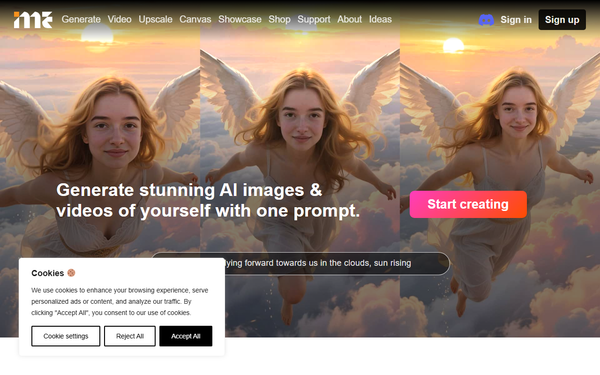
ImagineMe (imagineme.ai) is a web-based AI art platform that allows users to create personalized images and videos of themselves (or pets) by training a private custom AI model from uploaded photos and then generating content via simple text prompts. The core workflow involves uploading 10–20 varied, high-quality reference images, waiting for the model to train (typically a few hours, up to 5–24 hours depending on load), and then typing descriptive prompts to produce AI-generated art featuring the user’s likeness in any imaginable scenario, style, or setting.
Primary use cases include creating fun fantasy characters (e.g., as a cyberpunk James Bond or fantasy knight), historical portraits (e.g., Mona Lisa-style), artistic interpretations (e.g., watercolor, Disney 3D, or Greg Rutkowski concept art), photoreal scenes, D&D miniatures, pet adventures, or social media content. It leverages Stable Diffusion and DreamBooth technology to produce photorealistic, stylized, or animated results without requiring coding or advanced AI knowledge.
The target audience is primarily casual users, hobbyists, gamers, pet owners, and creative individuals seeking entertaining self-expression or unique visuals for personal projects, social media, or storytelling. It is not aimed at professional developers or enterprise teams needing scalable APIs, nor is it optimized for marketers or designers requiring pixel-perfect commercial assets—though some may use it for quick concept ideation.
Research conducted as of April 13, 2026.
Key Features & Capabilities
Core functionality centers on one-time private model training followed by unlimited prompt-based generation (subject to credits). Users select their trained model, enter a text prompt, and receive 4 images per credit (or videos at higher credit costs, e.g., 3 credits per video depending on quality and length). An inspiration showcase provides example prompts and community-generated results for easy starting points.
Standout features include the fully private per-user model (no data sharing or public LoRAs), extreme simplicity compared to self-hosted tools like Automatic1111 or services requiring manual LoRA training, support for both images and short videos, and flexible artistic styles ranging from photoreal to cartoon, vintage, or underwater. The platform also offers prompt tips, image selection guidelines, and a gallery for managing outputs.
Limitations and missing features are notable: no free tier or trial generations (credits must be purchased upfront), variable output consistency (likeness can be hit-or-miss), inability to generate multiple people in one scene, restrictions on explicit/violent/illegal content, common AI artifacts (e.g., hands/fingers), and longer training times during peak loads. It specializes in portraits and single-subject results rather than complex compositions or professional editing tools.

User Experience
The platform boasts a low learning curve thanks to its straightforward 4-step process and clean, intuitive interface focused on upload, training status, prompt entry, and gallery viewing. Desktop and mobile versions are available, making it accessible for non-technical users. Official guides cover image selection (varied poses, expressions, high quality, JPEG/PNG), prompting best practices (detailed descriptions, grammar, styles), and troubleshooting.
Interface quality is modern and minimal, with prominent “Get Credits,” model selection, and showcase sections. However, some users report occasional slowness or frustration during training waits and iterative prompting. Documentation includes an FAQ, Starter’s Guide, Prompting Guide, image selection blog post, and direct email support ([email protected]). Community inspiration comes via the built-in showcase rather than extensive external forums.
Performance & Reliability
Generation speed is efficient once the model is trained: initial “cold start” outputs take about 2 minutes, with subsequent images arriving in roughly 10 seconds. Training averages under 5 hours on the homepage but can extend to 10–24 hours per the support FAQ. Video generation adds extra processing time based on settings.
Known issues include inconsistent likeness to reference photos (a frequent user complaint), outputs that sometimes deviate significantly from prompts, and credit deductions only on successful generations (with refunds after 10 minutes if images fail to appear). Common user-reported problems center on hit-or-miss quality requiring multiple retries, which can feel costly on a paid service. Trustpilot reviews (2.8/5 from 19 ratings) highlight these frustrations alongside occasional praise for “epic” or “adorable” results when it succeeds.
Pricing & Value
ImagineMe operates on a credit-based pay-as-you-go model with no subscription or free tier. Credit packs are:
- 10 credits for $5 ($0.50/credit, ~$0.125 per image)
- 25 credits for $10 ($0.40/credit, ~$0.10 per image)
- 45 credits for $15 ($0.33/credit, ~$0.08 per image—best value)
One credit typically yields 4 images; videos cost more (e.g., 3 credits). Credits are only consumed on successful generations.
Value proposition is strong for light users seeking affordable entry into personalized AI art ($5 minimum), especially versus subscription-heavy competitors like Midjourney or Leonardo.ai that may require ongoing fees for similar custom training. However, inconsistent results can lead to rapid credit depletion during experimentation, reducing perceived value for users who expect reliable likeness on the first few tries. It excels for fun, occasional use but may feel expensive compared to free local Stable Diffusion setups for technically inclined users.
Practical Tutorial
A step-by-step tutorial for training a model and generating your first images (based on official documentation):
-
Sign up and purchase credits: Visit imagineme.ai, create an account, and buy a credit pack via the “Get Credits” dropdown (start with the $5/10-credit option to test).
-
Upload reference photos: On the model creation page, upload 10–20 high-quality, varied images (different angles, expressions, lighting, outfits; avoid blurriness, sunglasses, or group shots). JPEG or PNG format recommended.
-
Train the model: Submit for training. Monitor progress (usually completes in a few hours; up to 24 hours max). The platform displays one preview image once ready.
-
Generate images: Go to the Prompt page, select your trained model, type a detailed prompt (e.g., “me as a fantasy knight standing on a mountain at sunset, photorealistic, dramatic lighting”), and click Generate. View results in your Gallery tab. Copy successful prompts from the inspiration showcase for better results. For videos, use the dedicated video generator with a gallery image as base and adjust length/quality settings.
Tips for success: Be specific in prompts (include pose, style, background, lighting), use the official Prompting Guide for weights and phrasing, and iterate with slight variations. Download or share outputs directly from the gallery. Full official guides are available at https://imagineme.ai/support/. YouTube tutorials (e.g., “Easily Create AI Images of Yourself” by various creators) also provide visual walkthroughs.
Final Verdict
ImagineMe earns a 3.2 out of 5 rating. It shines as a simple, affordable entry point for turning yourself (or your pet) into AI art across endless creative scenarios, delivering delightful results when the model aligns well with prompts. Strengths include privacy-focused custom training, fast post-training generations, and an inspiring showcase that lowers the barrier for beginners.
Who should use this tool: Casual creators, gamers, or social media enthusiasts who want quick, fun personalized visuals without technical setup and are willing to experiment with prompts and invest a small amount upfront.
Who should avoid this tool: Users needing high consistency, professional-grade outputs, or free/unlimited generations; those frustrated by trial-and-error on paid credits; or anyone sensitive to variable likeness quality.
One-sentence recommendation: If you’re looking for an easy, magical way to insert your face into any fantasy or artistic scene and don’t mind a bit of iteration, ImagineMe is worth a $5 test run—otherwise, explore more consistent (if pricier) alternatives.