Inbox Zero Review: The Ultimate AI Tool for Email Automation
Overview & Purpose

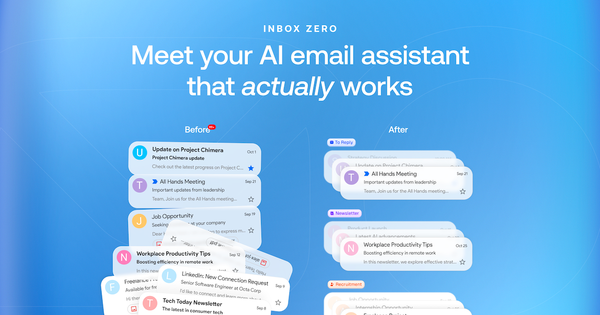
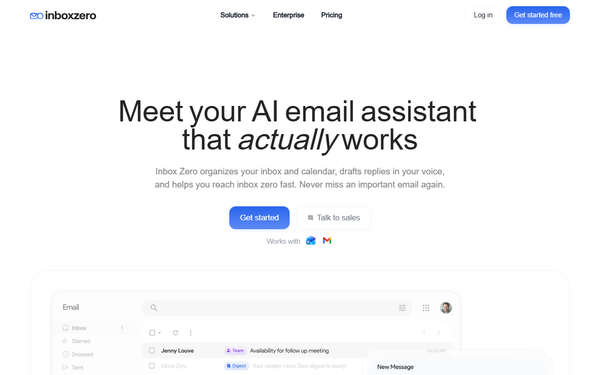
Inbox Zero is an open-source, AI-powered email assistant that works alongside your existing email client (Gmail, Google Workspace, Outlook, or Microsoft 365) to automate organization, drafting, and cleanup tasks. It helps users reach and maintain "Inbox Zero" by automatically labeling emails, generating reply drafts in your personal writing style (factoring in calendar availability and CRM context), bulk-unsubscribing from newsletters, blocking cold emails, and delivering analytics on email patterns. Primary use cases include reclaiming hours from repetitive inbox management, prioritizing important messages, tracking follow-ups, and gaining insights into who clutters your inbox most. It targets busy professionals, executives, entrepreneurs, power users, developers, and growing teams who receive high email volumes but want to retain full control over their data rather than switching to a new email client.
Key Features & Capabilities
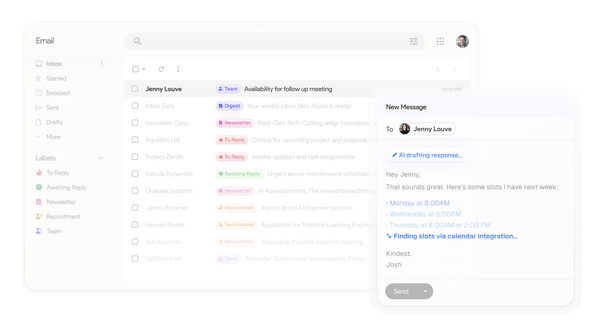
Core functionality revolves around AI automation: the tool scans incoming emails, applies user-defined plain-English rules ("Cursor Rules"), auto-labels/sorts messages, pre-drafts replies, and suggests actions for follow-ups via "Reply Zero." Standout differentiating features include one-click bulk unsubscribe/archive with visual sender analytics, automatic cold-email blocking, personalized pre-meeting briefings drawn from email + calendar data, auto-filing attachments to Drive/OneDrive, Slack notifications (Plus tier), and team-wide analytics (Professional tier). The open-source nature allows full self-hosting for maximum privacy, and it is SOC 2 Type 2 certified with explicit no-AI-training policies. Unlike closed competitors such as Fyxer, it emphasizes customization and transparency while integrating directly via OAuth without replacing your inbox.
Limitations include support only for Gmail/Outlook ecosystems (no other providers yet), reliance on external LLM API keys for self-hosting, and the need for careful permission review during OAuth setup. Missing features relative to premium email clients: no native mobile app, no built-in email sending interface (it drafts for you to send in your client), and advanced automation is tier-gated. Self-hosting requires Docker and technical setup, which may deter non-developers.
User Experience
Setup is straightforward for the hosted version—connect your account via OAuth in minutes—but requires reviewing detailed permission scopes for privacy comfort. The learning curve is low after initial connection; the clean dashboard centralizes conversations, AI preferences, analytics, and rules in an intuitive layout built with modern UI components (Next.js + Tailwind). Plain-English rule configuration and one-click actions make daily use feel effortless. Documentation is comprehensive via docs.getinboxzero.com (covering every feature with step-by-step guides) plus an active GitHub repo, Discord community, and blog. Support includes email for all users, priority assistance and dedicated onboarding for Professional/Enterprise plans. Users consistently praise the non-intrusive AI that adapts to personal tone without taking over.
Performance & Reliability
The tool processes emails efficiently in real time, with bulk operations (e.g., unsubscribing hundreds of senders) completing in seconds and AI drafts generating quickly while respecting your schedule. Analytics dashboards load instantly and adapt over time to your habits. As of March 2026, no widespread outages or major bugs are reported; the project maintains 10.2k GitHub stars with near-daily commits and active community contributions. Minor user-noted quirks include occasional subscription-tracking edge cases or the need for manual LLM configuration in self-hosted setups, but testimonials highlight smooth performance and significant time savings (often 3–4 hours weekly). Reliability is bolstered by SOC 2 certification and the option to self-host on your infrastructure.
Pricing & Value
A generous 7-day free trial (no credit card required, cancel anytime) lets users test the full experience. Paid plans are per-user monthly (billed annually for discounts): Starter ($18) for core AI + unsubscribe + analytics; Plus ($28, most popular) adds Slack, attachments, and unlimited knowledge base; Professional ($42) includes team analytics, priority support, and onboarding; Enterprise is custom with SSO and on-premise options. Self-hosting is completely free (just Docker setup and your own LLM keys). Compared to closed alternatives, Inbox Zero delivers superior value through open-source transparency, privacy guarantees, and lower long-term costs—especially for individuals or privacy-conscious teams—while matching or exceeding automation capabilities.
Practical Tutorial
Official documentation and blog provide clear walkthroughs; here is a real example for the most common task—bulk unsubscribing from newsletters—using the hosted version (as of March 2026). This process typically takes under 5 minutes and has helped users clean thousands of unwanted emails.
- Sign up or log in at getinboxzero.com and connect your Gmail or Outlook account via secure OAuth (review scopes carefully; they cover only labeling, drafting, and unsubscribe actions).
- From the left sidebar, navigate to the Bulk Unsubscribe tab (or visit the direct feature page).
- Review the sorted list of senders (default: by total emails received; reorder by most unread or unarchived for priority). Each row shows email volume, read percentage, and a graph of sending frequency.
- For each sender, click one of three one-click actions: Unsubscribe (removes you from the list), Auto Archive (future emails skip inbox), Auto Archive + Label (archives and applies a custom label), or Keep (hides from view but leaves unchanged).
- Expand any sender row (click the expand icon) to preview old emails, delete/ archive individually, or view detailed stats before deciding.
- Apply filters at the top to revisit "Kept" senders later. Changes sync instantly to your email client via Gmail/Outlook filters where possible.
For self-hosters, the same interface appears after running the CLI setup. Full official guide and video demo: How to Bulk Unsubscribe from Emails and docs.getinboxzero.com/essentials/bulk-email-unsubscriber.
Final Verdict
Overall rating: 4.7/5 — Excellent privacy-first automation with strong open-source credentials and real productivity gains, though setup nuance and ecosystem limits hold it back from perfection.
Use this tool if you are a high-volume email user (executive, founder, developer, or team) who values data sovereignty, customizable AI, and seamless integration with existing clients; the self-hosting option and tone-matching drafts make it uniquely empowering.
Avoid it if you want a complete email client replacement, zero technical involvement, or support for non-Gmail/Outlook providers—simpler paid tools may suit better.
One-sentence recommendation: Inbox Zero is the smartest, most privacy-respecting way to reclaim your inbox in 2026—try the free trial and never look back.