InfraNodus Review: Uncover Hidden Insights with AI Graph Analysis
Overview & Purpose
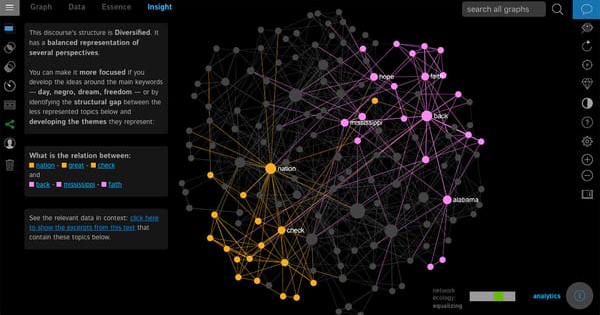
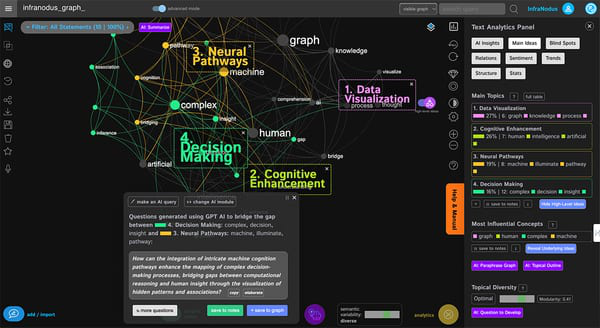
InfraNodus is an AI-powered text network visualization and analysis tool that converts any text—documents, search results, customer reviews, transcripts, or notes—into an interactive knowledge graph. Nodes represent concepts or keywords, while edges show co-occurrences and relations. Using graph theory algorithms, natural language processing, and integrated AI (including GPT-5), it identifies main topics, clusters, influential ideas, sentiment, and crucially, structural gaps or “blind spots” in the discourse. This helps users generate new insights, research questions, ideas, and connections that traditional linear tools or generic LLMs often miss.
Primary use cases include qualitative research and thematic analysis of surveys or feedback, market and competitive intelligence (e.g., keyword clustering for SEO or opportunity spotting), content optimization, creative writing and ideation, personal knowledge management (with Obsidian integration), academic or scientific text overviews, and GraphRAG-style LLM augmentation via its MCP server. It promotes “ecological thinking” by encouraging exploration of interconnections and missing links.
The target audience spans researchers, writers, marketers, consultants, university professors, NGOs, corporations (e.g., Greenpeace, Procter & Gamble), e-learning specialists, and information analysts—anyone working with unstructured text who needs deeper pattern recognition beyond simple summaries or tag clouds. It appeals especially to visual thinkers and those using tools like Obsidian for PKM.
Key Features & Capabilities
Core functionality revolves around text-to-network conversion: import data, auto-generate a graph, apply network metrics (e.g., betweenness centrality for influential nodes, community detection for clusters), and explore interactively. Built-in features include topic modeling, sentiment analysis, text mining, and filters by category or sentiment. The AI chatbot generates overviews, summaries, research questions, facts, and gap-bridging ideas. Data import supports PDFs, Markdown, CSVs, plain text, Google/YouTube/Amazon results, Twitter/X, websites, RSS, and more via browser extension. Export options include high-res images, embeddable graphs, and full data downloads. Multilingual support covers major languages.
Standout differentiators include its scientific-grade network science approach (peer-reviewed algorithms), explicit visualization of structural gaps for innovation and blind-spot detection, GraphRAG/MCP integration to steer LLMs and reduce hallucinations, Obsidian plugin and n8n workflows, and a “mind antivirus” philosophy that counters narrow thinking. Unlike simple mind-mapping or basic AI summarizers, it combines visualization, metrics, and AI for actionable ideation. The open-source self-hosted version (available on GitHub) provides core network visualization, while the cloud version adds advanced AI, larger-scale imports, and performance.
Limitations include per-text quotas that scale with pricing tier (e.g., PDF upload limits from 1 MB in Basic to 50 MB in Premium), restricted commercial use and API/MCP access in the entry-level plan, no live graph updates in Basic, and a reliance on understanding basic graph concepts for full value. The self-hosted open-source version lacks the latest AI integrations and requires technical setup.
User Experience
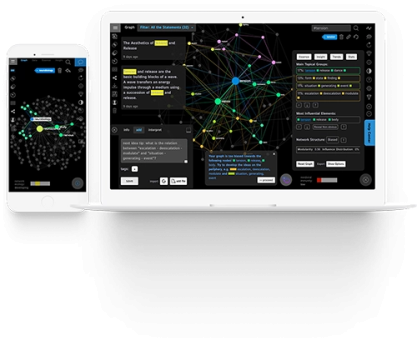
InfraNodus features a clean, interactive web interface centered on the dynamic knowledge graph, with side panels for analytics (topics, gaps, relations), AI chat, and filters. Navigation is visual and exploratory once familiar, allowing zooming, node filtering, and context inspection. The learning curve is moderate to steep for new users due to network science terminology and non-linear workflow; some reviewers note the UI feels confusing initially with many options.
Interface quality is high for visual learners, with responsive graphs and intuitive drag/selection tools. Documentation is strong: a comprehensive support portal with categorized how-to articles on importing text, graph interpretation, and AI ideation; in-app workflows; and a YouTube playlist of interface and use-case tutorials. Community support via Discord and ticket-based help (response times tiered by plan) round out resources. Overall, it rewards investment in the initial tutorial phase.
Performance & Reliability
The tool performs efficiently for typical use cases, quickly processing imports and generating graphs for documents or search results within plan limits. Network algorithms and AI responses are responsive, and EU-hosted data ensures privacy compliance. Live updates (e.g., Twitter/RSS) are available in higher tiers. No widespread reliability complaints appear in available reviews; the system handles multilingual text and large imports well in Premium plans.
Known issues are primarily quota-related in lower tiers (e.g., limited Google results or AI credits per hour) and occasional browser extension quirks (one review mentioned interference with browser shortcuts). Sparse third-party reviews on major platforms suggest it remains a niche tool, but user testimonials and YouTube demos consistently praise insight quality and speed for research workflows. As of April 2026, no major outages or critical bugs were reported in public sources.
Pricing & Value
InfraNodus offers a 14-day full-feature free trial. Paid plans are tiered subscriptions (monthly or annual with up to 35% savings and price lock-in): Basic (entry-level personal use with core analytics, limited uploads/AI credits/API), Advanced (commercial use, higher limits, full API/MCP), and Premium (highest quotas, priority support, live updates). Pricing starts around €12/month for Basic, scaling to higher tiers for teams or heavy use; enterprise options include dedicated servers. All plans allow unlimited graphs/texts/files but enforce per-item quotas.
Value is strong for users needing structural text insights beyond generic AI tools; the gap-detection and network metrics provide unique ROI for research, marketing, and ideation that competitors like basic mind-mappers or expensive enterprise platforms (e.g., NetBase Quid) do not match at this price point. The open-source self-hosted alternative reduces costs for technical users, though it lacks cloud AI extras. Compared to alternatives, it excels in visualization depth and LLM augmentation at accessible pricing.
Practical Tutorial
A common task is generating an overview of a topic and new research questions/ideas from web search results or a document (e.g., competitive analysis or literature review). Official tutorials are available in the support portal and YouTube playlist; here is a step-by-step walkthrough based on the standard workflow as of April 2026.
-
Sign up and start a trial: Go to https://infranodus.com/, create an account, and activate the 14-day full trial (no card required).
-
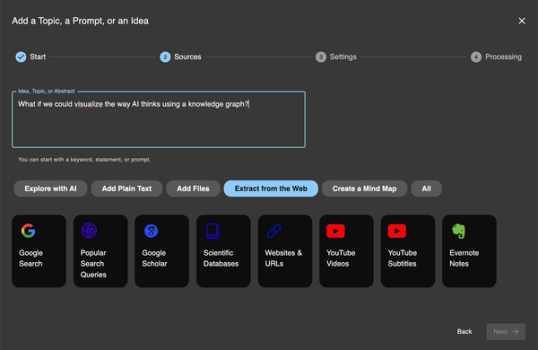
Import or add text: In the app, click “Add Text” or use the browser extension/imports. For this example, import Google search results for a query like “AI automation trends 2026” (Basic plan allows up to 40 results). Paste a document, upload a PDF, or connect YouTube/Amazon data. The system auto-processes into lemmas and builds the initial graph.
-
Explore the knowledge graph: The interactive visualization appears. Use the force-layout to see clusters (communities). Hover nodes for context; click to filter or view original text snippets. Check the analytics panel for “Main Topics,” “Structural Gaps,” and “Relations.”
-
Apply network metrics and filters: Sort nodes by influence (betweenness centrality) or zoom into clusters. Filter by sentiment or remove stopwords/high-frequency terms to reveal periphery ideas. Identify gaps—the tool highlights missing connections between clusters.
-
Generate AI insights: Open the AI chatbot (GPT-5 powered). Prompt it with context from the graph (e.g., “Summarize main clusters and suggest 5 research questions bridging the gaps”). Use predefined AI actions for overviews, idea generation, or gap-filling suggestions. Export the graph or results as image/data.
-
Iterate and export: Refine by adding more text, save the graph, or share embeddable link. For ongoing work, integrate with Obsidian via the plugin.
This process typically takes 10–20 minutes and yields actionable insights. For video guidance, see official tutorials like “InfraNodus Interface Tutorial” on YouTube or the support checklist at https://support.noduslabs.com/.
Final Verdict
InfraNodus earns a strong 4.5/5 rating for its innovative blend of network science, visualization, and AI that genuinely surfaces novel insights and blind spots.
It is ideal for researchers, marketers, writers, and knowledge workers who deal with complex text data and want more than surface-level summaries—especially those already using Obsidian or seeking GraphRAG capabilities. Avoid it if you need a dead-simple chat interface, have very large-scale enterprise needs without custom setup, or prefer zero learning curve for basic summarization.
One-sentence recommendation: If you want to move beyond generic AI summaries to truly see the structure, gaps, and hidden connections in your texts, InfraNodus is a powerful, privacy-focused investment worth the trial.