Interior AI Review: Transform Your Space with AI Virtual Staging

Overview & Purpose
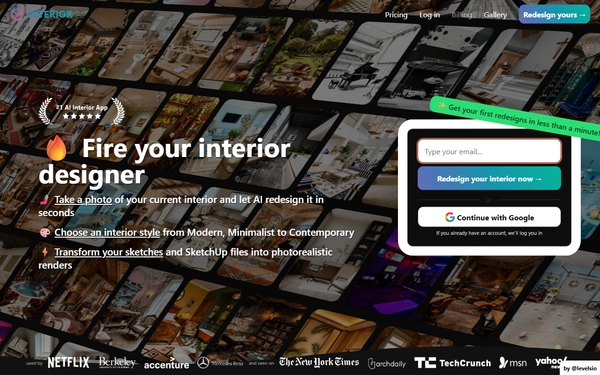
Interior AI is an AI-powered web-based platform (with associated mobile apps) that enables users to upload a photo of an interior space, exterior, garden, or even a SketchUp screenshot and instantly generate photorealistic redesigns or virtual stagings using one of over 55 preselected styles. Built as a solo indie project by entrepreneur Pieter Levels (@levelsio), it leverages advanced AI models like Flux™ and Hyper Realism™ to transform existing rooms while attempting to preserve the original structure, dimensions, and construction details. Primary use cases include rapid interior design ideation for homeowners, virtual staging of empty properties for real estate listings (claiming staged homes sell 87% faster and for higher prices), sketch-to-render conversion for architects and designers, and creating immersive 3D flythrough videos or VR walkthroughs. It also supports freestyle generation without an input photo and outdoor garden redesigns. The tool targets a broad audience: everyday homeowners seeking renovation inspiration, professional interior designers for quick client visualizations, real estate agents for marketing empty listings, and architects using CAD/sketches.
Key Features & Capabilities
Core functionality revolves around a simple upload-select-generate workflow: users choose a room type (30+ options), design mode (e.g., Interior Design with 3D Vision for style changes, Virtual Staging AI for furnishing empty rooms, Sketch2Image™, or SketchUp mode), and one of 55+ styles ranging from Modern and Scandinavian to Futuristic, Cyberpunk, or seasonal themes like Christmas. Generation produces multiple high-resolution variants in about 25 seconds each, with options for up to 16 parallel renders in the top tier. Standout features that differentiate it include strong structural preservation (better than many competitors at handling empty rooms without distorting furniture or architecture), integration with Stable Video Diffusion for walkthrough videos, World Labs partnership for VR/3D explorable worlds, and post-generation editing tools like upscaling, wall painting, lighting adjustments, furniture/people addition, and artifact removal. Privacy is emphasized—user photos are not used for model training—and commercial licensing is included in paid plans.
Limitations include reliance on high-quality, straight-on input photos (angled or low-res images reduce accuracy), experimental features like custom prompts or adding people that can yield random or poor results, and occasional AI artifacts (e.g., illogical furniture or construction). About 90% of outputs are usable for ideation, but not always production-ready without manual fixes. No native HEIC support, limited customization beyond styles/prompts, and no free tier or trial for testing.
User Experience
The interface is clean and intuitive with a low learning curve: a studio dashboard allows photo upload via camera, gallery, or clipboard, followed by dropdown selections for room/mode/style and a one-click "Create design" button. Results appear quickly with tabs for Designs, Saved, and Deleted, plus options to download, remix, edit, or generate videos/3D views. It works well on web (laptop/phone) and feels mobile-friendly, though some third-party app versions exist with varying quality. Documentation is minimal but self-explanatory via in-app prompts and a basic FAQ covering upload tips and modes; no comprehensive video tutorials or extensive help center from the official site. Support is limited—handled by the solo founder via an in-site agent—with user complaints highlighting slow responses, login bugs, and save issues.
Performance & Reliability
Renders typically complete in 25-30 seconds with priority queuing in higher plans, delivering high photorealism and detail when inputs are optimal. It excels at virtual staging empty rooms compared to tools like RoomGPT or Decorify, maintaining realistic furniture scale and IKEA-like placements. However, reliability varies: outputs can include artifacts or fail to match the original layout closely, especially with suboptimal photos, and parallel generation scales with plan tier (4/8/16 images). User feedback from 2025-2026 reviews notes inconsistencies—some praise "magical" speed and ideas, while others report buggy experiences (e.g., renders not saving, repeated logins) and results that feel generic or disappointing versus marketing claims. Common complaints include no refunds despite high GPU costs, mixed Trustpilot scores (around 2.6/5 from limited reviews), and frustration with experimental features. The tool improves daily via model updates, but it's not flawless for professional final outputs.
Pricing & Value
Interior AI operates on a subscription-only model with no free tier or trial; users must commit upfront via Stripe (credit/debit cards only, no PayPal/crypto). Plans are discounted heavily for yearly billing (equivalent to 6+ months free): Pro at $29/month ($349/year) for basic Flux™ renders, 4 parallel generations, ~1,000 stagings/month, and commercial use; Premium at $49/month ($599/year) adding Hyper Realism™, editing tools, videos, VR, 8 parallels, and higher limits; Ultra at $99/month ($1,199/year) for top photorealism, 16 parallels, priority speed, and unlimited storage. No refunds are offered due to processing costs. Value is strong for high-volume users like real estate agents needing fast staging (potentially cheaper than traditional services or competitors without trials), offering professional-grade speed and features. However, the lack of a free trial reduces accessibility compared to alternatives like Remodel AI or InstantInterior AI, and some users question the price-to-quality ratio given occasional inconsistencies.
Practical Tutorial
No official step-by-step video tutorials are prominently featured on the site beyond basic in-app guidance and FAQ best practices, though YouTube comparisons (e.g., "I tried 12 AI interior design tools") provide third-party walkthroughs. Here is a practical, real-world tutorial for the most common task—virtual staging an empty room for real estate marketing—based directly on the platform's workflow as of April 2026:
- Visit https://interiorai.com/ and sign up for a paid plan (email verification required; choose yearly for savings). Log in to access the studio dashboard.
- Prepare and upload a high-quality photo: Use a straight-on shot (0.5x zoom toward a wall/window), well-lit and sharp (JPG/PNG/WebP/AVIF format; convert HEIC if needed). Avoid angles or poor lighting for best results.
- Select "Virtual Staging AI" mode and your room type (e.g., Living Room, Kitchen).
- Choose a style from the 55+ options (e.g., Modern or Scandinavian) or upload a custom reference photo. Optionally add an experimental prompt like "bright neutral tones with plants."
- Set orientation if needed and opt for 4-16 parallel designs (depending on plan). Click "Create design."
- Review results in ~25 seconds: Download favorites, upscale, edit (e.g., paint walls, add furniture/people in Premium+), or generate a walkthrough video/3D VR view. Remix styles or regenerate sections with artifacts.
- Save/export for listings. Tip: Test multiple styles for variety; straight-on inputs yield the most accurate staging.
For SketchUp users, screenshot your model and use the dedicated mode for photorealistic renders in seconds.
Final Verdict
Interior AI earns a 7.5/10 rating as a fast, innovative tool for quick interior visualization and virtual staging, excelling in speed and structural fidelity but held back by artifacts, variable output quality, no free trial, and mixed support experiences. Homeowners, real estate agents, and designers seeking affordable ideation or marketing aids should use it for its efficiency and style variety, especially when paired with manual edits. Avoid it if you need guaranteed precision without iteration, prefer a risk-free trial, or require enterprise-level support—consider competitors with free tiers in those cases. Interior AI delivers impressive AI-driven design sparks in seconds but works best as a creative starting point rather than a complete professional solution.