InterviewAI Review: The Ultimate AI Tool for Hiring and Prep

Overview & Purpose

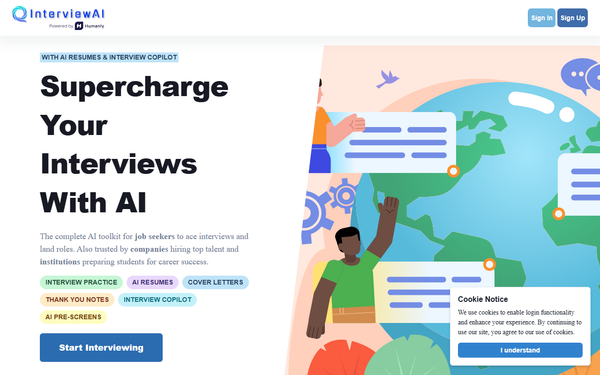
InterviewAI (https://www.interviewai.io/) is an AI-powered toolkit that streamlines both candidate preparation and the interviewer hiring process. It automatically generates real-time, role-specific interview questions, provides a customizable question library, manages interview workflows (including note-taking and candidate tracking), and produces intelligent AI follow-up questions based on responses. Additional capabilities include AI-powered resumes, cover letters, thank you notes, an interview copilot, and async pre-screening tools. Primary use cases include helping job seekers practice mock interviews with scoring and feedback to build confidence, enabling recruiters and hiring managers to conduct efficient, consistent interviews (live or async) to identify top talent faster, and supporting educational institutions in preparing students for career success through standardized simulations.
The platform targets a broad audience: job seekers and candidates seeking personalized practice, HR professionals and recruiters in companies of any size looking to reduce time-to-hire and bias, and career services/educators at colleges or training programs. It positions itself as an all-in-one solution rather than a recruiter-only or candidate-only tool, bridging both sides of the interview equation.
Key Features & Capabilities
Core functionality centers on AI-driven question generation tailored to any job category or position, a pre-loaded library for quick customization, real-time follow-up questions that adapt to candidate answers, interview management tools (saving notes, tracking progress), and automated analysis/scoring for objective evaluation. Standout features that differentiate it include:
- Dual-sided design: Comprehensive mock practice for candidates (unlimited interviews, voice-to-text input, custom templates, detailed per-question and overall scoring, performance archive, and data-driven insights) alongside interviewer tools for live or async sessions.
- Async interview mode: Candidates respond on their own schedule with video/audio submissions; AI handles transcripts, sentiment/contextual analysis, summaries, and insights to cut initial screening time.
- Integrated job-prep suite: AI resumes, cover letters, thank you notes, and copilot tools beyond just interviews.
- Bias-reduction and efficiency claims: Real-time tailoring and objective scoring aim to standardize processes and reduce manual effort (e.g., fewer initial interviews needed).
Limitations include no mentioned deep integrations with ATS platforms (Applicant Tracking Systems), potential variability in AI-generated question relevance or scoring nuance (common to generative AI tools), and relatively sparse independent validation of long-term reliability compared to more established competitors. Advanced enterprise features like team collaboration dashboards or heavy customization appear limited or not prominently detailed.
User Experience
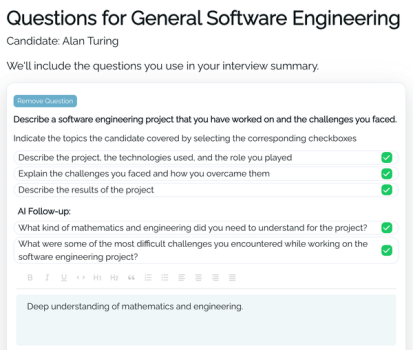
The interface is described as convenient and beginner-friendly, with a clean flow: users select or input a job role/position, and AI immediately generates tailored content or starts a practice/live session. Setup feels straightforward—select mode (practice or conduct interview), customize if needed, and proceed with voice/text input for responses. Learning curve is low for basic use, as features like voice-to-text and instant feedback are intuitive.
Documentation and support resources are minimal on the public site; no extensive help center, video tutorials, or detailed guides were prominently linked. Support appears primarily in-app or via standard contact forms. Related mobile apps (potentially companion tools) receive mixed feedback on UI jankiness and speech recognition accuracy, though the core web platform lacks widespread complaints about lag or navigation issues. Overall, it prioritizes speed and simplicity over polished enterprise-level onboarding.
Performance & Reliability
Real-time question generation and follow-ups are reported as fast and responsive, with no widespread reports of slowdowns during practice or live sessions. Async mode efficiently handles submissions with automated transcripts and insights, enabling scalable hiring. As of April 2026 research, known issues are limited: some users of similar companion apps note occasional speech-to-text inaccuracies or minor crashes, but these do not appear systemic for the main platform. Public user reviews are sparse across G2, SourceForge, and forums, making broad reliability hard to gauge—positive anecdotes highlight time savings and useful feedback, while general AI interview tool concerns (e.g., occasional off-topic follow-ups or scoring subjectivity) apply here too. No major outages or reliability scandals surfaced in searches.
Pricing & Value
InterviewAI offers tiered access with a limited free/trial option ("Try for free") before premium unlocks. Candidate-focused Premium passes include:
- Weekly: $4.99
- Monthly: $14.99
- Annual: $59.99 (significant savings, over 75% vs. monthly)
All premium tiers provide unlimited practice interviews, full scoring/analysis, custom templates, archive, and future features. For companies, separate Async hiring plans scale by number of active jobs: approximately $19/month (Essential, 1 job), $39 (mid-tier, 5 jobs), up to $99 (Pro, 15 jobs), with unlimited candidate interviews per job.
Value proposition is strong for budget-conscious users or small teams: low entry cost compared to enterprise video-interview platforms, combined candidate/interviewer tools in one place, and measurable efficiency gains (e.g., reduced screening time). It undercuts many competitors while delivering core AI automation. However, those needing heavy customization, ATS integrations, or proven scalability at large enterprises may find alternatives with more robust support worth the higher price.
Practical Tutorial
Official tutorials or demos are not prominently featured on the public site, so the following is a practical, real-world walkthrough for a common task—preparing as a job seeker for a Software Engineer interview (or, equivalently, an interviewer setting up a tailored session). This is based directly on the platform's described flow as of April 2026.
-
Sign up / Log in: Visit https://www.interviewai.io/ and click "Start Interviewing" or "Get Ready for Jobs." Create a free account (email/Google signup) to access basic features or trial.
-
Select your mode/role: Choose "Candidate Practice" (for mock interviews) or "Conduct Interview" if hiring. For this example: Candidate mode. Input job title ("Software Engineer") and company/industry details (e.g., "Mid-level role at a tech startup focusing on full-stack web apps").
-
Generate questions: AI instantly creates 8–12 tailored questions (mix of behavioral, technical, situational). Use the pre-loaded library to add/edit or create a custom template blending AI and your own questions.
-
Start the practice session: Begin recording (voice-to-text or manual typing). Answer each question (up to 3 attempts per question in some modes). AI generates smart follow-ups in real time based on your responses (e.g., "You mentioned React—can you walk through a challenging component you built?").
-
Receive instant feedback: After each answer (or at session end), get automated scoring (overall + per-question), detailed analysis (strengths, improvements, confidence metrics), and a summary report. Review the interview archive for progress tracking.
-
Enhance with extras: Switch to AI Resume/Cover Letter tools to align your materials, or use the Interview Copilot for live tips during an actual interview.
-
Upgrade for unlimited access: If limited by trial, subscribe to Premium for full scoring, unlimited sessions, and reports. Export/share your performance summary.
For interviewers: Replace step 2 with "Async" or live mode, invite candidates via link/email, and review AI-generated transcripts/insights post-submission. Full walkthrough aligns with the platform's "one convenient place" promise and takes under 5 minutes to start. Official site updates may include video demos—check the homepage for any new resources.
Final Verdict
Overall rating: 4.2/5 – A solid, affordable AI assistant that delivers on its promise of real-time tailored questions and streamlined workflows, with strong value for the price and useful extras like resumes/copilot tools.
Who should use this tool: Recruiters, HR teams, small-to-mid-size companies, job seekers, and educators who want an easy, cost-effective way to generate consistent questions, practice effectively, or run async screens without complex setup. It's ideal for those prioritizing speed and AI assistance over enterprise integrations.
Who should avoid this tool: Large enterprises needing deep ATS integrations, extensive team collaboration, or heavily validated reliability with thousands of reviews/support SLAs; also users sensitive to occasional AI inaccuracies in scoring or question relevance.
One-sentence recommendation: InterviewAI is a practical, budget-friendly all-in-one AI interview companion worth trying if you're seeking quick efficiency gains for hiring or personal prep—start with the free trial to see if it fits your workflow.