Inworld AI Review: Build Lifelike AI Characters and Voice Agents

Overview & Purpose

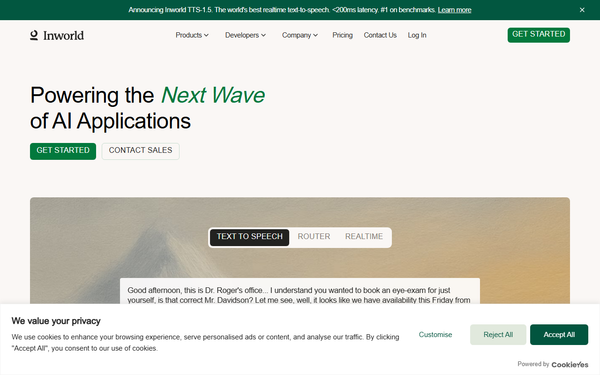
Inworld AI is a comprehensive realtime voice AI infrastructure platform designed for developers and creators to build lifelike AI characters, voice agents, and interactive companions. It combines a character creation studio with advanced runtime capabilities, including top-ranked text-to-speech (TTS), speech-to-text (STT), intelligent LLM routing, and full-duplex conversational APIs. The platform powers emotionally intelligent, context-aware AI interactions for games, virtual worlds, entertainment, digital workforces, customer support agents, language learning tools, and more.
Primary use cases include creating dynamic NPCs with personality, memory, and emotions for games (via Unity and Unreal Engine integrations), building scalable voice-first companions for entertainment and relationship-building, and deploying production-grade voice agents for enterprise applications. Target audience spans game developers, indie creators, VR/AR designers, AI application builders, marketers, and enterprises seeking compliant, low-latency AI infrastructure. As of April 2026 research, Inworld has shifted emphasis toward full-stack voice AI while retaining its core strength in believable character behavior.
Key Features & Capabilities
Core functionality revolves around the Inworld Studio (or Portal) for no-code/low-code character creation and the Agent Runtime for deployment. Users define characters using natural language prompts for personality, backstory, goals, emotions, and knowledge bases. The system then generates realtime dialogue, emotional responses, and behaviors powered by multiple ML models.
Standout features include:
- #1-ranked TTS models (TTS-1.5 Max and Mini) on independent benchmarks like Artificial Analysis (ELO ~1,236), with sub-200ms latency (P90 under 250ms for Max, under 130ms for Mini), instant voice cloning from 5-15 seconds of audio, 15+ languages, and precise timestamps for lip-sync/animation.
- Full-duplex realtime API supporting WebSocket/WebRTC streaming, intelligent turn-taking (acoustic + semantic VAD), context-aware eagerness adjustment, and dynamic context management to optimize token costs.
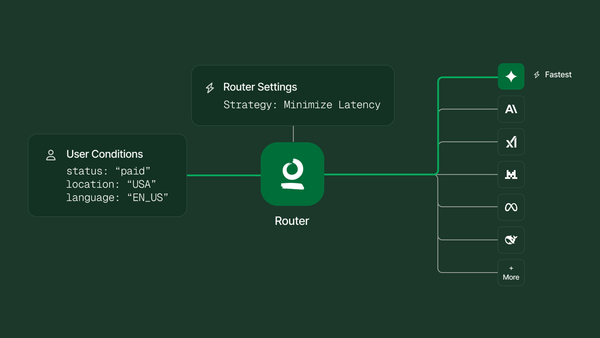
- Intelligent LLM Router accessing 200+ models from providers like OpenAI, Anthropic, Google, and others, with business-metric-based routing (cost, latency, quality) and A/B testing.
- Agent Runtime SDKs for seamless integration into Unity, Unreal Engine, Node.js, and more, including pre-built character templates for group conversations, player interactions, and emotional expression.
- Advanced character intelligence: Long-term memory, learned relationships, emotional states, tool/function calling mid-conversation, and multimodal support (voice, text, gestures in engines).
Differentiators from competitors (e.g., ElevenLabs for voice or Character.AI for chat) include the end-to-end stack (own TTS + orchestration + game-engine SDKs), provider-agnostic routing without markup on LLMs, enterprise security (SOC 2 Type II, HIPAA/GDPR options, zero-trust), and proven scale (1M daily active users for companions in 19 days).
Limitations include support for only 15 languages (strong coverage of major markets but gaps in niche ones), a steeper integration curve for full conversational agents compared to simpler TTS tools, no native in-house STT model (relies on unified transcription providers), and occasional complexity in advanced emotion tagging or custom tool implementation. Some users note limited production validation history for the TTS product (launched mid-2025).
User Experience
Inworld offers an accessible browser-based Studio/Portal for character creation with intuitive prompts, sliders for traits, and a realtime playground for testing voice/chat interactions—ideal for non-technical creators. The learning curve is moderate for basics but steeper for production integrations (SDK setup, API orchestration, engine-specific components). Interface quality is clean and modern, with workspaces for collaboration and visual tools for voice design.
Documentation is robust, featuring quickstarts for Unity, Unreal, Node.js CLI, and Router setup, plus detailed API references, migration guides, and best practices. Support includes community resources on lower tiers, priority email for Developer plans, and dedicated Slack/AM for Enterprise. Users praise the natural emotional range and low latency in reviews, though some report initial setup hurdles with SDKs or debugging realtime streaming.
Performance & Reliability
Performance stands out with sub-200ms TTS latency enabling fluid conversations, high-accuracy transcription, and reliable full-duplex streaming. The platform handles context management efficiently to prevent token bloat, and the router optimizes for uptime/cost. Real-world scale has been demonstrated through rapid user growth in companion apps.
Known issues are minimal in recent feedback, but include occasional pricing sensitivity at high volumes and past complaints about cost increases for TTS (clarified as tiered plan adjustments). Reliability is enterprise-grade with continuous monitoring and compliance certifications; no widespread outages reported in 2025-2026 reviews. Game engine integrations provide solid NPC consistency and memory retention, though heavy custom logic may require optimization.
Pricing & Value
Inworld uses a credit-based, usage-driven model with generous free access for prototyping. Plans (as of April 2026):
- On-Demand/Free: Limited TTS (up to ~40 minutes), basic testing.
- Creator: $25/mo ($25 credits), suitable for small projects.
- Developer: $300/mo ($300 credits, 20% off TTS/STT).
- Growth: $1,500/mo ($1,500 credits, 40% off).
- Enterprise: Custom (volume discounts, on-prem, SLAs).
TTS pricing is highly competitive: Mini at $25/1M characters (drops to $15 on Growth); Max at $50/1M (drops to $30). STT at $0.35/hr base. LLMs billed at provider cost with no markup. Credits roll over on paid plans; overages at plan rates. Add-ons include professional voice cloning and HIPAA.
Value is excellent versus alternatives like ElevenLabs (25x cheaper at comparable/superior quality for high-volume use) or other character platforms, especially for developers needing realtime performance and engine integrations. Indie creators get strong bang-for-buck on Creator/Developer tiers; enterprises benefit from compliance and scale discounts. Drawback: costs can add up quickly for very high-volume deployments without higher-tier discounts.
Practical Tutorial
Inworld provides official quickstarts and tutorials. Below is a step-by-step walkthrough for a common task—creating and deploying a simple AI NPC companion in Unity (adaptable to Unreal or API-only). This uses real examples from Inworld's documentation and assumes a free account.
-
Sign up and access Studio: Go to platform.inworld.ai, create a free account, and navigate to the Studio/Portal. Start a new workspace.
-
Create your character: Click "Create Character" or use a template (e.g., "Companion" or "Support Agent"). Use natural language: "Luna is a friendly meditation instructor, 28 years old, calm and empathetic. She speaks slowly with pauses for reflection. Goals: guide users through breathing exercises and build emotional connection." Adjust personality sliders for emotion intensity, knowledge bases (upload documents or define facts like "Favorite quote: 'Breathe, and let go'"), and relationships (e.g., remembers user preferences).
-
Configure voice and behavior: Select TTS model (TTS-1.5 Mini for lowest latency). Clone a voice or customize (e.g., "female, hesitant style, young"). Enable emotions, turn-taking, and function calling if needed (e.g., integrate external tools like calendar APIs).
-
Test in playground: Use the built-in chat/voice interface to simulate conversations. Refine with examples: User says "I'm stressed," character responds empathetically with breathing guidance and appropriate tone.
-
Integrate into Unity: Download the Inworld Agent Runtime SDK from the portal or Unity Asset Store. Import into a Unity 2022.3+ project. Add InworldCharacterComponent to your NPC GameObject and InworldPlayerComponent to the player. Set your API key in project settings. Use the Character template graph for pre-built interactions (includes emotions, group chat if multiple NPCs).
-
Deploy and run: Build a simple scene, play in editor, and interact via keyboard/mic. For voice: enable realtime streaming. Test memory by referencing prior dialogue. Publish to WebGL, mobile, or PC.
For full details and code samples, see official Unity quickstart at docs.inworld.ai/Unity/runtime/get-started or Node.js CLI tutorial for API-only agents. Video examples (e.g., building an AI tutor) are available on YouTube. Expect 15-30 minutes for a basic prototype.
Final Verdict
Overall rating: 4.5/5. Inworld AI excels as a production-ready platform for realistic, voice-enabled AI characters and agents, delivering exceptional quality, low latency, and developer-friendly tools that outperform many competitors on cost-performance metrics.
Who should use this tool: Game developers, VR creators, and teams building voice companions or enterprise agents who value emotional depth, seamless engine integration, and scalable realtime performance—especially those already comfortable with SDKs or APIs.
Who should avoid this tool: Complete beginners seeking zero-code drag-and-drop experiences without any technical setup, or budget-constrained hobbyists needing ultra-high-volume usage without scaling to paid tiers (prototyping is free, but production adds costs).
One-sentence recommendation: If you're ready to bring truly lifelike, emotionally intelligent AI characters and voice agents into games or apps with best-in-class TTS and easy deployment, Inworld AI is one of the strongest options available in 2026.