Iris.ai Review: The Ultimate AI Workspace for Scientific Research
Overview & Purpose

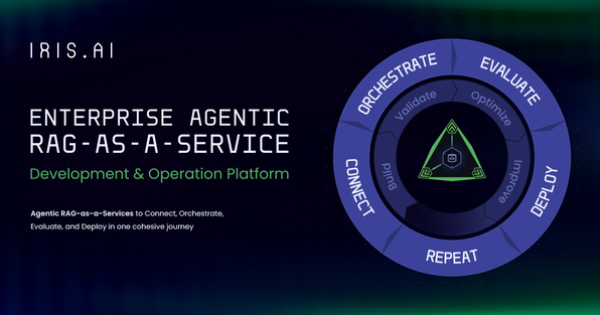
Iris.ai Researcher Workspace, also known as RSpace™, is an AI-powered platform designed to accelerate and enhance the research process by enabling users to upload collections of research documents or connect directly to live data sources such as publishers, patent databases, internal repositories, or other relevant proxies. It provides a suite of intelligent tools for searching full-text descriptions, contextual filtering, data extraction and systematization, large-scale document analysis, single- or multi-document summarization, and monitoring new publications with customizable alerts. The primary use cases include streamlining literature reviews, conducting systematic reviews, performing patent analysis, extracting structured data from scientific texts (e.g., for pharmacovigilance or medical writing), exploring interdisciplinary topics, and managing R&D workflows in regulated or data-intensive environments.
The target audience consists primarily of researchers, academics, students, and R&D professionals in fields such as pharmaceuticals, biotechnology, chemistry, manufacturing, public sector, and telecommunications. It is particularly valuable for institutions and enterprises handling large volumes of scientific literature or internal documents, rather than general developers, marketers, or designers. Research conducted as of April 2026 shows the tool has evolved from its 2022 launch into a comprehensive workspace integrated with broader Iris.ai offerings like Axion™ for data ingestion and Neuralith™ for enterprise AI foundations.
Key Features & Capabilities
Core functionality revolves around modular AI tools that work together within user-created datasets:
- Explore: A content-based search engine that generates visual context maps from problem statements, article links, or descriptions, ideal for broad or exploratory searches without precise keywords.
- Analyze: Provides topic modeling and word frequency overviews to quickly understand dataset content and refine by inclusion/exclusion.
- Filter: Offers smart contextual similarity matching, metadata filters (e.g., year, repository), and entity-based refinement for precise narrowing.
- Summarize: Delivers abstractive summaries (not extractive copy-paste) for single or multiple documents to speed up skimming and writing.
- Extract: Systematizes data points into structured databases or tables, with options for custom layouts, unit unification, confidence scoring, and context addition.
- Additional capabilities include dataset merging, chat-like interaction for querying, and monitoring for new matching documents.
Standout features that differentiate it from competitors (such as Elicit, ResearchRabbit, or Scite) include its purely content/semantic-based approach (avoiding citation bias and treating papers from all sources equally), field-specific model training without human intervention, powerful structured extraction from complex elements like tables/figures, and seamless support for both uploaded collections and live proxy connections. It excels in handling interdisciplinary discovery and reducing manual review time in niche or emerging fields.
Limitations include a primary focus on English-language scientific literature (with plans for expansion), potential challenges parsing highly complex PDFs (e.g., heavy equations or non-standard layouts), iterative refinement required for optimal results rather than one-click perfection, and dataset handling best suited for manageable sizes (e.g., narrowing millions to under 10,000 then further). No built-in hypothesis extraction or full disagreement spotting in current versions, per the product roadmap.
User Experience
The interface is modern and dashboard-driven, with tools accessible via a right-side panel for intuitive workflow progression from dataset creation to analysis and export. Users start by uploading files (PDFs, .csv, .bibtex, .ris, .xml) or connecting sources, then apply tools iteratively. The learning curve is moderate: beginners can quickly grasp basics like Explore and Summarize via visual maps and notifications, but mastering smart filters, context matching, and extraction customization benefits from practice and resources. Non-experts may initially find terminology or iterative strategies overwhelming, though the modular design empowers customization to individual workflows.
Interface quality is clean and research-focused, emphasizing visual aids (maps, topic clouds) over clutter. Documentation and support are robust, including a dedicated Help Center with an AI assistant, video library for tool-specific demos (e.g., Explore, Analyze, Summarize), webinars, training sessions for enterprise users, and detailed blog guides. Community feedback and case studies highlight responsive support for licensed users.
Performance & Reliability
The platform performs efficiently for its intended scale, with rapid dataset analysis, context matching, and summarization that significantly reduce literature review times—testimonials report cutting weeks or months from R&D timelines and enabling review of far more patents or papers. It handles large initial imports (e.g., from PubMed) and iteratively narrows them reliably, with background processing and notifications minimizing wait times. Reliability is strong in regulated environments due to secure private workspaces for internal + external data.
Known issues or common complaints are relatively few in public sources but include occasional generic outputs in lighter usage tiers, minor PDF parsing limitations with equations/tables/figures, and the need for user verification of AI-extracted data to ensure accuracy. Independent reviews are limited (the tool is more enterprise/academic-oriented), but official case studies from ArcelorMittal and public sector users consistently praise speed and relevance over 21 competing vendors. No widespread downtime or major reliability complaints surfaced in 2025–2026 searches.
Pricing & Value
Iris.ai Researcher Workspace operates on a subscription model with no prominently advertised free tier (though trials or limited access may be available upon request). Individual researcher and student plans include significant discounts (up to 75% for academics), while enterprise and institutional licensing is custom-priced based on users, data volume, and integrations. Pricing details are managed via Stripe on the subscription page and are not fully transparent publicly; users must log in or contact sales for exact quotes in EUR (VAT included). Enterprise options emphasize dedicated support, training, custom evaluations, and governance features.
Value proposition is excellent for heavy users: the time savings, bias reduction, and structured output capabilities often outweigh costs compared to manual processes or less specialized alternatives like general AI chat tools or basic literature databases. It provides strong ROI in R&D-intensive sectors through measurable efficiency gains (e.g., 80%+ faster AI deployment in related Iris.ai offerings) and secure handling of proprietary data. For casual or budget-constrained individual users, the paid-only access and learning investment may feel high relative to lighter free tools.
Practical Tutorial
A practical, official step-by-step tutorial is available in Iris.ai's blog for one of the most common tasks: streamlining a literature review. Below is a condensed walkthrough based on their March 2024 guide (still relevant in 2026), using real examples for a researcher exploring "avian flu response strategies in public health crises" (inspired by public sector case studies). Full original guide: https://iris.ai/blog/streamlining-literature-reviews-with-the-researcher-workspace-a-step-by-step-guide-1. Official tool videos (e.g., YouTube: "Iris.ai Researcher Workspace - Explore Tool") complement this.
-
Create Your Initial Dataset: Log into your Workspace dashboard and click "Add Content." Upload a .ris/.bibtex export from PubMed/Google Scholar (or connect live to a proxy) or start with a broad Explore search using your problem statement: "avian flu response strategies in public health crises." Aim for an initial set (e.g., thousands of articles); apply basic metadata filters (recent years, relevant repositories) to get under 10,000 documents if starting from millions.
-
Quick Overview with Analyze: Select the dataset and open the Analyze tool from the side panel. Review topic clouds and word frequency; include/exclude clusters (e.g., keep "public health intervention" and "vaccine development," exclude unrelated "avian genetics"). This provides a bottom-up view of content. Save the refined set as a new dataset.
-
Refine Iteratively with Filter and Explore: For focused narrowing (target <150 articles): Use Filter's contextual similarity—input a detailed description like "real-time crisis data collection and interdisciplinary insights on avian flu." Sort by similarity scores and apply multiple context filters (Venn-style overlap). Alternatively, use Explore to build visual maps from top articles, bookmarking and snowballing into new maps (15–18 maps recommended for unknowns). Merge datasets as needed and manually delete outliers.
-
Extract and Systematize Data: On the final small set, run Extract to pull structured data points (e.g., "crisis response timelines," "efficacy metrics") into a customizable table/database. Add confidence scores and context for traceability.
-
Summarize and Export: Apply Summarize to the curated list for abstractive overviews or individual key papers. Use Chat for follow-up queries. Generate a report draft automatically and export (CSV/PDF) or set monitoring alerts for new matching publications.
This process typically takes hours instead of weeks. Practice with sample datasets from the dashboard for best results; enterprise users receive personalized training.
Final Verdict
Overall rating: 4.5/5 (9/10). Iris.ai Researcher Workspace excels as a specialized, content-driven AI suite that meaningfully transforms tedious research tasks into efficient, insightful workflows.
Researchers and R&D teams in science, academia, or regulated industries with frequent literature reviews or data extraction needs should use this tool for its bias-reducing search, powerful extraction, and customizable all-in-one workspace that delivers verifiable time and cost savings. Casual browsers, students on extremely tight budgets without institutional access, or those needing only basic keyword search should avoid it due to the subscription cost, moderate learning curve, and focus on deep, iterative scientific analysis rather than quick answers.
One-sentence recommendation: If you're a serious researcher drowning in literature or patents, Iris.ai Researcher Workspace is a worthwhile investment that turns overwhelming data into actionable knowledge faster than manual methods or generic AI tools.