Jamahook Sound Assistant Review: The Ultimate AI Sample Finder
Overview & Purpose
Jamahook Sound Assistant is an AI-powered VST/AU plugin (with AAX support now available) that inserts directly into any major DAW on the master track. It listens to a short section of your project (typically 4 or 8 bars), analyzes its harmonic, rhythmic, tempo, key, mood, genre, and groove characteristics using deep neural networks developed with the Fraunhofer Institute, and instantly suggests matching loops, samples, stems, or instrumentals from either your personal local library or Jamahook’s cloud library. The primary use cases include rediscovering forgotten audio files in large personal collections, quickly finding harmonically or rhythmically compatible elements to fill gaps in a track, overcoming writer’s block, and streamlining the sample-browsing process without ever leaving the DAW environment.
The target audience is music producers—especially those working in electronic, hip-hop, pop, or loop-based genres—who have accumulated extensive sample libraries over the years and want an intelligent assistant to turn chaotic folders into creative fuel. It is not aimed at developers, marketers, or non-audio professionals.
Key Features & Capabilities
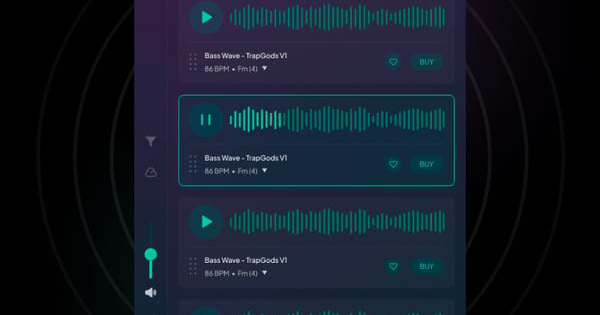
Core functionality revolves around real-time audio analysis and smart matching. The plugin generates a unique “musical signature” for the playing section and ranks suggestions by match proximity, automatically transposing pitch and adjusting tempo to fit your project. Users can switch between Harmonic matching (melodic compatibility, including pitch-shifted suggestions from other keys), Rhythmic matching (groove-focused, including drums), or Drums-only mode. Advanced filters let you narrow results by instrument, mood, genre, or source (local/cloud), while auditioning happens in real time with adjustable playback volume before dragging directly into your arrangement.
Standout features that differentiate it from competitors include the hybrid local/cloud approach—local matching runs entirely offline on your machine via the separate Offline Agent (no files leave your computer), while cloud access taps an ever-growing royalty-free library of hundreds of thousands of loops—and the ability to index and search your own disorganized hard-drive libraries without manual tagging. This “rediscover your own sounds” capability is rare in in-DAW tools.
Limitations include variable AI suggestion accuracy (some matches feel spot-on, others random or only loosely related according to user tests), time-consuming initial indexing for very large libraries (thousands of files can take hours), no generative audio creation (it only matches existing content), and the requirement of a paid cloud subscription for permanent ownership and commercial use of downloaded loops. AAX was planned for 2024 and is now confirmed available, but detailed system requirements beyond standard DAW compatibility are not publicly specified.
User Experience
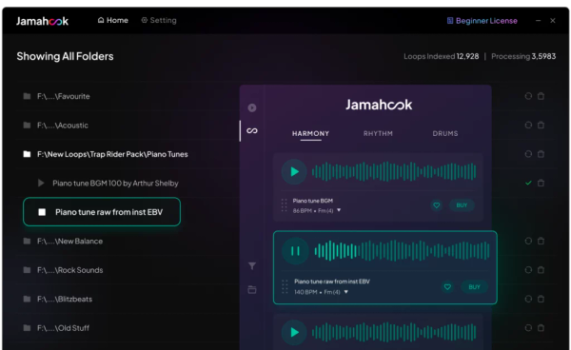
Installation is straightforward: download the free plugin and Offline Agent from the official site, sign up for a free account, and insert the plugin on your master bus. The interface is clean and minimalist—large Match button, source selector (Local/Cloud), filter toggles, and a results list with audition controls—making it accessible even for producers with limited technical skills. The learning curve is low once the initial library indexing is complete (a one-time process), though first-time users may spend 30–60 minutes setting up folders and understanding match types.
Documentation is adequate but not exhaustive: an official PDF guide walks through setup and advanced workflows, supported by a Freshdesk forum, email support ([email protected]), and multiple YouTube tutorials from the developer and independent creators. No extensive in-app help or interactive onboarding exists, but the simple UI reduces the need for heavy reading.
Performance & Reliability
Matching happens in seconds after analysis, with results ranked and ready to audition instantly. Local processing speed scales with library size and CPU (parallel indexing is supported in the Agent), while cloud queries are near-instant. Reliability is generally solid for real-time use inside the DAW, with no widespread reports of crashes or major bugs in 2025–2026 user discussions.
Known issues from user feedback include occasional “weird or random” suggestions that do not feel harmonically accurate, particularly in complex or layered projects, and longer indexing times for libraries exceeding 10,000 files. Some producers report the AI relying more on fingerprinting than deep creative insight, leading to hit-or-miss inspiration. No critical reliability failures (e.g., data loss or compatibility crashes) appear in forums or reviews, though maintenance windows can temporarily affect cloud matching.
Pricing & Value
The core Jamahook Sound Assistant plugin and basic cloud matching/previews are completely free to download and use (guest mode available). Local matching requires the Offline Agent, available as a one-time perpetual license starting at €39.99 (Basic package) with Pro unlimited indexing options often available via deals around $50–100. Cloud Loop downloads require a subscription: Artist (€3.99/mo or €39.99/yr for 20 loops), Studio (€9.99/mo or €99.99/yr for 80 loops), or Pro (€19.99/mo or €190.99/yr for 200 loops). All subscriptions include full commercial rights.
Value is strong for producers with large existing libraries—the one-time local license pays for itself quickly by unlocking forgotten content—while occasional cloud use offers affordable inspiration without browser hopping. Compared with alternatives like Splice (browser-based, subscription-only) or manual DAW search tools, Jamahook’s in-DAW AI + local indexing provides unique efficiency, though heavy cloud users may find the loop quotas restrictive versus unlimited platforms.
Practical Tutorial
Official tutorials and a downloadable PDF guide are available through the Jamahook support portal and developer YouTube channel. Below is a step-by-step walkthrough for the common task of finding a matching drum loop or melodic element for an 8-bar section of your track (tested in Ableton Live and FL Studio).
- Download and install the free Sound Assistant plugin and Offline Agent from jamahook.com.
- Launch the Offline Agent, log in, and add your sample folders (it performs AI classification and filtering in two phases—use parallel processing and duration/BPM filters to speed things up).
- In your DAW, insert Jamahook Sound Assistant on the Master track.
- Play your project and position the playhead over a representative 4- or 8-bar section (mute unrelated elements for focused analysis if needed).
- In the plugin, select “Local Matching” (or Cloud), choose Harmonic, Rhythmic, or Drums-only mode.
- Click the large Match button—the AI analyzes and populates ranked suggestions with auto pitch/BPM correction.
- Apply filters (instrument, mood, genre) to refine results, audition loops by clicking Play, adjust volume, then drag the winner directly into your arrangement.
- For cloud matches you love, click Buy (requires active subscription) or add to Favorites for later.
Repeat for different song sections or re-match after arrangement changes. For visual walkthroughs, see the official DC Breaks tutorial (https://www.youtube.com/watch?v=TQaljw4oids) or genre-specific examples such as “How to create a Trap beat with Jamahook” on YouTube.
Final Verdict
Overall rating: 7.5/10.
Jamahook Sound Assistant shines for music producers who maintain large personal sample libraries and crave seamless, AI-driven discovery inside their DAW—it genuinely speeds up workflow and sparks ideas that manual searching often misses. Producers on tight budgets or those expecting flawless generative AI should avoid it, as the hit-or-miss suggestion quality and cloud subscription model may frustrate more than they help.
Jamahook Sound Assistant is a worthwhile investment for any loop-based producer tired of digging through folders—pair it with your existing library and watch creativity flow faster than ever.