Jellypod Review: Turn Your Email Newsletters Into a Daily Podcast

Overview & Purpose

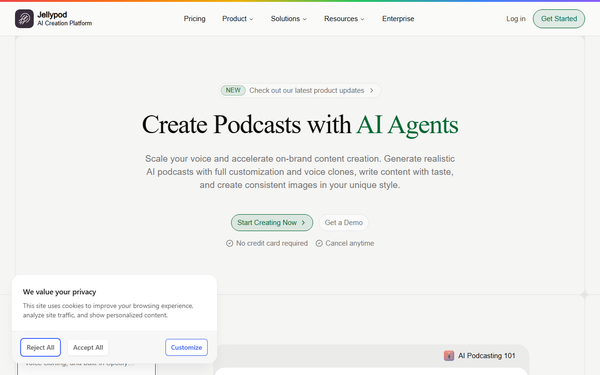
Jellypod is an AI-powered tool that transforms your email inbox—particularly newsletter subscriptions and daily digests—into a personalized daily podcast. Users forward emails or subscribe them to a unique Jellypod address, and the platform uses AI to extract key insights, condense them into a conversational audio recap, and deliver it on a customizable schedule. This audio-first format lets busy professionals consume information hands-free during commutes, workouts, or chores, replacing hours of reading with an engaging podcast experience.
Primary use cases include staying current on industry news, tech updates, marketing trends, or research papers without opening dozens of emails. While it launched with this consumer-focused inbox summarization at its core, the platform has expanded into a full AI podcast studio for creators, allowing source uploads (emails, PDFs, URLs) to generate professional multi-host episodes with publishing capabilities. Target audience spans busy knowledge workers such as developers, marketers, designers, executives, educators, and researchers who suffer from email overload and prefer audio consumption over skimming text. It also appeals to content creators and teams seeking to repurpose newsletters or internal communications into shareable audio.
Key Features & Capabilities
Core functionality revolves around automated email processing: forward subscriptions to your dedicated Jellypod address, and the AI generates a concise, multi-voice daily recap podcast. Standout features include adjustable playback speed, choice of multiple AI voices (with personality customization), offline mode for downloads, customizable delivery schedules, support for multiple daily pods (e.g., one for work, one for personal), completely ad-free listening, simple email forwarding integration, and strong privacy focus (no training on user data, secure processing, and user-owned content).
Differentiators from competitors like Google NotebookLM or manual summarizers include seamless inbox automation without manual uploads, natural conversational dialogue between AI hosts, one-click offline access, and expansion into full publishing (RSS feeds, Spotify, Apple Podcasts, YouTube) plus clip generation for social media. Advanced capabilities now cover voice cloning, script editing with pronunciation guides, up to four hosts reacting naturally, multilingual support in 30+ languages, analytics dashboards, and style-consistent visuals or video versions.
Limitations include credit-based usage (free tier caps episode length and frequency), occasional AI summarization inaccuracies or missed nuances in complex technical content, and voices that reviewers describe as competent but sometimes lacking the ultra-natural “ums” and interruptions of human speech or top-tier alternatives. No native mobile app is prominently featured for all platforms (web and limited iOS support noted in early feedback), and advanced team collaboration or enterprise features require higher plans.
User Experience
Setup is straightforward with a minimal learning curve—most users are up and running in minutes by simply forwarding a few emails. The interface is clean and modern, with an intuitive dashboard for managing sources, voices, schedules, and listening history. Playback controls (speed, skip, download) feel polished and podcast-app-like, making daily use effortless.
Documentation is solid via the help center at /help/docs, including step-by-step guides, video tutorials, and a blog covering updates like emotional voice cues or script iteration. Support resources include responsive in-app chat or email, plus community mentions on Product Hunt and Reddit. Users praise the “set it and forget it” flow, though some note the shift toward creator tools can make inbox-specific settings slightly less prominent in the current UI.
Performance & Reliability
Generation is fast—daily recaps typically arrive within minutes of the scheduled cutoff, with efficient processing even for high-volume inboxes. Offline downloads and consistent audio quality ensure reliability across devices and networks. Publishing and distribution (when using the expanded features) work smoothly with one-click platform integration.
Known issues from user reviews include occasional factual slips in summaries (common to AI tools) and voice output that can sound slightly robotic during rapid edits or complex topics. No widespread outages or major complaints appear in recent searches on Reddit, Product Hunt, or G2; early adopters from 2024–2025 report steady improvements in accuracy and voice naturalness. Credit consumption is predictable, avoiding surprise limits for moderate use.
Pricing & Value
Jellypod offers a generous free tier with 2,000 monthly credits (enough for several short daily recaps), unlimited drafting, and basic voice options—no credit card required. Paid plans scale with usage: Creator level provides 8,000 credits (approximately $29–$59/month depending on billing cycle), more voice clones, longer episodes, and publishing features; Business reaches 30,000 credits (around $150–$200/month) with team collaboration and analytics; Enterprise is custom for large organizations with unlimited credits and dedicated support. Annual billing often discounts rates.
Value is strong for heavy newsletter consumers: the time saved (hours per week) far outweighs the cost compared to alternatives like manual reading, paid newsletter apps, or limited free tools such as NotebookLM (which lacks easy publishing and inbox automation). The ad-free, privacy-first experience and evolution into a full studio add long-term utility, though light users may stick to the free plan indefinitely.
Practical Tutorial
Jellypod provides official guidance through its help docs and blog. Below is a step-by-step walkthrough for the most common task—setting up your personalized daily newsletter recap podcast—based on the current platform (verified as still fully supported via email forwarding as of March 2026).
-
Sign up for free at https://jellypod.ai/. No credit card needed; create an account with email or Google in under a minute.
-
Access your unique forwarding address in the dashboard (under “Sources” or “Inbox Setup”). Copy the dedicated @jellypod.ai email.
-
Forward or subscribe your newsletters. Forward existing subscriptions or update newsletter sign-ups to route directly to your Jellypod address. Start with 5–10 key sources (tech digests, industry reports, marketing updates) to test.
-
Customize your podcast in settings: Choose or clone voices (multiple hosts for natural dialogue), set playback preferences (speed, tone), define daily schedule (e.g., 7 AM delivery), and adjust summary depth or topics to prioritize.
-
Receive and enjoy your daily pod. Jellypod processes overnight emails and emails you a link or pushes to your player. Listen on any device with adjustable speed (0.5x–3x), download for offline mode, or stream ad-free. For advanced use, edit the script directly or generate social clips.
For official video walkthroughs and updates, visit the /help/docs section or blog posts on newsletter-to-podcast workflows. Example: Forward a popular tech newsletter like The Batch or Morning Brew, and within days you’ll have a 10–15 minute conversational recap ready each morning.
Final Verdict
Overall rating: 4.3/5. Jellypod excels for anyone drowning in email newsletters who craves hands-free audio consumption—it delivers genuine time savings and engagement through smart AI summarization. Who should use it: Busy professionals (developers, marketers, designers, executives) seeking a daily audio digest or creators wanting an easy entry into professional podcasting with publishing power. Who should avoid it: Users with very low email volume (free tier suffices but paid may feel unnecessary), those needing pixel-perfect factual accuracy without review, or anyone preferring text-only summaries over audio. One-sentence recommendation: If you want your inbox turned into a personalized, ad-free daily podcast that fits your lifestyle and grows with your needs, Jellypod is a smart, evolving investment worth trying for free today.