Jetpack AI Assistant Review: The Ultimate WordPress Co-Pilot
Overview & Purpose

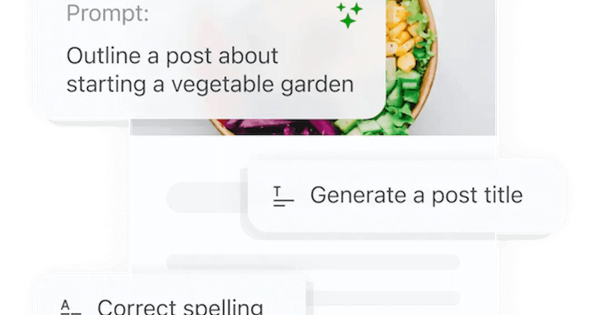
Jetpack AI Assistant is an AI-powered content creation and optimization tool developed by Automattic and deeply integrated into the WordPress Gutenberg block editor. It allows users to generate, edit, refine, and enhance written content, structured elements like tables and forms, and even images directly within the familiar WordPress interface—no copying and pasting between external AI tools required. Primary use cases include drafting full blog posts or pages from prompts, creating lists and tables on the fly, generating illustrative images or featured images based on content, improving readability and clarity of existing text, changing tone, translating content, summarizing or expanding sections, and optimizing titles, summaries, and excerpts for better performance and SEO.
The tool is targeted primarily at WordPress users such as bloggers, content marketers, small business owners, freelancers, site administrators, and digital creators who manage self-hosted WordPress sites (via the Jetpack plugin) or WordPress.com sites. It appeals to non-technical users who want AI assistance without leaving the editor, as well as marketers and writers who need quick, on-site content workflows. It is less suited for developers focused on code or non-WordPress platforms.
Key Features & Capabilities
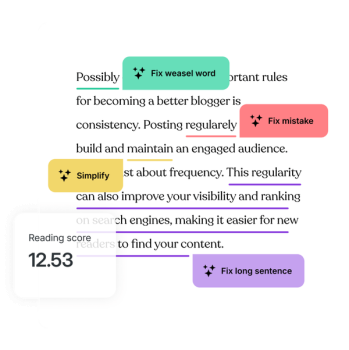
Core functionality revolves around the AI Assistant block and toolbar integrations. Users can prompt the AI to generate text, tables, lists, or forms with pre-filled content; create AI images from text descriptions or site context; and apply one-click edits to selected blocks or text. Standout editing tools include adaptive tone adjustment (multiple styles like formal or conversational), superior spelling and grammar correction, readability analysis (flagging long sentences, complex words, or ambiguous phrasing), title and summary generation, and AI-powered translations. Additional capabilities cover featured image generation, post excerpts, alt text suggestions, and a feedback mechanism (thumbs up/down) to improve future outputs.
Differentiating features include its native Gutenberg integration, which makes it feel like a natural extension of WordPress rather than a separate app—context-aware image generation tied to your site's content is particularly useful. It also supports form creation with prompts and provides publishing optimizations like one-click title improvements. Compared to standalone tools like ChatGPT or other plugins (e.g., AI Engine), the seamless in-editor experience and no-need-for-API-key setup give it an edge for pure WordPress users.
Limitations include request-based quotas (even on paid plans, though generous for most users), occasional generic or bland output that requires human editing, and potential hallucinations common to large language models. It lacks advanced customization like custom model selection or very long-form automation for high-volume publishers. Some users note it struggles with highly niche or technical topics without detailed prompts.
User Experience
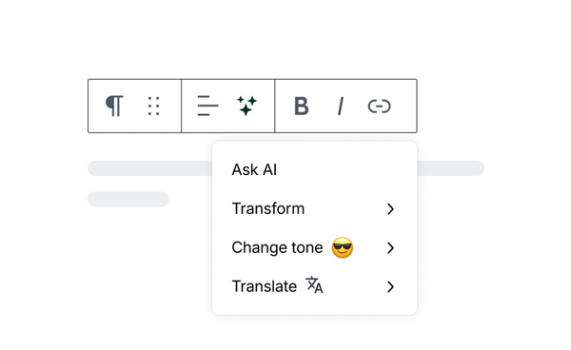
Jetpack AI Assistant boasts an extremely low learning curve for anyone already comfortable with the WordPress Gutenberg editor. Features are accessible via a dedicated AI block (searchable or via /ai shortcut), a toolbar button on selected text, or inline prompts—making it feel intuitive and conversational, like chatting with a colleague inside the editor. The interface is clean, native, and non-intrusive, blending perfectly with WordPress without adding clutter.
Documentation is solid through official Jetpack support pages and FAQs on the product site, with helpful guides on block usage, prompt best practices, and feature explanations. Priority support is available on paid plans, and community resources plus YouTube tutorials supplement this. Overall, users praise its accessibility even for beginners, though some long-time WordPress users express frustration with Jetpack's broader plugin bloat or the inability to fully disable AI elements if undesired.

Performance & Reliability
The tool performs quickly and efficiently for most tasks, with generations completing in seconds directly in the editor. Reliability is generally high thanks to Automattic's infrastructure, and it handles common content tasks without noticeable lag. Image generation and complex edits (like readability fixes) also respond promptly.
Known issues include occasional request limit hits on free tier, rare connection errors tied to Jetpack's cloud services, and plugin conflicts on heavily customized sites. User complaints center on output quality needing refinement (not always publication-ready) and privacy concerns around data sent to AI models. Forums occasionally mention irritation with AI being "pushed" in updates, though it can be managed via editor preferences. No widespread outages or major reliability complaints appear in recent 2025–2026 reviews.
Pricing & Value
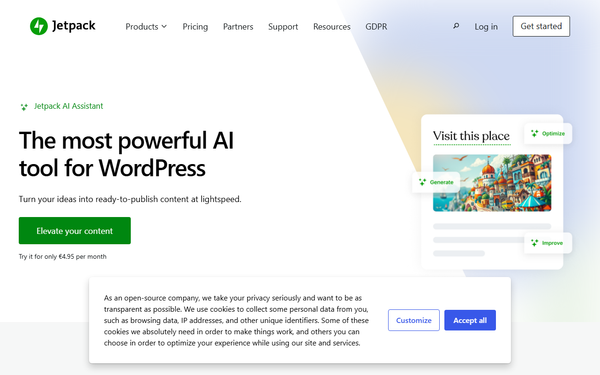
Jetpack AI Assistant offers a generous free tier with 20 requests per site (one-time quota for testing). The paid upgrade starts at $4.95 per month for the first year (50% off promotion), renewing at the full price of approximately $9.95–$10 per month per site. This includes high request capacity sufficient for the vast majority of users, priority support, and all free features. Pricing is per-site and can sometimes bundle into broader Jetpack plans.
Value is excellent for WordPress-centric users: it eliminates workflow friction compared to copying text to/from external AI tools like ChatGPT ($20/month) and provides specialized Gutenberg tools at a lower effective cost. It stands out as cost-effective versus alternatives requiring API keys or higher subscriptions, especially for moderate content volume. High-volume users or those needing unlimited generations may find limits restrictive, but for typical bloggers and marketers, it delivers strong ROI through time savings (often 1+ hours per post).
Practical Tutorial
Official tutorials are available on the Jetpack support site (e.g., "Create Better Content with Jetpack AI"). Below is a step-by-step walkthrough for a common task: generating and refining a blog post section using real examples (as of April 2026). This assumes you have the Jetpack plugin installed and activated on a self-hosted WordPress site, with a connected WordPress.com account.
-
Setup: In your WordPress dashboard, go to Plugins > Installed Plugins and ensure Jetpack is active. Connect your site via the Jetpack dashboard if prompted (required for AI features).
-
Insert the AI Assistant Block: Open or create a new post/page in the Gutenberg editor. Click the block inserter (+) or type
/aiand select "AI Assistant" block. -
Generate Content: In the block, enter a natural-language prompt. Example: "Write a 400-word conversational introduction to the best budget coffee makers in 2026, including key features and why they're worth it." Hit Enter or the generate button. The AI will produce text instantly (costs 1 request).
-
Refine with Toolbar: Select the generated text. Click the AI toolbar button (or use options in the block sidebar). Choose "Change tone" (e.g., make it more professional), "Translate" (to one of 12 languages like Spanish or French), "Summarize," "Expand," "Simplify," or "Correct grammar/spelling." For readability, use the "Improve" or feedback tools to flag issues.
-
Add Supporting Elements: For a table, prompt a new AI block: "Create a comparison table of 3 budget coffee makers with columns for price, features, and pros/cons." For an image: Insert an Image block, select AI generation, and prompt "Generate a realistic photo of a modern drip coffee maker on a kitchen counter."
-
Optimize for Publishing: Highlight the full post content and use AI tools for a better title ("Generate 5 SEO-friendly title options") or featured image based on the content. Accept or regenerate as needed.
-
Review and Publish: Use the readability analyzer to fix flagged issues. Provide thumbs-up/down feedback on outputs to train the AI. Save and preview.
This process typically takes minutes and keeps everything in one editor. For video demos, search YouTube for "Jetpack AI Assistant tutorial."
Final Verdict
Overall rating: 8.5/10. Jetpack AI Assistant excels as a convenient, integrated AI companion for everyday WordPress content creation, shining for users who value seamless workflow over raw power.
Who should use this tool: WordPress bloggers, marketers, and site owners who create regular content and want fast, in-editor assistance for drafting, editing, images, and optimization—especially those already using Jetpack for other features. It saves significant time and keeps creativity in your native environment.
Who should avoid this tool: High-volume publishers needing unlimited generations without limits, users uncomfortable with AI data processing, or those preferring standalone tools with more advanced customization. Also avoid if you dislike Jetpack's ecosystem or run highly customized sites prone to conflicts.
One-sentence recommendation: If you build and write on WordPress, Jetpack AI Assistant is a smart, affordable upgrade that turns your editor into a powerful AI co-pilot—highly recommended for most users.