Jogg AI Review: Create Realistic AI Avatar Videos in Minutes
Overview & Purpose
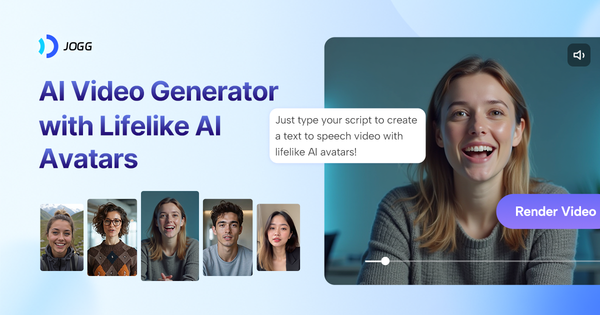
Jogg AI is an AI-powered video generation platform that creates realistic avatar-based videos from text prompts, photos, scripts, product URLs, or existing content—eliminating the need for filming, actors, or manual editing. It automates the full workflow to produce professional, ready-to-publish videos complete with lifelike avatars, accurate lip-syncing, AI-generated voices, captions, and built-in editing tools. Primary use cases include short-form social media content, video ads, e-commerce product promotions, faceless tutorials, podcasts, video translation, and marketing campaigns. It excels at repurposing ideas or URLs into engaging UGC-style (user-generated content) videos in minutes.
The target audience spans marketers, content creators, e-commerce businesses, advertisers, agencies, real estate professionals, educators, and startups—particularly those who are camera-shy or need to produce high volumes of video quickly without high production costs. It is especially appealing to beginners and small teams focused on rapid content creation for platforms like TikTok, Instagram, or YouTube Shorts.

Key Features & Capabilities
Core functionality revolves around avatar video generation: users can select from a gallery of 450+ avatars, generate custom ones from text or photos (talking photo, photo animator), or use advanced AvatarX models. Features include text-to-video, URL-to-video (ideal for instant product ads), AI voice cloning with 100+ voice options, automatic lip-sync, AI script writer, video translation, product photo/video shoots, and green-screen editing. Built-in tools add captions, VFX, brand kits (higher tiers), batch processing, and exports in 9:16 or 16:9 formats.
Standout features differentiating it from competitors like HeyGen or Synthesia include seamless URL-to-video automation for e-commerce (paste a product link and get a full ad), hyper-realistic UGC-style lip-sync praised as among the best for short-form content, and affordable access to advanced editing without external software. It also supports image-to-video and cinematic avatar VFX for more creative outputs.
Limitations include credit-based consumption (even “unlimited” plans have practical caps and monthly avatar limits), occasional unnatural avatar movements or jittery expressions in longer videos, video length restrictions on lower tiers (up to 1–3 minutes free/Starter), no direct social media publishing, and variable voice quality. Advanced cinematic control or multi-speaker interactions remain less refined than premium rivals.

User Experience
Jogg AI offers a clean, modern, browser-based dashboard with an intuitive workflow that keeps the learning curve minimal—even for complete beginners. Users can preview edits for free before committing credits, and the interface supports drag-and-drop adjustments, templates, and one-click rendering. Most reviewers describe it as “user-friendly” and faster than traditional tools like CapCut combined with AI.
Interface quality is professional and responsive, though some note occasional queue delays during peak times. Documentation includes a comprehensive knowledge base, blog with use-case guides, and live chat support (priority for higher plans). Email support ([email protected]) is available, but response times and resolution of complex issues receive mixed feedback. No extensive video academy exists, but community YouTube tutorials fill the gap effectively.

Performance & Reliability
Video generation is typically fast—often under a minute for short clips and a few minutes for edited outputs—with high-quality 1080p exports. The platform claims reliable lip-sync and expressive avatars, and many users report it replaces multiple tools for ad production. Processing speed improves significantly on paid plans (fast to fastest).
Known issues include inconsistent avatar head movements or robotic gestures in some generations, occasional generation failures or stuck renders, and credit burn rates that can feel opaque. Queue times during high demand and watermarking on free exports are common complaints. Reliability is strong for short UGC-style videos but less dependable for long-form or highly customized projects. Overall user ratings reflect solid everyday performance with room for polish.

Pricing & Value
Jogg AI uses a credit-based subscription model with a generous free tier and clear paid upgrades (billed monthly or yearly with up to 50% savings):
- Free: $0 – 3 credits, up to 3 avatar videos (1 min max), 1 custom avatar, watermark on exports, limited tools.
- Starter: $29/mo or $24/mo yearly – 200 credits/year, up to 200 videos (3 min max), 3 custom avatars, watermark-free, faster processing.
- Creator: $69/mo or $36/mo yearly (flash sale pricing) – 480 credits/year, unlimited videos (15 min max), 10 custom avatars, brand kit, faster processing.
- Team: $89/seat/mo or $46/seat/mo yearly – 720 credits/year, unlimited videos (30 min max), multi-user workspace.
- Enterprise: Custom – unlimited everything, dedicated support, custom features.
Pay-as-you-go is not prominently offered; credits cover all generations and tools. Value is strong for budget-conscious users needing quick short-form output—often cheaper than hiring freelancers or using higher-end alternatives—especially via occasional AppSumo lifetime deals (with noted past benefit restoration issues). Compared to pricier competitors, it delivers excellent speed and realism for the price but requires monitoring credit usage.
Practical Tutorial
Jogg AI provides official guidance via its blog and knowledge base. Below is a step-by-step walkthrough (current as of March 2026) for the common task of creating a text-to-avatar promotional video—based directly on the platform’s “Text to Avatar Video” flow and verified through multiple user demos.
- Sign up or log in at app.jogg.ai (free account works for testing; no credit card needed).
- From the dashboard, click “Avatar Video” or “Text to Video” (or select “AI Creator” for advanced options).
- Choose or create an avatar: Browse the gallery, generate from text prompt (“professional female marketer, 30s”), upload a photo for talking photo, or use custom upload.
- Input your script: Paste text (or upload audio), let the built-in AI script writer refine it if desired, and select a voice (100+ options or clone your own).
- Customize: Set aspect ratio (9:16 for social), add captions, background music, or product elements (or paste a URL for auto-generation). Adjust length and style.
- Preview: Review the full video with free editing tools (lip-sync, timing, green screen if needed)—no credits used yet.
- Render and edit: Click “Generate” (consumes credits), then use the built-in editor for final tweaks (captions, VFX, brand kit on paid plans).
- Export: Download in 1080p, watermark-free on paid plans.
Example: For a 30-second product ad, paste a Shopify URL → AI auto-generates script, avatar, and visuals → render in ~45 seconds. Official tutorial resources: Jogg AI blog post on tutorial videos and YouTube community walkthroughs demonstrate identical flows with real-time examples.
Final Verdict
Jogg AI earns a solid 4.2 out of 5. It delivers exceptional speed, realistic avatars, and cost savings for high-volume short-form content, making it ideal for marketers, e-commerce brands, content creators, and small businesses seeking quick, professional videos without production headaches. Avoid it if you require ultra-consistent long-form cinematic quality, advanced multi-speaker scenes, or zero tolerance for occasional rendering quirks—consider more premium tools like HeyGen instead. One-sentence recommendation: If you need fast, affordable, UGC-style avatar videos that look pro in minutes, Jogg AI is a game-changing choice worth starting with the free tier today.