Jounce Review: The All-in-One AI Marketing Hub for Content Creators
Overview & Purpose

Jounce (jounce.ai) is an all-in-one AI marketing hub that combines AI-powered copywriting with artwork generation to help users create professional marketing content in minutes rather than days or weeks. It streamlines the entire content creation process through customizable templates, an intelligent document editor, and AI chat capabilities, enabling quick production of blog outlines and full posts, social media content, email campaigns, website copy, product descriptions, ad headlines, and complete campaign strategies. Primary use cases include generating high-converting ad copy, SEO-optimized blog content, e-commerce descriptions, and visual assets for social or promotional materials.
The tool primarily targets marketers, small business owners, and content creators who need fast, effective copy without hiring expensive writers or spending hours brainstorming. It is particularly suited for teams in digital marketing, e-commerce, and small-to-medium businesses looking to scale content output while maintaining quality and brand voice.
Key Features & Capabilities
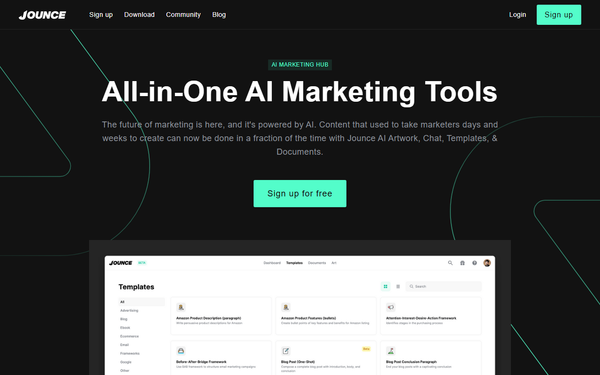
Core functionality revolves around a simple “Click. Prompt. Done.” workflow: users select from over 70 (and growing) marketing-specific templates, input a prompt or topic with tone preferences, and receive instant AI-generated content. The AI-powered document editor supports real-time editing, automatic formatting, spell/grammar checking, and slash-command (/ ) integration for additional templates directly in the document. Additional tools include AI artwork generation, headline optimizers, and campaign planners.
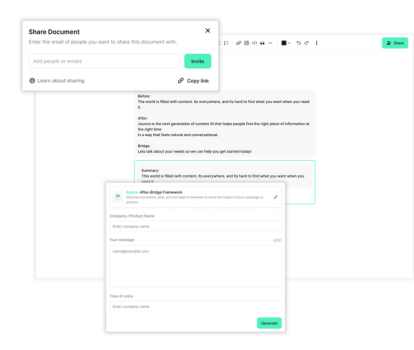
Standout features that differentiate Jounce include unlimited team members with seamless collaboration (share documents or invite via email without restrictions), dark mode for comfortable long sessions, native content templates that auto-format and expand sections, and integrated AI art for visual marketing assets—creating a true all-in-one hub rather than a pure text generator. The editor’s thumbs-up/down feedback system helps the AI learn preferences over time.
Limitations include credit-based usage on paid plans (word and image limits rather than truly unlimited generation), occasional generic or “robotic” output that requires human editing, and a lack of deep third-party integrations (e.g., direct WordPress or email platform exports). No advanced analytics or A/B testing tools are built-in, and mobile functionality is limited to a responsive web experience without a dedicated app.
User Experience
Jounce boasts an intuitive, clean interface with minimal learning curve—most users can generate their first piece of content in under two minutes. The dashboard organizes templates by category with powerful search and filters, while the document editor feels familiar to tools like Google Docs but with AI smarts embedded. Dark mode and responsive design enhance usability for extended sessions.
Documentation is straightforward via the official blog, which includes practical how-to guides and feature announcements. Support resources include in-app feedback mechanisms, though some users report slower email response times. Overall, the experience prioritizes speed and simplicity over complexity, making it accessible for non-technical users while powerful enough for pros.
Performance & Reliability
Generation is lightning-fast, with most templates delivering polished drafts in seconds. Users consistently praise reliability for marketing-specific outputs that understand industry context better than generic AI tools. The platform handles team collaboration smoothly without performance lag.
Known issues from user reviews include occasional billing glitches on paid subscriptions and outputs that can feel formulaic or overly wordy, requiring light editing. Customer service receives mixed feedback, with some praising responsiveness to feature requests while others note delays in support tickets. No widespread outages or major reliability complaints were evident in 2025–2026 reviews.
Pricing & Value
Jounce operates on a freemium model with a free tier for testing (limited words/images) and paid Pro plans based on monthly word and image credits. Typical tiers include entry-level options around $9–12/month for 20,000 words plus AI art, scaling to $39–52/month for 200,000 words with priority support and extended limits; unlimited team members are included across all plans. Enterprise/custom options are available via contact.
Value is strong for small teams and frequent content creators: unlimited collaborators and the copy + art combination make it more cost-effective than separate tools like Jasper or Midjourney. Compared to competitors, it offers competitive pricing with marketing-focused templates that reduce editing time. Free access allows low-risk trials, though heavy users quickly benefit from upgrading. Some older pages still reference “free and unlimited” beta access, but current usage is credit-capped on paid tiers.
Practical Tutorial
Jounce provides an official step-by-step guide in its blog (https://www.jounce.ai/blog/how-to-use-jounce-ai). Here is a complete walkthrough for a common task—generating and expanding a blog post outline into full content (as of April 2026):
- Log in at app.jounce.ai (free signup available) and navigate to the Templates dashboard.
- Use the left sidebar filters or top search bar to find “Blog Post Outline” (or type “blog”).
- Select the template, paste your topic or relevant text (example: “Introduce Jounce AI as an all-in-one marketing tool that saves time on content creation”), choose tone (e.g., “informational” or “conversational”), and click Generate. You’ll receive a structured outline with 8–12 sections in seconds.
- Review the output and thumbs-up/down individual sections for AI learning. Click “Open in a Document” to load it into the AI editor.
- In the editor, place your cursor where you want to expand and type “/” to summon templates. Select “Command” or “Blog Post” template, paste the outline or a section description, and Generate to create full paragraphs.
- For specific improvements, highlight text (e.g., a short sentence), type “/sentence expander”, specify adjustments (“make more conversational”), and replace the original.
- Edit formatting directly: change headings, add lists, insert links, or use built-in grammar/spell check. Add AI art by selecting an image template and prompting (e.g., “modern marketing dashboard illustration”).
- Collaborate: click Share to generate a link or invite team members by email for real-time editing.
- Export or publish once polished.
This process typically takes 10–15 minutes from idea to ready-to-publish post. Experiment with other templates like “Social Media Post” or “Product Description” for variety.
Final Verdict
Overall rating: 4.5/5
Jounce excels for marketers, small business owners, and content teams who prioritize speed, collaboration, and marketing-specific templates paired with AI art—its unlimited team access and intuitive editor deliver excellent value for consistent content production. Avoid it if you need unlimited free generation, advanced SEO analytics, deep platform integrations, or flawless first-draft AI without any editing.
One-sentence recommendation: Jounce is a highly practical, team-friendly AI copywriting and art hub that dramatically accelerates marketing content creation for busy professionals who value simplicity and results over perfection out of the box.