Kansei App Review: The Best AI Tool for Language Fluency?

Overview & Purpose

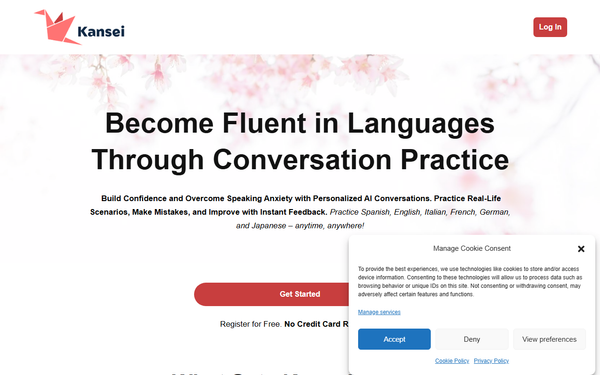
Kansei.app is a freemium AI-powered chat platform designed specifically for language learners to practice conversational skills through interactive dialogues with specialized AI companions. Users engage in natural text- and voice-based conversations that simulate real-life scenarios, receive instant personalized feedback on grammar, vocabulary, pronunciation, and fluency, and build confidence while immersing themselves in cultural contexts. Primary use cases include overcoming speaking anxiety, preparing for travel or daily interactions, reinforcing vocabulary through tailored narratives, and receiving on-demand explanations from a dedicated language tutor. The tool supports Spanish, English, Italian, French, German, and Japanese.
The target audience is primarily language learners of all levels—beginners seeking foundational practice, intermediates aiming to boost fluency, and hobbyists or professionals wanting low-pressure immersion—rather than developers, marketers, or designers. It appeals to self-learners who prefer flexible, anytime access over traditional classes or generic chatbots.
Key Features & Capabilities
Core functionality revolves around AI companions (lifelike personas such as Hanako for Japanese practice) that adapt dynamically to a user's proficiency, interests, and goals. Conversations unfold naturally with text or voice input/output, while "conversation boosters" provide helpful prompts to sustain engaging dialogues. Real-time feedback highlights mistakes and offers corrections, and a separate tutor mode delivers detailed breakdowns of grammar rules, vocabulary usage, and pronunciation tips. Practical real-life scenarios and cultural immersion elements differentiate the experience from rote drills.
Standout features include its laser-focused specialization in language mastery (unlike generic AI tools such as ChatGPT, which lack built-in pedagogical structure or conversation boosters) and credit-based flexibility that rolls over unused credits indefinitely. Speech recognition is continually refined for more accurate voice practice.
Limitations include a credit consumption system (no truly unlimited free tier), dependency on internet connectivity with no offline mode, potential over-restrictive content filters that can interrupt natural dialogue, and lack of deep integration with other learning apps. Advanced customization of personas or interface is minimal, and feedback accuracy has occasionally been reported as inconsistent.

User Experience
Kansei.app features an intuitive web-based interface (accessible via chat.kansei.app after simple sign-up) that feels approachable for most users, with clean chat windows and easy switching between text/voice modes. The learning curve is generally low for anyone familiar with chat apps, though some newcomers may find the credit system and persona selection slightly confusing at first.
Interface quality is modern and distraction-free, emphasizing immersion over flashy design. Documentation is light on the official site (primarily blog posts on language tips), but community resources such as YouTube walkthroughs fill the gap effectively. Support is limited to in-app feedback forms and email; no live chat or extensive knowledge base exists. Overall sentiment from the small user base is mixed, with praise for accessibility offset by isolated reports of frustration with restrictions.
Performance & Reliability
Conversations are designed for real-time responsiveness with instant feedback and improving speech recognition, delivering efficient practice sessions even on standard devices. Speed and reliability are generally strong for short interactions, aligning with claims of boosting fluency through seamless immersion.
Known issues are sparse due to limited public reviews, but one detailed 2025 Trustpilot report highlighted bugs preventing proper response evaluation, overly restrictive filters that reject neutral or non-sugarcoated input, and personas failing to sustain open-ended dialogue—issues that made the experience feel inferior to free alternatives at the time. No widespread recent complaints appear on social platforms or review aggregators as of March 2026, suggesting possible improvements, though reliability may still vary by language or device.
Pricing & Value
Kansei operates on a credit-based freemium model: new users receive a free trial of 20 credits upon login. Paid monthly credit plans start at $4.99 (Basic), scaling to $14.99 (Standard) and $29.99 (Premium), with options for one-time credit top-ups from $2.99. Unused credits roll over indefinitely with no expiration, allowing flexible "pay only for what you use" usage. No enterprise options are advertised.
Value is strong for budget-conscious learners seeking specialized conversational tools—far more structured and feedback-oriented than free generic AI, yet significantly cheaper than human tutors or premium apps like some competitors. The proposition shines for occasional practice but may feel restrictive for heavy daily users compared to unlimited plans elsewhere.
Practical Tutorial
Official documentation is minimal, but a helpful community-driven tutorial exists on YouTube ("Master Spanish with AI: In-Depth Kansei App Tutorial"). Below is a self-contained step-by-step walkthrough for a common task—starting a personalized Spanish conversation to practice ordering food at a restaurant (based on the platform's real-life scenario capabilities as of March 2026).
- Visit https://kansei.app/ and click "Start Chatting" or go directly to https://chat.kansei.app to sign up/log in with email (free 20-credit trial activates automatically).
- On the dashboard, select your target language (e.g., Spanish) from the supported options.
- Choose or create an AI companion/persona suited to your goal (e.g., "Maria – Friendly Café Owner" for cultural immersion); customize level and interests if prompted.
- Start a new chat and type or speak: "Hola, quiero practicar pedir comida en un restaurante mexicano. ¿Puedes actuar como el mesero y guiarme?" The AI will initiate a narrative scenario with context (e.g., "Estamos en un restaurante en México City. ¿Qué te gustaría pedir?").
- Engage naturally in the conversation (text or voice). Use conversation boosters if stuck—the AI suggests prompts like "Try asking about the specials."
- After a few exchanges, type "/feedback" or tap the feedback button; the AI provides instant corrections, explanations (e.g., "You said 'quiero agua' correctly, but for politeness add 'por favor'"), pronunciation tips, and vocabulary expansions.
- End the session to check remaining credits. Repeat daily; credits roll over automatically.
For visual guidance and Spanish-specific examples, watch the official-style tutorial at https://www.youtube.com/watch?v=1pfLd4U7FqE. The process typically takes under two minutes to begin practicing.
Final Verdict
Overall rating: 3.8/5 – a capable niche tool with strong conversational focus but limited by its small user base and occasional reliability hiccups.
This tool suits motivated self-learners or travelers wanting affordable, personalized speaking practice in the supported languages without committing to expensive tutors. It excels at building confidence through adaptive immersion.
Avoid it if you need unlimited free usage, offline access, highly customizable experiences, or guaranteed human-level nuance—free generic AI or more established apps like LanguaTalk may serve better in those cases.
Kansei.app delivers enjoyable, targeted language practice for anyone serious about conversational fluency on a budget—worth trying the free credits today.