Keepmind AI Review: The Ultimate AI-Powered Study Companion
Overview & Purpose

KeepMind AI is an intelligent study companion that instantly converts any input—text notes, PDFs, images, links, articles, or even Excel files—into AI-generated flashcards, interactive quizzes, and structured mind maps. It functions as a complete learning workflow tool, using advanced spaced repetition to schedule reviews at optimal intervals based on the forgetting curve, helping users retain information long-term rather than simply organizing static notes. Primary use cases include exam preparation, language learning (e.g., vocabulary or verb conjugations), summarizing business books or articles, preparing speeches from scripts, mastering software shortcuts (like Figma), or exploring hobbies such as coffee brewing methods.
The tool targets students, self-learners, educators, and professionals who need to quickly master new topics or certifications (e.g., CFA Level 1) without spending hours manually creating study materials. It appeals especially to those overwhelmed by traditional flashcard apps like Anki or Quizlet, positioning itself as a faster, AI-first alternative for efficient knowledge retention. Research as of March 2026 shows it has gained traction among top students and educators worldwide, though it remains a relatively new entrant in the edtech space.
Key Features & Capabilities
Core functionality revolves around effortless content ingestion and output generation: users paste text, upload files, or enter a topic prompt, and the AI extracts key points, creates high-quality Q&A flashcards, turns them into customizable quizzes for self-testing, and builds visual mind maps organized into chapters. An advanced FSRS algorithm (noted as FSRS-5 or FSRS-6 variants across updates) powers spaced repetition scheduling, allowing users to achieve strong retention with fewer daily reviews compared to basic systems. Additional capabilities include progress tracking, deck organization into folders, blank deck creation for manual additions, sharing decks with passwords or whitelists, bulk imports/exports, and custom learning plans where Pro users set daily card limits, retention goals, and review intervals.
Standout features that differentiate it from competitors include fully automated card generation from any source with no manual tagging or editing required, seamless integration of quizzes directly from flashcards (with 1:1 mapping and instant regeneration), automatic mind map visualization to reveal concept relationships, and “Study Assistants” for instant summaries or guides. These go beyond Anki’s manual focus or Quizlet’s simpler templates by creating an all-in-one active-recall loop.
Limitations include dependency on AI accuracy—cards may occasionally need human verification or editing for complex subjects—and a freemium model that restricts free users to limited generations or decks. Missing features noted in early feedback include deeper third-party integrations (e.g., direct Anki export or calendar sync), advanced analytics beyond basic progress, and offline mode for mobile (though apps support core study). No enterprise plan is prominently offered.
User Experience
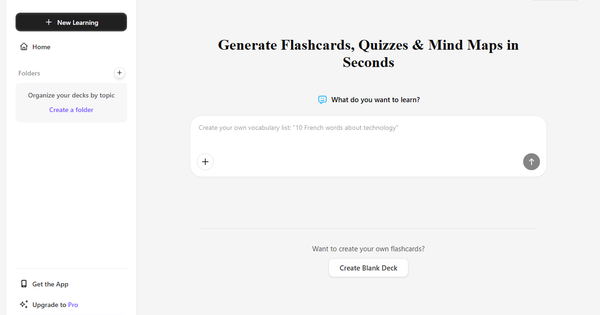
KeepMind AI boasts a low learning curve thanks to its intuitive chat-like input for deck creation and one-click generation flows—most users can start studying meaningful content within seconds via guest mode without even signing up. The interface is clean, modern, and distraction-free, with gesture-friendly mobile navigation, virtual scrolling for handling thousands of cards, and responsive design across web, iOS, and Android. Recent redesigns (late 2025 onward) introduced simplified home screens, intuitive editing, and swipe actions, making it feel polished and fast.
Documentation is lightweight: no extensive external knowledge base exists, but the in-app tutorial, changelog, and quick-start prompts guide users effectively. Support comes primarily through responsive developer updates on the App Store and in-app feedback channels; the team has addressed user concerns promptly (e.g., clarifying new card-quantity input methods after UI changes). Overall, the experience prioritizes simplicity over power-user customization, earning praise for saving study time.
Performance & Reliability
Generation and loading are notably speedy—flashcards and mind maps appear in seconds, with virtual scrolling optimizations delivering up to 10x faster performance for large decks. Spaced repetition calculations feel accurate and adaptive, and cross-device syncing (web to native apps) works reliably after login. Active development through February 2026 has resolved early issues like PDF upload errors, duplicate imports, and mobile gesture bugs.
Known issues are minimal and mostly tied to infrequent post-update UI shifts; one App Store reviewer in late 2025 called an update “trash” for initially obscuring the card-count selector, though the developer quickly clarified the improved input method and rolled out further refinements. With only a small sample of public reviews (4.8/5 on the App Store from 22 ratings), broader complaints are scarce—no widespread reports of crashes, AI hallucinations, or data loss. Reliability appears solid for a young tool, bolstered by frequent patches and guest-mode testing.
Pricing & Value
KeepMind offers a generous free tier (including guest access, basic generations, and core studying) alongside Keepmind Pro subscriptions. Pro unlocks unlimited flashcards/quizzes/mind maps, advanced AI customization (language, card count, instructions), custom learning plans, priority features, and ad-free experience. Pricing via in-app purchases or web (Paddle) is straightforward: $10 monthly, $59 annually, or $159 lifetime, with occasional new-user discounts (e.g., 30% noted in updates) and local-currency display. Apple Pay and Google Play billing are supported for mobile.
Value is strong compared to manual alternatives like Anki (free but time-intensive) or premium Quizlet subscriptions, especially for users who generate study materials frequently—Pro pays for itself quickly by cutting preparation time in half. Free tier suits light or trial use, while lifetime Pro offers excellent long-term ROI for serious learners. No enterprise tier exists, limiting appeal for teams.
Practical Tutorial
Official video tutorials or extensive guides are not yet published (the site and apps rely on in-app onboarding and a public changelog), so here is a complete, real-world walkthrough for a common task: turning uploaded class notes into flashcards, a quiz, and a mind map, then beginning spaced-repetition study. This example uses the topic “Principles of Marketing” as referenced on the official site.
- Visit https://keepmind.ai/ (or open the iOS/Android app) and click “New Learning” or use guest mode to skip sign-up.
- Choose your input method: paste class notes directly into the prompt box, or click “Add file”/“Add image”/“Add link” and upload a PDF or screenshot of your notes (e.g., a lecture on the 4Ps of marketing).
- In the generation screen, type or confirm the topic (“Principles of Marketing”) and, if on Pro, specify details like “Generate 15 cards in English with custom instructions: focus on definitions and examples.” Hit generate—the AI instantly creates flashcards, extracts key points, and suggests a mind map.
- Review and tweak: open the deck, edit any card by clicking it (questions regenerate automatically if needed), then click “Generate Quiz” to create a multiple-choice or 1:1 test from the same cards.
- Visualize connections: select “Mind Map” or “Study Guide” to see an interactive diagram of chapters and relationships (regenerate anytime).
- Start studying: tap “Review” to enter spaced-repetition mode. Cards appear at optimal intervals based on your performance; swipe or tap to rate difficulty and track progress. Set daily limits in deck settings (Pro) for personalized scheduling.
The entire process takes under two minutes. For reference, try the live demo at https://keepmind.ai/ or check the latest app version for updated flows.
Final Verdict
Overall rating: 4.7/5
KeepMind AI is ideal for students, self-learners, and educators who want an effortless, all-in-one AI study system to turn raw materials into effective revision tools quickly and retain knowledge longer. It shines for time-poor users focused on active recall rather than manual organization.
Avoid it if you prefer fully manual control, advanced Anki-style customization, heavy integrations, or have no budget for Pro after exhausting the free tier—power users may still reach for more mature open-source options.
In one sentence: Keepmind AI is a smart, fast-evolving flashcard powerhouse that genuinely makes learning faster and more enjoyable for anyone tired of manual study prep.