Kippy AI Review: The Best AI Tool for Language Speaking Practice
Overview & Purpose

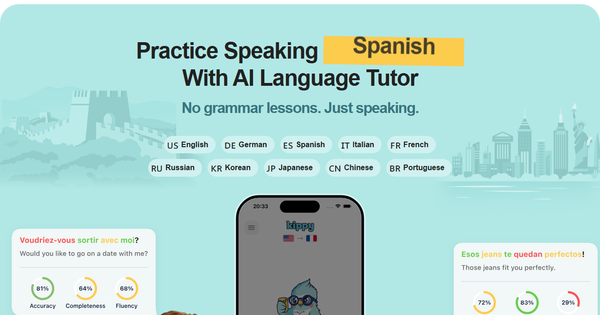
Kippy AI is a mobile app (currently iOS-only with Android version forthcoming) that serves as an AI-powered language tutor focused exclusively on conversational speaking practice and pronunciation improvement. Users engage in real-time voice dialogues with a cheerful budgie character named Kippy, practicing casual chats, role-playing real-life scenarios, and receiving instant feedback to build fluency and confidence. Primary use cases include supplementing grammar-focused apps like Duolingo with actual speaking drills, preparing for travel, job interviews, social conversations, or overcoming the common "freezing" fear when speaking a new language. It is explicitly not a full language course or grammar tutor—its tagline is "No grammar lessons. Just speaking."
The target audience is primarily intermediate learners (not absolute beginners), including students, travelers, professionals, and hobbyists who already have basic vocabulary and grammar but need safe, anytime practice to improve spoken fluency. It supports 10 languages: English, Spanish, French, German, Italian, Portuguese, Russian, Korean, Japanese, and Chinese. With over 110,000 downloads and helping more than 80,000 people practice daily, it appeals to those seeking a cost-effective, judgment-free alternative to traditional tutors or language exchanges.
Key Features & Capabilities
Core functionality revolves around voice-based conversations: users speak into the microphone, and Kippy responds in natural accents while providing real-time guidance. Key elements include 30+ real-life role-play scenarios (e.g., ordering at a restaurant or asking for directions), daily fresh conversation topics to maintain engagement, guided response suggestions when users get stuck, a two-way instant translator, and a personal phrasebook for saving useful expressions.
Standout features that differentiate Kippy from competitors like TalkPal or Speak include its friendly, chatty budgie avatar that makes sessions feel playful and low-pressure; word-by-word pronunciation ratings; comprehensive fluency assessments covering pronunciation, grammar, vocabulary, and overall flow; adaptive progress tracking with daily streaks, vocabulary growth reports, and personalized speech analytics; and gentle, context-aware corrections that highlight mistakes without overwhelming the user. The AI remembers common errors and tailors future chats accordingly, creating a supportive learning loop.
Limitations include a speaking-only focus (minimal emphasis on listening comprehension, reading, or writing skills), conversations that can feel scripted or repetitive for advanced users, and no offline mode. It is not suitable as a standalone solution for complete fluency, and speech recognition occasionally struggles with non-native accents or intermediate-level pronunciation variations. No deep integrations with other learning platforms are offered.
User Experience
Kippy boasts an intuitive interface with a clean, engaging design centered around the cute budgie mascot, making it approachable and fun rather than intimidating. The learning curve is gentle—users can jump straight into practice after selecting a language and scenario, with optional toggles for translations, hints, or difficulty adjustments. Onboarding is quick, and features like swipeable response suggestions or tap-to-speak make interactions seamless on iPhone (requires iOS 17+).
Documentation is light: the website offers feature-specific pages explaining tools like the pronunciation checker or vocabulary report, but there is no extensive user manual or in-app academy. Support is available via email ([email protected]), with developers responsive to feedback. Overall, the app earns praise for its motivational gamification (streaks and goals) and confidence-building feel, though some users note initial overwhelm from advanced phrasing in early sessions.
Performance & Reliability
Sessions run smoothly with responsive AI replies and human-like voices, enabling fluid back-and-forth practice in most cases. Progress tracking and feedback are delivered instantly post-session or in real time, helping users see measurable improvements in pronunciation and fluency over days or weeks.
Known issues include inconsistent speech-to-text accuracy, particularly for non-native speakers or those with strong accents—some App Store reviews report error rates as high as 80% in certain languages like Portuguese, requiring re-recording. Conversations can occasionally loop into repetitive patterns, and advanced users sometimes find depth limited. No major outages or crashes are widely reported, and the app performs reliably for daily 10-minute free sessions. User retention can dip after the initial 30-day honeymoon period, a common challenge noted by the developers themselves in community discussions.
Pricing & Value
Kippy follows a freemium model with a generous free tier offering 10 minutes of daily conversation practice forever—enough for consistent habit-building without commitment. Premium unlocks unlimited sessions plus full correction tools and analytics via in-app subscriptions: options include approximately $16.99 per month or annual plans ranging from $79.99 to $99.99 (depending on promotional tiers), providing excellent value compared to traditional tutors or premium competitors like Speak ($234+/year).
At roughly 93% less than one-on-one lessons, the paid plan delivers strong ROI for motivated learners through unlimited access and adaptive features. It outperforms limited free tiers in other apps while remaining far more affordable than human tutors, making it a smart supplement for cost-conscious users. No enterprise options are currently advertised.
Practical Tutorial
Official in-depth tutorials are limited (feature explanations exist on kippy.ai, and a live demo video is available on YouTube), so here is a practical, step-by-step walkthrough for a common task: preparing for a real-world scenario like ordering food in Spanish. This is based on the app's described interface and user-reported flow as of March 2026.
- Download Kippy AI Speaking Practice from the Apple App Store and create a free account (or sign in with Apple/Google).
- On the home screen, tap your target language (e.g., Spanish) from the 10 available options.
- Choose a scenario: Scroll to "Real-Life Scenarios" and select "Restaurant: Ordering Food" (or use Daily Topics for casual chat). Toggle translations and suggestions on for beginner-friendly support.
- Tap the microphone icon to start. Kippy (the budgie) greets you in Spanish and begins the role-play, e.g., "¡Hola! ¿Qué te gustaría pedir hoy?"
- Speak your response naturally. If stuck, swipe for AI-suggested replies or tap the translator. Kippy provides instant word-by-word pronunciation feedback (green for good, red for needs work) and gentle grammar corrections.
- Continue the conversation for 5–10 minutes. End the session with "Stop" or naturally.
- Review your personalized report: Check the Speech Report for fluency score, pronunciation trends, and recommendations. Save standout phrases to your personal phrasebook and view the Vocabulary Report for words used.
- For deeper practice, repeat daily to build streaks or switch to free chat mode for custom topics like "Job Interview in French."
This process typically takes under 15 minutes and directly simulates real situations. For a visual example, watch the official live demo: https://www.youtube.com/watch?v=9u13wRIMiVM.
Final Verdict
Overall rating: 4.5 out of 5. Kippy excels as an engaging, accessible tool for building speaking confidence but falls short as a complete language solution due to recognition quirks and narrow focus.
Who should use this tool: Intermediate learners who want convenient, fun, and affordable daily speaking practice to complement other resources—especially travelers, professionals prepping for interviews, or anyone intimidated by real conversations.
Who should avoid this tool: Absolute beginners needing structured grammar/vocabulary foundations, Android users waiting for official support, or those seeking comprehensive multi-skill training and flawless voice recognition across all accents.
One-sentence recommendation: Kippy AI is a delightful, budget-friendly speaking companion that turns practice into play—ideal for anyone ready to move beyond apps and start actually talking in a new language.