KittenTTS Review: The Best Lightweight Offline AI Text-to-Speech
Overview & Purpose
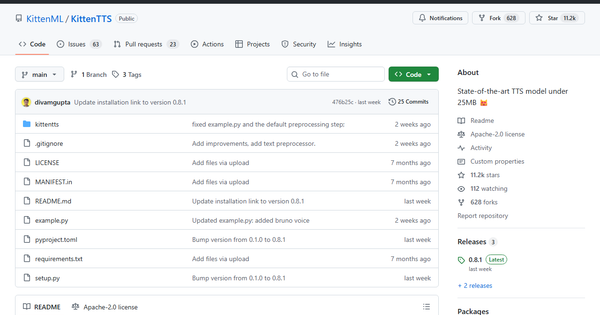
KittenTTS is an open-source text-to-speech (TTS) model developed by KittenML that converts written text into natural-sounding speech using an ultra-compact neural network. With variants as small as 15 million parameters and under 25 MB in size, it enables high-quality voice synthesis entirely on CPU hardware without any internet connection or GPU acceleration. Primary use cases include embedding voice output into privacy-sensitive applications, edge computing devices like Raspberry Pi projects, accessibility tools for screen readers or assistive tech, offline mobile/web apps, and IoT prototypes where resource constraints rule out larger cloud-based models such as those from ElevenLabs or Google TTS.
The target audience is primarily developers and hobbyists building lightweight AI applications—particularly those focused on embedded systems, browser-based tools, or privacy-first software. It also appeals to educators, makers, and small teams needing quick offline voice prototypes without paying for API usage or managing heavy infrastructure. As of March 2026 (research date), the project has gained significant traction with over 11,200 GitHub stars and active community interest on platforms like Reddit and YouTube.
Key Features & Capabilities
Core functionality revolves around loading one of three model sizes—nano (15M parameters, ~25 MB int8), micro (40M parameters), or mini (80M parameters)—and generating 24 kHz audio from text input using any of eight premium English voices: Bella, Jasper, Luna, Bruno, Rosie, Hugo, Kiki, and Leo. The library provides a dead-simple Python API for inference, with built-in support for saving output as WAV files. Standout differentiating features include true CPU-only real-time synthesis (often exceeding 10x real-time speed on modern hardware), full offline operation for maximum privacy, and an Apache 2.0 license that permits unrestricted commercial use. Browser-based demos powered by ONNX Runtime and transformers.js further extend accessibility, with official web support planned.
Compared to competitors like Piper TTS or larger models (e.g., Tortoise or Vall-E derivatives), KittenTTS wins on extreme portability and deployment ease while delivering surprisingly expressive prosody and natural intonation for its size—earning praise as “SOTA under 25 MB.” Limitations include English-only support (multilingual expansion is on the roadmap), no native streaming inference yet, and the project still being labeled “developer preview” in version 0.8.1. Voice quality, while impressive, can exhibit occasional artifacts or pronunciation quirks depending on the environment, and the nano model shows minor quality trade-offs versus the larger variants.
User Experience
Installation and usage boast an exceptionally low learning curve for anyone familiar with Python. The official wheel installation takes seconds, and the API requires just a few lines of code with intuitive parameters for voice selection and text input. There is no official graphical interface, but the Hugging Face demo space offers instant no-code testing, and community-built web UIs and Docker containers provide polished front-ends for non-coders.
Documentation consists primarily of the concise GitHub README with clear examples, plus links to a Discord server and Google Form support channel. While not exhaustive, the resources suffice for most users; community tutorials on YouTube and Medium fill any gaps. Overall interface quality is excellent for a library—clean, dependency-light, and focused on developer productivity rather than enterprise polish. Minor friction arises from occasional environment-specific installation hiccups (e.g., Python version mismatches), but these are well-documented in GitHub issues.
Performance & Reliability
KittenTTS delivers strong real-time performance on CPU-only systems, with the nano variant achieving fluid generation even on older laptops or Raspberry Pi 5 (faster than Pi 4). Benchmarks show it outperforming many larger models in footprint and startup time while maintaining respectable quality; users report smooth operation for interactive apps and offline assistants. Reliability is generally high once installed, with offline operation eliminating API downtime risks.
Common complaints center on slower inference compared to highly optimized alternatives like Piper TTS (especially on very low-end hardware) and occasional voice-quality inconsistencies tied to library mismatches or long inputs. Some users noted missing words or prosody glitches in early versions, though v0.8 improvements have mitigated many issues. No widespread crashes or security concerns have surfaced; the project remains stable for its preview status.
Pricing & Value
KittenTTS is completely free with no tiers, usage limits, or enterprise licensing required—distributed under the permissive Apache 2.0 license. Model weights are publicly hosted on Hugging Face, and all code is open for modification or redistribution. This creates exceptional value for developers avoiding recurring cloud TTS costs (often $0.01–$0.10 per 1,000 characters elsewhere) while gaining full data privacy and offline capability. Compared to paid services or heavier open-source alternatives, the combination of tiny footprint, zero runtime cost, and surprisingly high quality makes it unbeatable for resource-constrained or privacy-critical projects.
Practical Tutorial
A basic walkthrough for generating speech from text and saving it as audio is straightforward using the official Python package (tested with version 0.8.1 as of March 2026). For a no-install test, visit the official Hugging Face demo at https://huggingface.co/spaces/KittenML/KittenTTS-Demo.
- Ensure Python 3.12 is installed (Conda environment recommended).
- Install the pre-built wheel directly from the releases page:
pip install https://github.com/KittenML/KittenTTS/releases/download/0.8.1/kittentts-0.8.1-py3-none-any.whl -
Create a new Python script (e.g.,
speak.py) with the following code:from kittentts import KittenTTS import soundfile as sf # Load the smallest model for maximum efficiency model = KittenTTS("KittenML/kitten-tts-nano-0.8-int8") # Generate speech (choose any voice from: Bella, Jasper, Luna, Bruno, Rosie, Hugo, Kiki, Leo) audio = model.generate( "Hello world! This is KittenTTS running locally on my CPU with almost no resources.", voice="Jasper" ) # Save to WAV file (24 kHz sample rate) sf.write("output.wav", audio, 24000) print("Audio saved as output.wav") - Run the script:
python speak.py. The resultingoutput.wavfile will contain natural-sounding speech. - For playback testing or integration, load the WAV in any audio library or media player.
Additional examples, including batch processing or integration with web frameworks, appear in community repositories and YouTube tutorials. For Raspberry Pi or browser deployment, refer to Adafruit guides or community ONNX web demos.
Final Verdict
Overall rating: 9/10
KittenTTS excels for developers, makers, and privacy-conscious teams who need high-quality offline TTS on minimal hardware—offering unmatched portability and zero-cost deployment where larger models fail entirely. Users should avoid it if they require native multilingual support, streaming audio output, or production-grade consistency without any tweaking, as these features remain in active development.
One-sentence recommendation: If you need realistic voice AI that actually runs everywhere without breaking the bank or your device, install KittenTTS today—it’s the lightweight breakthrough the open-source community has been waiting for.