Klarops Review: The Privacy-First AI Tool for Workforce Intelligence
Overview & Purpose

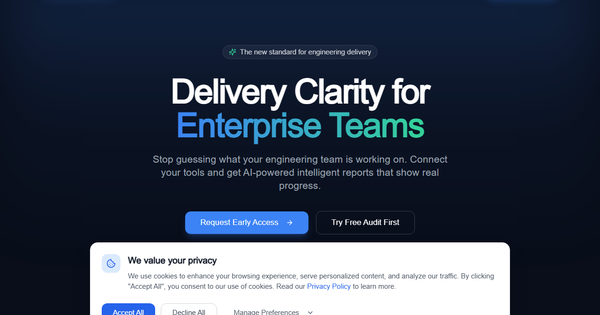
Klarops is an AI-powered workforce intelligence platform designed to deliver clear visibility into team productivity and engineering delivery without invasive monitoring tools like screenshots or keylogging. It consists of two core products: Klarops Tracker, a lightweight desktop agent that tracks work patterns in real-time and generates automated AI reports with alerts for issues such as burnout, quiet quitting, over-employment, and delivery risks; and Klarops Lens, which integrates with tools like Jira, GitHub, Slack, and more to provide unified analytics, delivery predictions, and an AI assistant for deeper insights. Primary use cases include optimizing resource allocation in distributed or outsourced teams, automating status updates to save managerial time, proving productivity for client billing in BPOs, and enabling proactive interventions based on intelligent alerts rather than manual oversight.
The target audience is primarily executives, managers, and leaders in engineering teams, business process outsourcing (BPOs), remote-first organizations, and distributed workforces. It is not specifically tailored for individual developers, marketers, or designers but rather for those overseeing such roles at scale, where traditional monitoring feels overly intrusive or ineffective. As of research conducted in March 2026, Klarops positions itself as a privacy-first alternative to legacy employee monitoring software, emphasizing actionable insights over raw surveillance data.
Key Features & Capabilities
Core functionality revolves around intelligent activity tracking and AI-driven reporting. Tracker installs as a transparent desktop agent on macOS and Windows, logging app usage, task switching, and productive time locally before encrypting and uploading summaries every five minutes. It automatically produces daily, weekly, and monthly text reports (readable in under 30 seconds) plus team rollups, while AI agents monitor for specific risks and deliver instant alerts. Lens complements this by connecting to project and communication tools for aggregated dashboards, AI summaries of shipped work, timeline forecasts, and natural-language querying via an AI assistant (e.g., “What blockers does the frontend team have?”).
Standout features that differentiate Klarops from competitors include its strict privacy-first design (no screenshots or keystroke logging, local-first storage, end-to-end encryption, and full GDPR compliance), the shift from image overload to concise AI-generated narratives with “what shipped” and “next actions” sections, and proactive alerts for wellbeing and delivery risks—capabilities rarely combined in traditional tools. Real-time monitoring without employee disruption and seamless transparency further set it apart.
Limitations include the absence of HIPAA compliance mentions (only GDPR is confirmed), a focus primarily on engineering/BPO contexts rather than broad industries, and no native mobile app or advanced attendance features like geofencing. Initial configuration for custom alerts or integrations may require IT involvement, and Lens depends on existing tool usage for full value. Public documentation on advanced analytics is sparse.
User Experience
Klarops offers a low learning curve thanks to its lightweight desktop agent and automatic report delivery—no complex dashboards or manual data entry required for basic use. Managers receive clean, readable text summaries and alerts directly (via email or dashboard), while the AI assistant in Lens supports conversational queries. The interface quality is modern and minimalistic, emphasizing executive summaries, progress metrics, and prioritized actions rather than overwhelming visuals; sample reports include clear sections like “What Shipped” and “Top Actions for Next Week,” making insights immediately actionable.
Installation is straightforward and fully transparent to employees, with data visible to them upon request. Documentation is limited to FAQ sections on the site (covering privacy, report mechanics, and differences from screenshot tools), with no comprehensive user guides or video library beyond a demo video. Support is primarily through sales contact or beta access requests; third-party reviews note smooth ongoing operation once set up, though initial optimization can take time. Overall, the experience prioritizes simplicity and trust over feature bloat.
Performance & Reliability
The platform performs efficiently with lightweight local processing and uploads occurring every five minutes, delivering real-time alerts and reports without noticeable system impact on employee devices. AI summarization is fast, turning raw activity logs into executive-ready insights within seconds, and integrations in Lens provide near-instant unified views. No major performance bottlenecks are reported in available sources.
As a relatively new or beta-stage tool (with free beta access promoted), public user complaints are minimal; early feedback highlights reliable alert accuracy for risks like burnout and consistent report quality. No widespread downtime, false positives, or security incidents appear in reviews or forums as of March 2026. Reliability is bolstered by enterprise-grade encryption and local-first architecture, though long-term scalability data for very large teams remains limited due to sparse independent testing.
Pricing & Value
Pricing is not publicly listed on the official site and requires contacting sales or requesting beta access (currently free during beta with no credit card needed). Third-party directories list starting prices around $6.40–$10 per user per month, with options for free trials and enterprise custom quotes; a limited-time lifetime deal has been referenced in some coverage. A no-commitment Free AI Audit is available instantly at audit.klarops.com.
Value is strong compared to traditional monitoring suites (e.g., those relying on screenshots), as Klarops eliminates storage bloat, reduces micromanagement, and delivers higher-quality insights that directly support billing, retention, and efficiency gains—potentially saving hours weekly on status updates. The privacy focus adds compliance value for GDPR-regulated organizations. However, opaque pricing and setup effort may reduce appeal for budget-conscious small teams versus more transparent alternatives.
Practical Tutorial
Official tutorials and comprehensive documentation are not yet extensively available on the Klarops site (only basic FAQs and a demo video exist). Below is a practical, step-by-step walkthrough for a common task—Running the Free AI Audit followed by setting up Tracker for ongoing productivity monitoring—created based on the official process described on klarops.com and /tracker as of March 2026. This is ideal for managers evaluating team delivery patterns without commitment.
-
Run the Free AI Audit (no account or setup required, <5 minutes): Visit https://audit.klarops.com. Provide basic team details (e.g., size, primary tools used). The tool scans publicly available or connected patterns (via quick integration prompts) and instantly generates an anonymous snapshot report highlighting delivery gaps, workflow bottlenecks, and productivity trends. Example output might resemble: “Amber status trending Green; review throughput improved 15%.”
-
Request Beta Access for Full Tracker: From the audit results or https://klarops.com/tracker, click “Request Access — Free During Beta.” Submit company info; approval is typically quick with no sales call required initially.
-
Install the Desktop Agent: On each employee’s macOS or Windows machine, download and run the lightweight installer (fully transparent—employees see exactly what is tracked). No admin rights beyond standard installation are needed. Data begins storing locally immediately.
-
Configure Team Settings and Alerts: In the manager dashboard (accessed post-approval), connect any optional tools for Lens integration (Jira, GitHub, Slack). Set custom alert thresholds (e.g., flag burnout if late hours exceed X or quiet-quitting signals appear). Enable daily/weekly report delivery.
-
Review First Reports and Act: Within hours, receive your first AI-generated daily report via email or dashboard. Example real sample from site: Executive Summary (“Solid progress on Billing v2...”), What Shipped (“Closed 27 work items...”), Top Actions (“Maintain sub-8-hour review median”). Click any alert (e.g., “Burnout Risk Detected”) for details and recommended interventions.
-
Monitor and Iterate: Use Lens AI Assistant for queries like “Are there any blockers?” or export team rollups for client billing. Adjust based on feedback—employees can view their own data for transparency.
For visual guidance, watch the official demo video linked on /tracker. This setup typically yields measurable insights within one day and scales easily for distributed teams.
Final Verdict
Klarops earns a strong 4.5 out of 5 rating for its innovative privacy-first AI approach and actionable reporting, tempered slightly by opaque pricing and limited public documentation/reviews.
It is best suited for executives and managers in engineering, BPO, or remote/distributed organizations that value trust-building insights over invasive oversight and need proactive alerts to prevent issues like burnout or disengagement. Teams already using Jira/GitHub/Slack will gain the most from the Lens integration.
Avoid it if your organization requires verified HIPAA compliance, prefers fully transparent public pricing, or operates in highly regulated sectors demanding screenshot-level proof, or if you need extensive self-service onboarding resources.
Klarops is a forward-thinking choice for leaders ready to replace guesswork and micromanagement with intelligent, privacy-respecting workforce clarity—highly recommended for scaling teams in 2026 and beyond.