Klutch App Review: The Ultimate Knowledge Base and Wiki Tool

Overview & Purpose
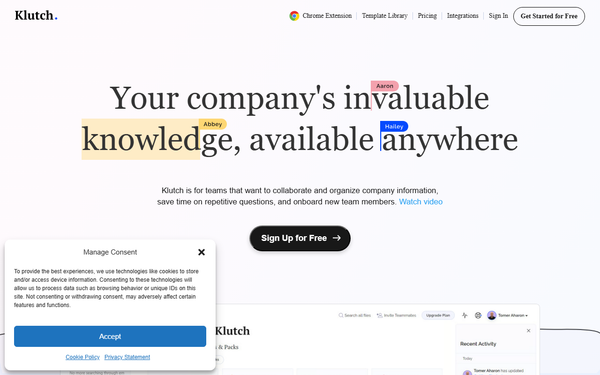
Klutch is an internal knowledge base platform that combines a team wiki for long-form documentation with searchable canned responses to handle repetitive questions efficiently. It allows teams to create, organize, and share company information such as standard operating procedures (SOPs), onboarding guides, and quick-reply templates, all accessible from any device or browser. Primary use cases include reducing time spent on repeated customer or internal queries, documenting essential processes to minimize errors, speeding up employee onboarding, and enabling real-time collaboration on shared content.
The tool targets customer support and sales teams in particular—claiming to serve over 3,000 such teams—but extends to any organization needing centralized knowledge, including remote teams, agencies, small to medium businesses, and departments handling frequent inquiries or procedural documentation. It is especially useful for support reps, sales professionals, and operations staff who rely on consistent, up-to-date information across tools like email, Slack, or browsers.
Key Features & Capabilities
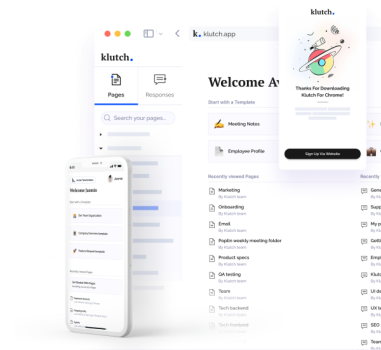
Core functionality revolves around two main pillars: Responses (canned replies and snippets) and Pages (wiki-style documents). Responses support one-click insertion into emails or chats, keyboard shortcuts for text expansion, custom snippets, and an AI generator for context-aware drafts (limited on free plans). Pages offer real-time collaborative editing, templates, customizable folders, categories, tags, drafts vs. published states, comments, and flexible sharing with individuals, groups, or the entire company. Additional capabilities include multi-browser extensions (Chrome, Edge, Brave, Opera), Slack and Gmail/Zoom integration for direct access, permission controls, and unlimited team members on all plans.
Standout features that differentiate Klutch from broader tools like Notion or Guru include its tight integration of quick-reply canned responses directly into communication workflows via browser extensions and shortcuts, plus built-in AI response suggestions that can be saved back to the wiki. The combination of lightweight, instantly accessible replies with full-featured wiki pages in one platform creates a seamless experience for hybrid support-and-documentation needs.
Limitations include a very restrictive free tier (only 10 combined pages/responses and 2 GB storage), no native mobile app (browser-based access only), and relatively basic search or analytics compared to enterprise alternatives. Advanced features like custom branding, detailed audit logs, or extensive third-party integrations beyond the listed browsers and Slack are not prominently available, and enterprise-specific options (such as SSO or dedicated support) are not detailed on the site.
User Experience
Klutch emphasizes simplicity with a low learning curve, making it accessible even for non-technical teams. Installation of the Chrome/Edge extension takes seconds, and the web app uses intuitive editors with keyboard shortcuts and templates to accelerate setup. The interface is clean and focused, prioritizing quick access over complex dashboards, which aligns well with its productivity-first design.
Official documentation via the Help Center is well-structured with practical articles on editing pages, using responses, installing extensions across browsers, team management, and sharing options. Additional resources include blog posts on knowledge management best practices. User support appears responsive based on limited public feedback, though live chat or priority help is reserved for paid plans. Overall, the platform feels polished for daily use without overwhelming new users.
Performance & Reliability
The web app and browser extensions perform efficiently for real-time collaboration and quick insertions, with recent updates (as of July 2025) adding improved keyboard shortcuts and AI capabilities without reported slowdowns. Accessibility across desktop, mobile browsers, and multiple browsers ensures consistent uptime for distributed teams.
No widespread known issues or common complaints appear in reviews or forums; the tool maintains a solid 4.7/5 rating on the Chrome Web Store from nearly 50 ratings and 3,000+ users. Minor limitations, such as AI response caps on free plans, are clearly documented rather than causing unexpected downtime. Reliability is strong for its intended scope as a lightweight knowledge tool.
Pricing & Value
Klutch offers a generous free-forever plan and a single Pro upgrade with straightforward per-user billing. The Free plan includes up to 10 pages and canned responses combined, 2 GB storage, 10 AI responses/emails per month, unlimited members, templates, extensions, and basic integrations—suitable for testing or very small teams. The Pro plan removes all limits with unlimited pages/responses, unlimited storage (listed as 100 GB in help docs), unlimited AI usage, and all free features; pricing is $5 per user per month (billed monthly) or $4 per user per month (billed annually). Only paid members are charged upon invitation acceptance. Non-profit discounts are mentioned but not detailed.
Value is excellent for teams prioritizing affordable, focused knowledge management over feature-heavy alternatives (which often start at $8–15+ per user). The extension-driven workflow and AI assistance deliver immediate time savings that justify Pro for growing support or sales teams, though very large organizations may find the lack of enterprise tiers less competitive.
Practical Tutorial
Official documentation and a getting-started video are available on the Klutch Help Center and YouTube. Below is a step-by-step walkthrough for a common task—creating and using a canned response for customer support (based on official features and Help Center guidance for "Using Responses in your work" and extension setup).
- Sign up for a free account at klutch.app/register and verify your email.
- Install the Chrome/Edge extension from the Chrome Web Store (search “Klutch Canned Responses”). Pin it for easy access.
- In the Klutch web app (web.klutch.app), navigate to the Responses tab on the left sidebar and click “New Response.”
- Give it a title (e.g., “Password Reset Instructions”), add content with placeholders like {{customer_name}}, and optionally assign keyboard shortcuts (e.g., Ctrl+Shift+P) or tags/folders for organization. Use the AI generator button for a draft if desired. Save as Shared for team access.
- Test in Gmail (or Slack/Zoom): Open an email, click the Klutch extension icon or type your shortcut—the response appears for one-click insertion or editing.
- For team use, share via user groups in settings; track usage through the dashboard.
This process typically takes under 5 minutes and immediately reduces repetitive typing. Full guides are linked here: https://klutch.app/help/responses and extension install articles.
Final Verdict
4.5 out of 5 — Klutch delivers reliable, time-saving value through its smart blend of wiki and canned responses.
Teams in customer support, sales, or any department dealing with repetitive questions and procedural documentation should use this tool for its seamless browser integration, low cost, and quick onboarding that keeps knowledge centralized and accessible. Avoid it if you need heavy enterprise customization, advanced analytics, or a full-featured all-in-one workspace like Notion, as the free tier limits and narrower scope may feel restrictive.
Recommendation: Start with the free plan today—Klutch is an excellent choice for teams tired of scattered knowledge and endless copy-paste.