Kubbi Review: Secure Data Handoffs for AI Agent Workflows
Overview & Purpose

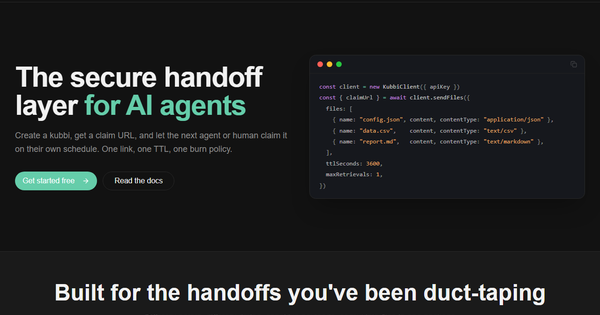
Kubbi is a secure handoff layer designed specifically for AI agents and multi-step automated workflows. It enables producers (agents, scripts, or humans) to upload sensitive payloads, single files, or multi-file bundles and generate temporary, encrypted claim links (called "kubbis"). Consumers then retrieve the data on their own schedule without the original payload ever traveling inline through prompts, logs, queues, or orchestrators. This replaces "duct-taped" solutions like embedding secrets in JSON or sharing raw data across systems.
Primary use cases include passing one-time tokens, configuration files, analysis results, API responses, or attachments between distinct agents, workflow steps, or humans where timing differs and data sensitivity is high. It is ideal for transient data that should minimize exposure through TTL expiry, burn-after-read options, and metadata-only previews.
The target audience is primarily developers, AI engineers, and teams building agentic workflows, multi-agent systems, or automated pipelines (e.g., using MCP-compatible agents, LangChain-style orchestrators, or custom A2A setups). It is less suited for non-technical users or general file sharing.
Research note: All information is current as of April 9, 2026, based on the official site, documentation references, MCP integration page, and pricing details.
Key Features & Capabilities
Core functionality revolves around creating, claiming, inspecting, and managing ephemeral encrypted payloads:
- AES-256-GCM encryption at rest with automatic key rotation; payloads never exist in plaintext on storage or in transit.
- Claim URLs as the only thing shared in workflows—consumers use the URL to retrieve data.
- TTL (time-to-live) expiry (minimum 1 minute; tier-dependent maximum).
- Burn-after-read via
maxRetrievals(e.g., set to 1 for single-use self-destruction). - Multi-file bundles (up to 5 files on Pro tier; metadata preview available before claiming).
- Producer controls: early revocation/deletion and per-kubbi settings for TTL and retrieval limits.
- Inspect-before-claim: preview metadata, file manifests, and status without consuming or counting toward retrieval limits.
Standout differentiators include native MCP tool support (six dedicated tools for send, send_files, claim, inspect, get, and delete), seamless integration into agent prompts without exposing sensitive data in logs or state, and a focus on "different actors + different timing" scenarios that general cloud storage or presigned URLs do not optimize as cleanly for AI pipelines.
Limitations include tier-based quotas (e.g., payload size, active kubbis, file count, and TTL max), with the free tier restricting payloads to ~16 KB and packages to 1 MB. There is no mention of very large file support, browser-based drag-and-drop UI for non-developers, or built-in analytics beyond basic metadata. Self-hosted or on-prem deployment is not offered.
User Experience
Kubbi has a low learning curve for developers familiar with APIs or SDKs. Setup takes minutes: sign up for a free API key via the dashboard, then install the Python (pip install kubbi) or TypeScript (npm install @kubbi.ai/sdk) package. Code examples are concise (often 3–5 lines to create and claim a kubbi), with full type hints and async support.
The primary interface is programmatic (SDKs or REST API), with a simple web dashboard for API key management and viewing your created kubbis. MCP integration is particularly frictionless—add one config snippet and agents can call tools in plain English. No complex authentication is required for claim URLs, making consumer-side access straightforward.
Documentation exists at kubbi.ai/docs with sections on Quickstart, API Reference, Authentication, and Claim URLs, though some deeper examples are sparse. MCP-specific setup guides and code snippets are clear and include ready-to-paste configurations for Claude Desktop and Cursor. Support is via priority channels on paid plans; no public community forum or extensive user-generated content was found as of April 2026. Overall, the experience feels purpose-built and developer-friendly rather than consumer-oriented.
Performance & Reliability
Creation and claiming operations are lightweight and fast, as the service only handles encrypted storage and URL-based access rather than heavy processing. SDKs are optimized for edge and serverless runtimes (TypeScript works in Node/Deno), and MCP tools run via npx with no global install needed.
No widespread user complaints, known outages, or performance issues appear in public sources—likely because Kubbi remains a niche, early-stage tool focused on AI agent use cases. Reliability stems from its ephemeral design: automatic deletion after TTL or retrieval limits reduces long-term storage risks. Rate limits are enforced per tier (e.g., 20 req/min on free), with clear 429 responses on exceedance. The encryption and revocation mechanisms appear robust, with no reported security incidents.
Pricing & Value
Kubbi follows a freemium model with generous defaults on the free tier—no credit card required. Free allows approximately 20 kubbis/day, 5 active kubbis, 16 KB payload size, 1 MB package size, 3 files per kubbi, 2-hour max TTL, 5 retrievals, and 20 requests/min.
The Pro plan costs $19/month (cancel anytime) and significantly expands limits: 100 kubbis/day, 50 active, 64 KB payload / 5 MB package, 5 files, 2-day TTL, 25 retrievals, and 100 req/min, plus priority support. Enterprise is custom-priced with higher limits (500 kubbis/day, 25 MB packages, 7-day TTL, custom SLAs, SSO, and dedicated infrastructure).
Value is strong for AI developers: the free tier supports prototyping and small workflows, while Pro is inexpensive compared to the engineering time saved avoiding custom secure handoff logic. Compared to alternatives (temporary S3 URLs, Vault, or custom Redis solutions), Kubbi offers tighter agent-specific integration (MCP tools, burn-after-read semantics) without infrastructure overhead. It is not cost-effective for high-volume, large-file transfers where general cloud storage would be cheaper.
Practical Tutorial
Official documentation provides Quickstart guidance and SDK examples; a full walkthrough is available via the dashboard after signup. Below is a practical, self-contained tutorial for a common task: securely passing analysis results between two agents in an MCP workflow (using Python SDK for the producer and MCP tools for the consumer). This mirrors real examples from the site and MCP page.
Step 1: Sign up and get an API key
Visit https://www.kubbi.ai/, create a free account, and copy your kb_... API key from the dashboard.
Step 2: Install the SDK (producer side)
pip install kubbiStep 3: Create and send a kubbi (Python example)
from kubbi import KubbiClient

client = KubbiClient(api_key="kb_your_key_here")

result = client.send(
    content='{"analysis": "high-confidence lead", "score": 0.92}',  # or use send_files for bundles
    content_type="application/json",
    ttl_seconds=3600,          # 1 hour
    max_retrievals=1,          # burn after read
    metadata={"source": "agent-a"}
)

print(result.claim_url)  # Share ONLY this URL with the next agent
print(result.kubbi_id)   # For your own tracking/revocation
For multi-file: use client.send_files(files=[...], ttl_seconds=..., max_retrievals=1).
Step 4: MCP integration (for agent consumers)
Add Kubbi as an MCP server (one-time config in Claude Desktop or Cursor):
{
  "mcpServers": {
    "kubbi": {
      "command": "npx",
      "args": ["-y", "@kubbi.ai/mcp"],
      "env": { "KUBBI_API_KEY": "kb_your_key_here" }
    }
  }
}
Step 5: Claim the payload (agent or consumer)
In an MCP-compatible agent, simply prompt: “Claim the kubbi at this claim URL and summarize the JSON.” The agent calls kubbi_claim behind the scenes. Or use kubbi_inspect first to preview without consuming.
Step 6: Revoke if needed (producer)
client.delete(kubbi_id=result.kubbi_id)This pattern ensures no sensitive data ever enters prompts or logs. Full SDK reference and REST curl examples are in the official docs.
Final Verdict
Kubbi earns a 4.5/5 rating. It excels as a specialized, secure, and low-friction solution for the exact pain point of ephemeral data handoffs in AI agent pipelines.
Who should use this tool: AI developers, agent builders, and workflow engineers who regularly pass secrets, configs, results, or files between asynchronous steps or humans—especially those already using MCP or similar agent frameworks. It saves significant custom engineering time and reduces security surface area.
Who should avoid this tool: Teams with very high-volume or large-file needs (better served by general cloud storage), non-technical users seeking a simple web UI, or anyone not working in agentic/AI automation contexts. Budget-conscious users may outgrow the free tier quickly for production workloads.
One-sentence recommendation: If your AI agents are duct-taping sensitive data handoffs, Kubbi provides the clean, encrypted, claim-link pattern you’ve been missing—start with the free tier today.