Lets Enhance Review: The Best AI Tool for Image Upscaling
Overview & Purpose
Let's Enhance is an AI-powered online image enhancement and upscaling tool that automatically improves photo quality, resolution, and visual appeal without requiring manual editing skills. It uses specialized neural networks to upscale images up to 16x (reaching 512 megapixels and 300+ DPI for print-ready results), recover lost details, correct colors and lighting, reduce noise, sharpen edges, remove JPEG artifacts, and restore old or damaged photos. Beyond traditional enhancement, it supports AI image generation from text prompts, background removal, image-to-video animation, and a Chat Editor for text-based refinements.
Primary use cases include preparing eCommerce product and fashion photography for catalogs, creating large-format prints or merchandise from personal or AI-generated art, restoring scanned family photos or archives, and polishing low-resolution images for marketing, social media, or professional portfolios. It excels at handling batch workflows for businesses and delivers natural, professional results rather than overly filtered or artificial ones.
The target audience spans photographers, graphic designers, eCommerce teams, marketers, digital artists (especially those using tools like Midjourney or Stable Diffusion), and small businesses needing scalable image processing. Developers can integrate similar capabilities via its underlying Claid API for automated pipelines. As of April 2026 research from the official site and user platforms, it positions itself as a practical, no-install solution for both casual users and professionals seeking pro-quality outputs quickly.
Key Features & Capabilities
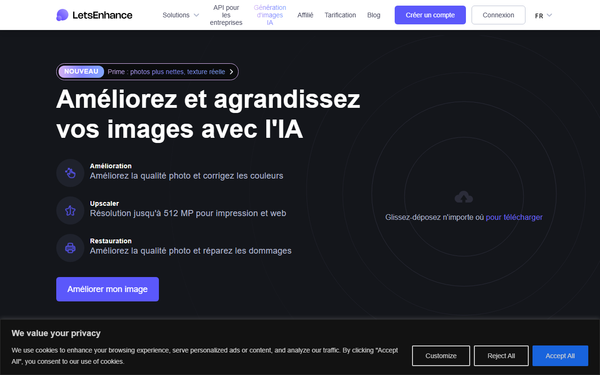
Core functionality revolves around three main pillars: Enhance (recover detail, fix exposure/color/lighting), Upscale (increase resolution with customizable size, DPI, and output dimensions), and Restore (targeted modes for blur, noise, old photos, or AI art artifacts). Users select from multiple AI models tailored to content type—Prime for portraits/products/textures with natural skin and detail preservation, Gentle for images with fine text or delicate elements, Old Photo for damage repair and authentic restoration (with an optional "Authentic" toggle to minimize colorization), Digital Art for stylized/AI-generated content, and others like Ultra, Balanced, or Strong for varying intensity.
Additional capabilities include batch processing of up to 20 images simultaneously, one-click presets for print or eCommerce sizes, Light AI for quick HDR-like boosts, advanced Color and Tone correction, background removal (export as PNG), text-to-image generation, and image-to-video conversion. The platform supports JPG, PNG, and WebP files, with input limits up to 64 MP/50 MB on paid plans.
Standout features that differentiate it from competitors like Magnific AI or generic upscalers include its content-specific AI models that prioritize realistic detail reconstruction over generic sharpening (avoiding halos or plastic textures), massive output resolutions suitable for posters and large prints, seamless combination of enhancement + upscaling in one workflow, and flexible API access via Claid.ai for integration into apps or automated pipelines. It also offers rollover credits and no watermarks on paid plans.
Limitations include a credit-based system (typically 1 credit per image, with higher-res outputs sometimes consuming more), caps on maximum resolution per plan, and less emphasis on highly creative or artistic transformations compared to tools focused purely on generative AI. Free-tier restrictions (watermark, 8 MP upscale limit) and occasional dependency on internet speed for processing are noted, though the tool avoids common over-processing pitfalls.

User Experience
Let's Enhance boasts an intuitive, web-based interface with minimal learning curve—ideal for non-technical users. The dashboard features a simple drag-and-drop uploader supporting batch uploads, clear tabs for "Enhance & Upscale" versus "Image Generation," and a "My Images" section for managing processed files. Users select modes and options via dropdowns or toggles, preview adjustments, and start processing with one click; results appear quickly with full-resolution downloads.
Interface quality is clean and modern, focused on functionality over flashy design, with helpful presets and a "Try all" option to test multiple models at reduced credit cost. Documentation is solid through the Help Center (with video tutorials and getting-started guides) and YouTube playlist covering common tasks. Support includes email (free tier), chat (paid plans), and responsive customer service praised in reviews. Priority processing on paid plans reduces wait times during peak usage.
Overall, the platform feels accessible for beginners while offering advanced controls for power users, with no software installation required.
Performance & Reliability
Processing is generally fast and efficient for cloud-based AI, with most single images completing in under a minute and batches of 20 handled smoothly on paid plans. Users report reliable detail recovery, natural color correction, and effective artifact removal, particularly for real-world photos, product shots, and old scans. High-resolution outputs maintain print quality at 300+ DPI, and the tool excels at preserving authentic textures without introducing unwanted artifacts in most cases.
Known issues from user feedback include occasional slower processing during high demand, minor inconsistencies with highly stylized AI art (where specialized modes help but may not match creative-focused competitors), and credit consumption surprises on complex Ultra-mode upscales. Some older reviews mention billing hiccups (e.g., post-cancellation charges), though recent Trustpilot (4.3/5 from ~174 reviews), G2 (4.6/5), and Capterra (4.5/5) feedback highlights improved reliability, excellent results on portraits/old photos, and strong customer support. No widespread downtime or major reliability complaints appear in 2025–2026 sources.
Pricing & Value
Let's Enhance uses a freemium credit model with generous entry points and flexible scaling. The free tier provides 10 credits on signup (no card required), enabling testing with watermarks and an 8 MP upscale limit. Paid subscriptions (billed monthly or annually for savings) include:
- Starter: $9/month (annual) or $12/month — 100 credits, up to 256 MP upscale, 3-month storage.
- Pro (most popular): $24/month (annual) or $32/month — 300 credits, up to 350 MP.
- Max: $34/month (annual) or $45/month — 500 credits, up to 512 MP.
Credits roll over (up to 6x monthly allowance on personal plans) and reset monthly; most operations use 1 credit per image. Pay-as-you-go bundles are available for extra flexibility, with business/enterprise plans (1,000+ credits) via custom contact. Additional perks on paid tiers: priority processing, chat support, background removal, AI generation, no watermarks, and higher storage (up to 6 months). Input limits are 64 MP/50 MB across paid plans.
Value is strong for moderate-to-heavy users compared to alternatives—affordable entry for professionals needing print-ready results or bulk eCommerce work, with API access adding developer utility. It outperforms some pricier tools ($39+/month) in realistic photo/product scenarios and offers better resolution ceilings than many free upscalers. Heavy users or enterprises may find credit math limiting without bundles, but rollover and annual discounts enhance long-term value.
Practical Tutorial
Official tutorials are available on the Let's Enhance Help Center and YouTube (e.g., "How to Upscale a Photo in 1 Minute"). Here's a step-by-step walkthrough for a common task—upscaling and enhancing a low-resolution product photo for eCommerce or print—based on the official 2.0 getting-started guide (tested conceptually as of April 2026):
-
Sign Up and Access Dashboard: Go to letsenhance.io, create a free account (10 credits awarded instantly), and confirm via email. Log in to reach the main enhancement page.
-
Upload Images: Drag and drop your photo (or up to 20 for batch) into the uploader area. Supported formats: JPG, PNG, WebP. For a product shot example, upload a compressed 1 MP JPEG with soft focus.
-
Select Operations: In the Enhance & Upscale tab, choose your AI model—e.g., Prime for product textures or Gentle if text/logos are present. Set upscale factor (e.g., 4x or custom Width/Height/DPI for 300 print quality). Toggle Light AI for quick exposure/contrast boost and Color and Tone for automatic corrections. Enable background removal if needed (saves as PNG).
-
Customize and Preview: Use presets for eCommerce/print sizes or manually adjust. Click "Try all" to generate variants across models (costs 3 credits but shows options).
-
Process and Review: Hit "Start processing." Monitor progress; results save to "My Images." Download the full-resolution enhanced version (no watermark on paid/processed credits).
-
Further Edits (Optional): Use the Chat Editor for text prompts like "brighten lighting and sharpen edges" or animate with Image to Video. For AI art integration, switch to the Generation tab, enter a prompt, and refine.
Example outcome: A blurry 800x600 product photo becomes a sharp 3200x2400 (or higher) image with vivid colors, clean backgrounds, and print-ready detail—ready for Shopify or large-format output. Link to official tutorial: https://help.letsenhance.io (search "How to Upscale Photo").
Final Verdict
Overall rating: 4.5/5. Let's Enhance delivers excellent results for its core strengths in realistic image enhancement and high-resolution upscaling, with an easy interface and competitive pricing that makes it a smart choice for targeted professional workflows.
Who should use this tool: Photographers, eCommerce teams, marketers, and AI artists needing reliable, print-ready enhancements for photos/products/old images—especially those valuing natural quality and batch efficiency without steep learning curves or high costs.
Who should avoid this tool: Users seeking heavy creative/generative transformations (better with specialized art tools), extremely high-volume free processing, or offline/desktop solutions, as the credit model and web-only access may feel restrictive.
One-sentence recommendation: If you need fast, natural-looking AI upscaling and restoration that turns everyday or low-quality images into professional assets, Let's Enhance is a highly effective and accessible solution worth trying with its free credits.