Letterly Review: Turn Your Voice Notes Into Polished Text Fast
Overview & Purpose

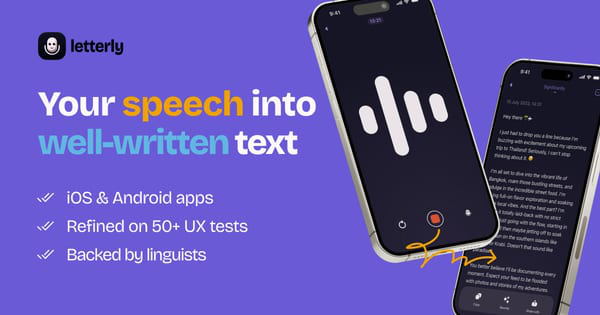
Letterly is an AI-powered mobile app that converts unstructured spoken thoughts into polished, well-structured text ready for immediate use in messages, emails, notes, social media posts, journals, to-do lists, and more. Unlike basic speech-to-text tools that produce verbatim transcripts filled with filler words and disorganization, Letterly leverages AI to clean, restructure, and rewrite content automatically, enabling users to capture ideas on the go without typing or heavy editing. Primary use cases include drafting professional communications, organizing meeting notes, brainstorming content, daily journaling, and creating social media or blog material directly from voice recordings. It supports recording, typing, pasting text, or uploading audio files.
The app targets professionals, writers, content creators, marketers, entrepreneurs, students, and anyone who thinks or speaks faster than they type—particularly those with typing fatigue, dyslexia, or busy on-the-go lifestyles. It is available on iOS, Android, web, and macOS, with cross-device syncing, and is trusted by over 300,000 users worldwide. Research conducted as of March 2026 confirms its positioning as a productivity booster for voice-first workflows.

Key Features & Capabilities
Core functionality centers on high-accuracy speech-to-text transcription followed by instant AI-powered rewriting. Users record voice notes (up to 90 minutes per session), and the app transcribes in real time while removing fillers ("um," "uh"), fixing grammar, and organizing into paragraphs, bullet points, or headings. It supports automatic language detection across 90+ languages, with manual overrides and full translation options.
Standout features that differentiate it from competitors like basic dictation apps (e.g., Apple Voice Memos) or general note-takers (e.g., Otter.ai) include:
- 25+ predefined rewrite templates (e.g., formal email, LinkedIn post, to-do list, newsletter, X/Twitter thread) plus fully custom prompts (e.g., "Rewrite as if written by a lawyer").
- Offline recording and screen-off mode for use anywhere (e.g., flights, walks).
- Home screen widgets for one-tap recording on iOS/Android.
- Custom tags for organization, searchable notes, auto-generated titles, and multi-speaker mode for interviews/meetings.
- Integrations via Zapier or custom webhooks to export directly to Google Docs, Notion, or other tools.
- Additional capabilities like audio playback, continuing recordings, sharing, dark/light modes, and speaker role assignment.
Limitations include no native team collaboration or real-time multi-user editing, limited advanced rich-text formatting or desktop-first tools, and reliance on internet for AI rewriting (offline only for raw recording). Occasional struggles with heavy accents or extreme background noise occur, though performance exceeds many alternatives in tests. No deep enterprise admin features are present.

User Experience
Letterly offers an exceptionally intuitive interface with a minimal, clean design that prioritizes speed—most users master it in under five minutes. The learning curve is virtually nonexistent: the main screen features a prominent microphone button, with simple navigation for notes, tags, and settings via a cogwheel icon. Native iOS and Android apps feel polished and responsive, with web and macOS versions providing seamless syncing. Widgets and screen-off recording enhance convenience for quick captures.
Documentation includes an official step-by-step blog guide and practical use-case articles, supplemented by responsive developer support noted in user feedback. In-app settings cover language selection, theme toggles, tag management, and integration setup. Overall, the experience earns consistent praise for its "effortless" flow from voice to polished output.

Performance & Reliability
Transcription and rewriting are lightning-fast—typically processing in seconds after stopping a recording—with high accuracy even in noisy environments, technical jargon, or long sessions (99% in independent tests). Offline recording works reliably, and cross-device sync is smooth. Users report no significant lags, with the app handling accents and complex topics better than built-in phone tools in most cases.
Known issues are minor and infrequent: occasional bugs on the web version (e.g., rewrite button failing, requiring a mobile switch), rare transcription errors with strong accents requiring manual edits, and isolated reports of server hiccups. No widespread reliability complaints appear across platforms; the iOS App Store and Google Play show strong positive sentiment, with Android rated 4.3/5 (608 reviews) and iOS reviews highlighting daily reliability. Customer support is responsive for edge cases.

Pricing & Value
Letterly operates on a freemium model: a free tier allows starting with limited recordings and rewrites (exact quotas vary by usage). Paid Pro plans provide unlimited access, custom rewrites, and full features, priced at approximately $9 per month or $70 per year (with options for lifetime access via occasional AppSumo deals around $59–79 depending on devices). In-app purchases and free trials are available. Subscription management is straightforward in app settings.
Value is excellent for frequent users—saving hours on drafting compared to manual transcription plus ChatGPT workflows—especially versus alternatives like Otter.ai (higher cost for similar features) or generic voice memos (no AI structuring). Light users may find the free tier sufficient, while power users (content creators, professionals) report strong ROI through time savings and polished output. Past lifetime deals enhance long-term value.
Practical Tutorial
Letterly provides an official step-by-step guide on its blog. Below is a walkthrough for a common task—turning a spoken brain dump into a professional follow-up email—based on real app usage and the official tutorial (full guide: https://letterly.app/blog/your-guide-to-the-letterly-mobile-app/).
-
Download and sign in: Install from the App Store (iOS) or Google Play (Android). Open the app, tap “I have an account,” and log in via Google, Apple, or email link.
-
Record your note: On the main screen, tap the large microphone button in the center. Speak naturally (example: “Hey team, just a quick update—the Q3 launch is delayed by two weeks because of supply chain issues with the vendor, but we’re on top of it and should recover by mid-October. Let me know if you have questions or need more details for your reports.”). Tap Stop when finished. The app transcribes automatically (works offline).
-
Review and rewrite: The note opens with the raw transcript. Tap the big “Rewrite” button. Choose “Formal Email” from the gallery (or tap “+ New” to create a custom prompt like “Rewrite as a polite professional follow-up email to clients with subject line and bullet points”). AI processes in seconds, transforming the ramble into:
Subject: Update on Q3 Launch Timeline
Dear Team,
I wanted to provide a quick update regarding the Q3 launch... [polished paragraphs with bullets]. Best regards, [Your Name]. -
Edit, organize, and export: Tweak any names or details directly in the text. Add tags (e.g., “Clients” or “Projects”). Tap the three-dot menu for Actions: export via Zapier to Google Docs/Notion, copy to clipboard, share, or translate. Play back the original audio if needed. Save or archive.
This process takes under two minutes and produces ready-to-send content. For more examples (e.g., LinkedIn posts or journals), see the official 50+ use cases blog.
Final Verdict
Overall rating: 4.5 out of 5
Letterly excels for individuals who prefer voice over typing—content creators, busy professionals, students, and note-takers—delivering fast, accurate, and creatively structured output that genuinely saves time and reduces friction.
Avoid it if you need robust team collaboration, heavy desktop editing, or perfect performance with very strong accents/noise in enterprise settings.
One-sentence recommendation: If you talk faster than you type, Letterly is the essential AI writing companion that turns messy voice notes into polished, professional content instantly.